30
Setup menu
30
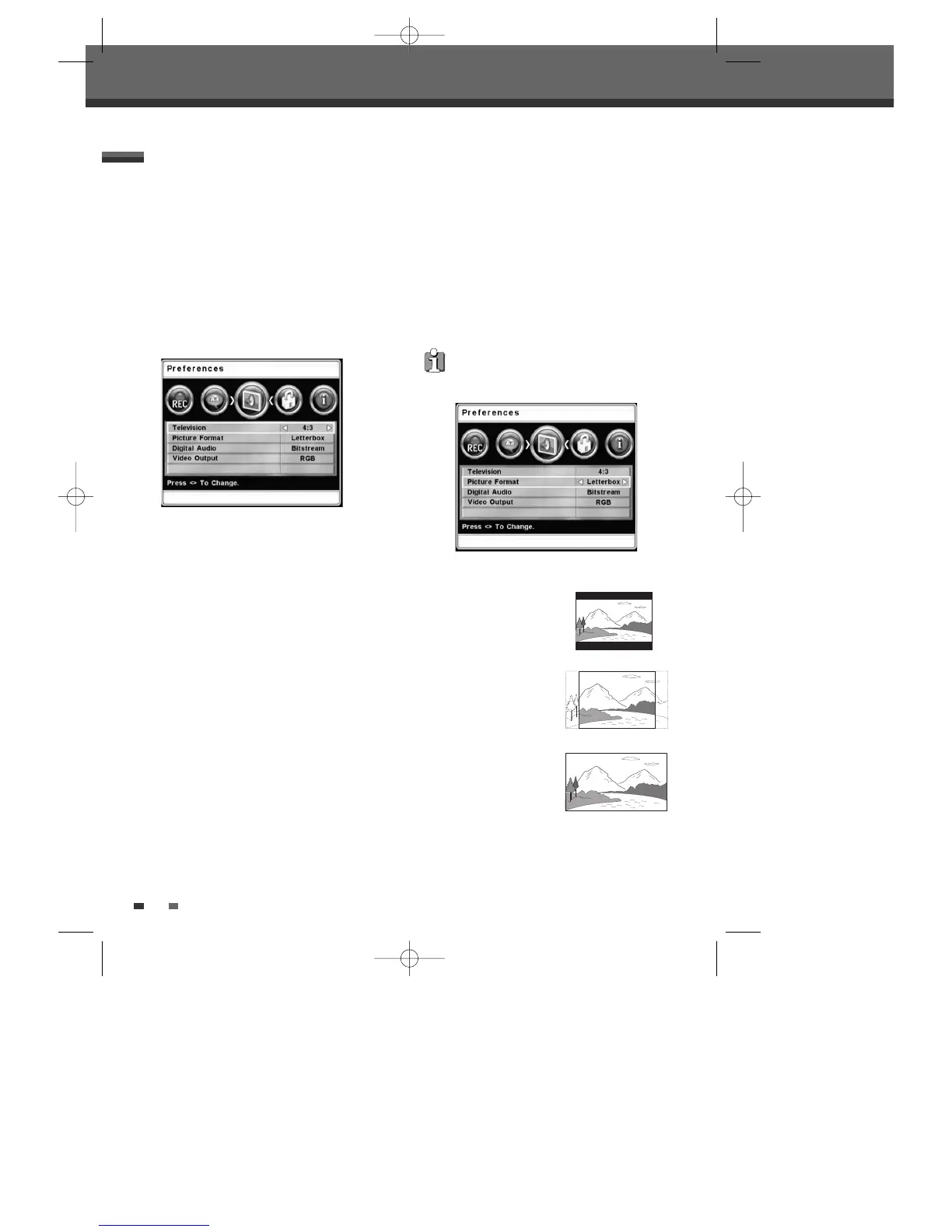
• 4:3 :
Select when a standard 4:3 TV is connected.
• 16:9 :
Select when a 16:9 wide screen TV is
connected.
TV Aspect Ratio
1
Press [SETUP].
2
Use [œ/√] to select ‘Preferences‘.
3
Whilst ‘Preferences‘ is selected, press [†] to
select ‘Television’.
4
Use [œ/√] to select the desired TV Aspect
ratio.
5
Press [SETUP] to exit the menu.
PREFERENCES Settings
• Letter Box :
Displays
theatrical images with
masking bars above and
below the picture.
• Centre :
Displays pictures
cropped to fill your TV
screen. Both sides of the
picture are cut off.
• Auto :
Converts to the
appropriate aspect ratio
automatically.
Picture Format
1
Press [SETUP].
2
Use [œ/√] to select ‘Preferences‘.
3
While ‘Preferences‘ is selected, press [†] to
select ‘Picture Format’.
4
Use [œ/√] to select the desired Picture
Format.
5
Press [SETUP] to exit the menu.
If Television setting is set to "16:9", the
picture format is alwalys fixed to "Auto".
DTBC-MNF(or D)1NP-AG 2007.9.11 4:18 PM ˘ `30



 To Next Page