INDEXSKIP
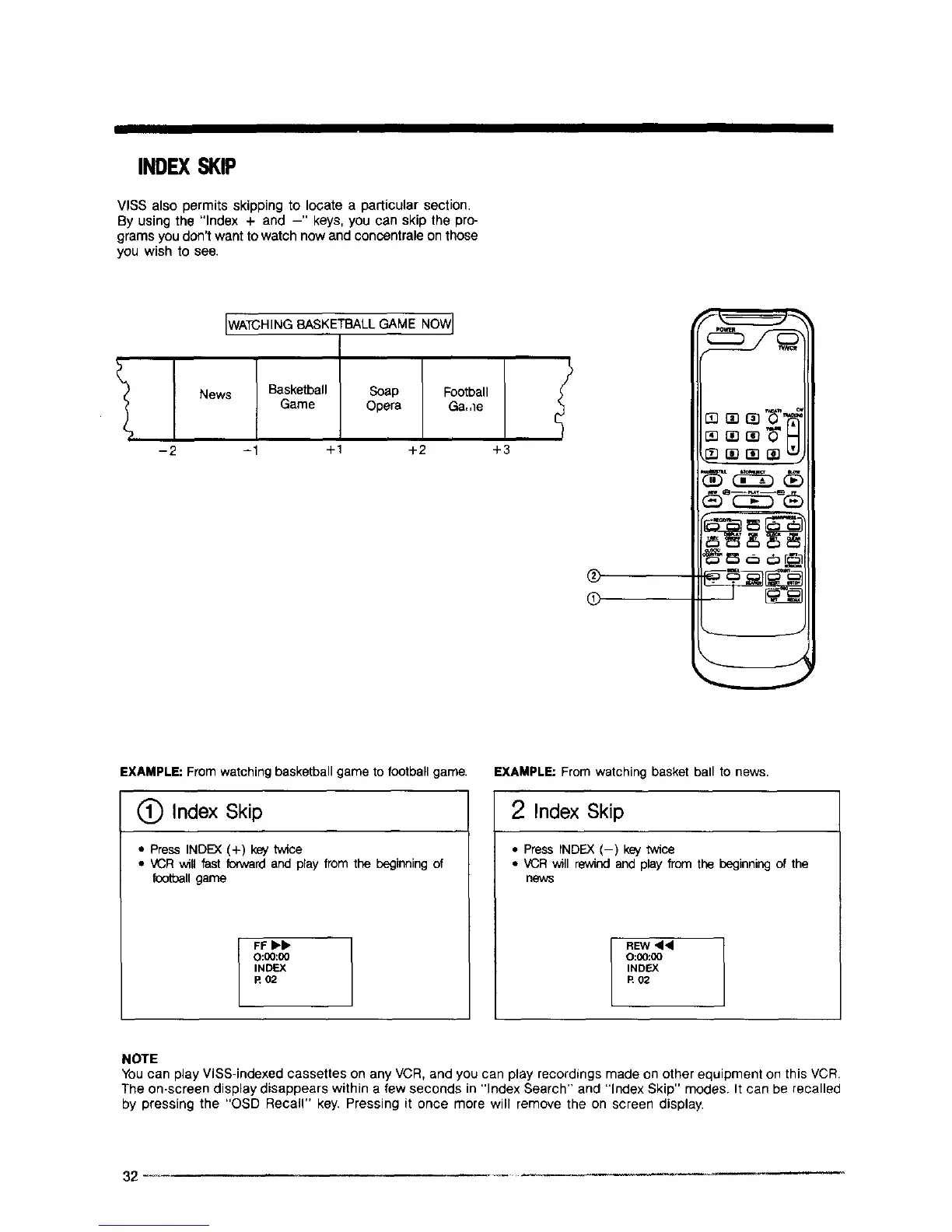
VISS also permits skipping to legate a particular section,
By using the "Index + and -" keys, you can skip the pro-
grams you don't want to watch now and concentrale on those
you wish to see.
LWATCHINGBASKETBALL GAME NOWJ
News Basketball
Game
-1 +1
Soap
Opera
+2
Football
Ga,,le
+3
®
®
EXAMPLE: From watching basketball game to football game.
Index Skip
• PressINDEX (+) key twice
• VCR will fast fowvardand play from the beginning of
footballgame
I FFI_-_-
O:_:00
INDEX
R 02
EXAMPLE: From watching basket ball to news.
2 Index Skip
• Press INDF_.X(-) key twice
• VCR will rewind and play from the beginning of the
news
REW <1<1
O:00:00
INDtEX
R 02
NOTE
YOUcan play VISS-indexed cassettes on any VCR, and you can play recordings made on other equipment on this VCR,
The on-screen display disappears within a few seconds in "Index Search" and "Index Skip" modes. It can be recalled
by pressing the "OSD Recall" key. Pressing it once more will remove the on screen display.
32 --_



 To Next Page