21
6 Commissioning
Configuring Radar 6.1
Configure radar parameters. Step 1
1) Log in to web interface of camera, and then select Setup > ITC > Intelligent >
Radar.
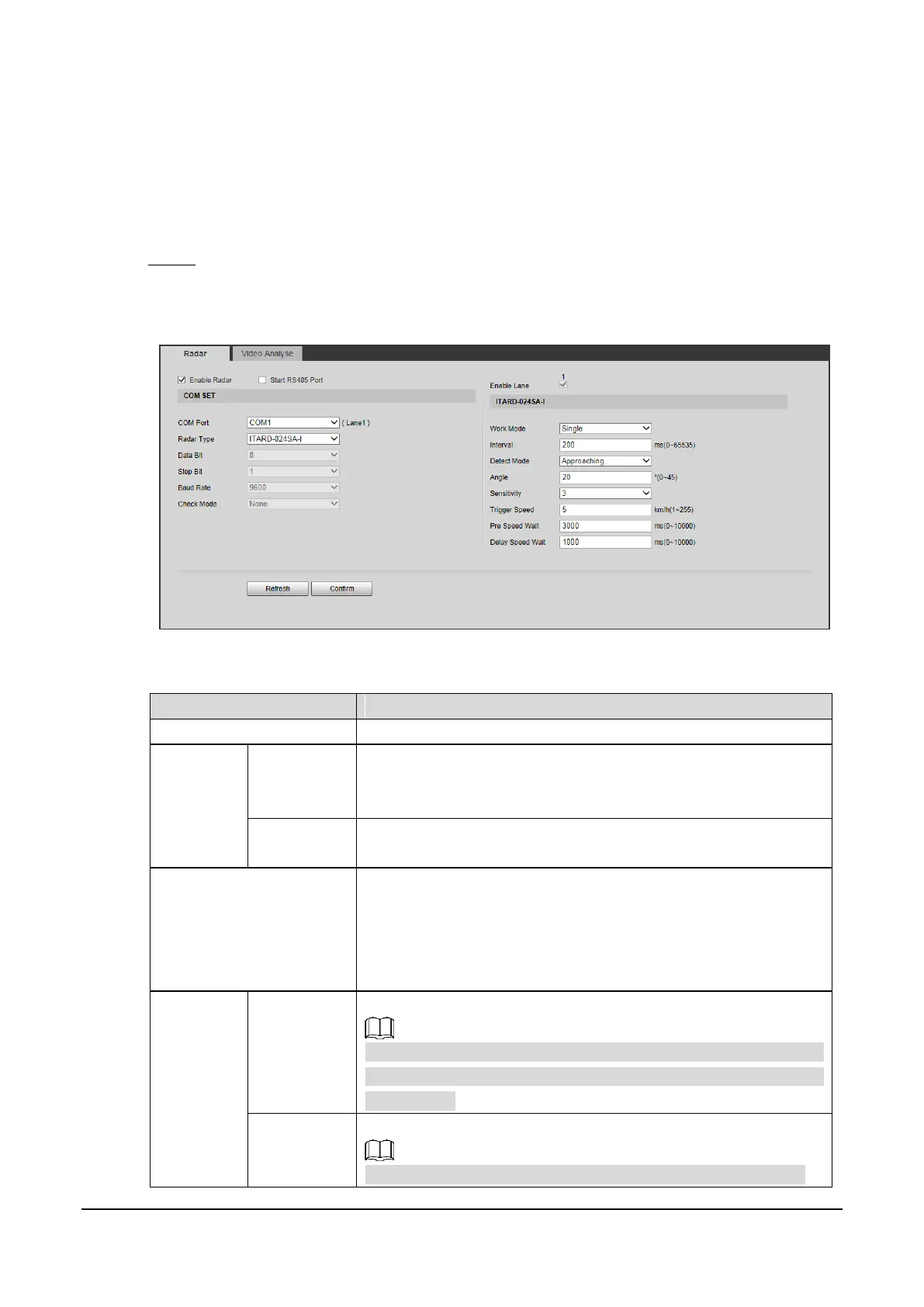
Radar Figure 6-1
2) Select Enable Radar, and then you can configure the parameters.
Table 6-1 Radar parameter description
Enable radar detection function.
COM1/2/3 corresponds to Lane1/2/3 respectively. COM port
depends on the number of lane (enable lane from Setting >
ITC > Lane Property).
Parameters of the selected radar need to be configured at the
right side of the interface.
For Size disabled
You can configure the low/high speed limit.
For Size enabled
You can configure the low/high speed limit by vehicle size
(small vehicles (SV) and large vehicles (LV)).
The way of sending information captured by Radar.
Currently, the Camera supports only Single. Special program is
required if you want to send the information in continuous or
manual way.
The radar will recognize only one subject within the interval.
This function is available with the support of special program.



 To Next Page