Control Devices EDUS39-605
22 Controls
Cool/Heat changeover and settings
NOTE:
Cool/heat Mode-setting capability for the Indoor Unit Remote Controller:
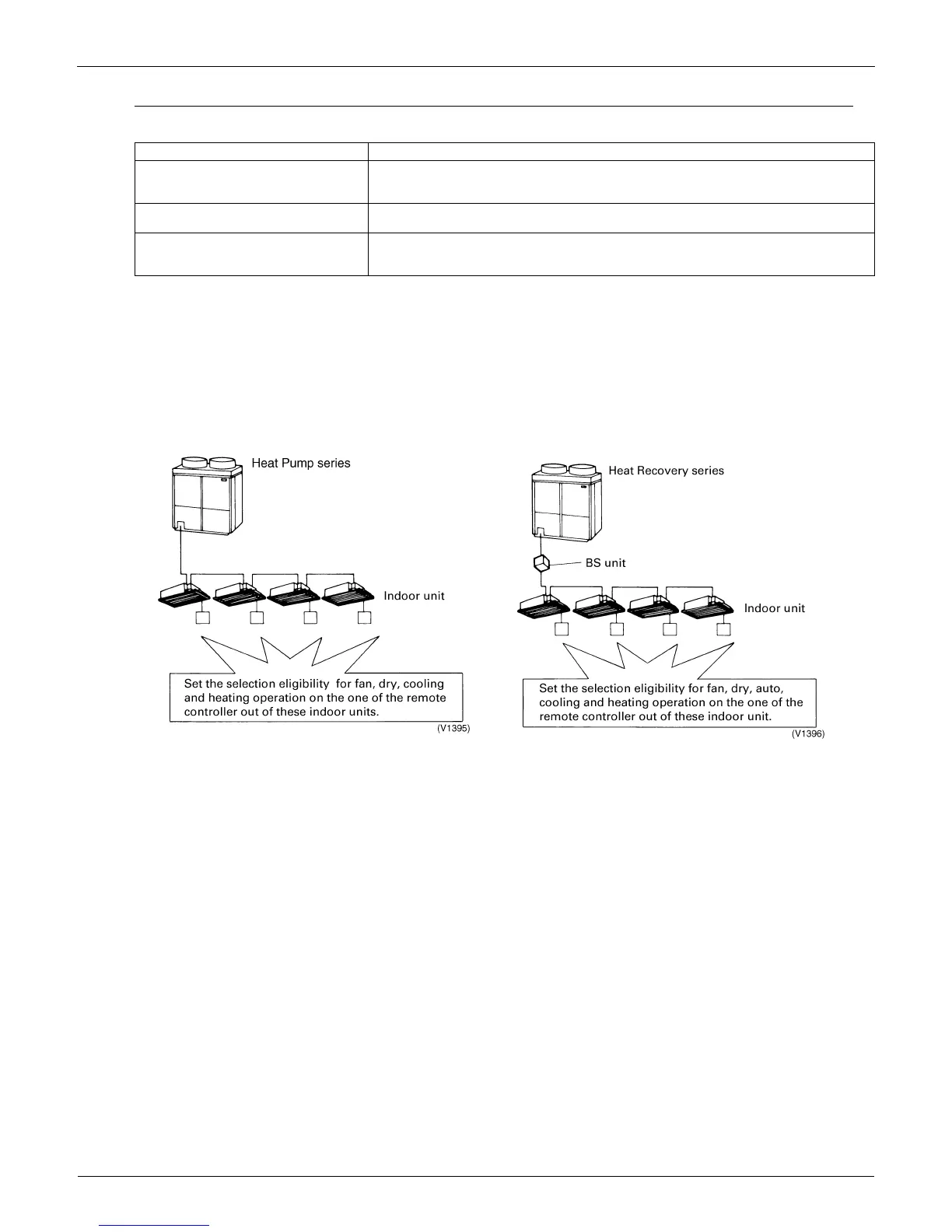
The outdoor unit’s operation mode of fan, dry, auto (available only with Heat Recovery units), cooling, or heating can be
selected usingthe indoor unit’s designated primary remote controller that is connected to the outdoor unit. The settings
chosen for the primary remote controller determine the settings for the remaining controllers. . For the Heat Recovery
series, if 2 or more indoor units are connected to one BS unit, you must set the fan, dry, auto, cooling, or heating
operation on the primary remote controller connected to the BS unit.
Only remote controller designated for settings can change the operation mode.
Setting method for cool/heat
1. Preparation
When turning on the power the first time, the CHANGEOVER UNDER CONTROL sign blinks.
Function Descriptions of outline
Possible control The operation mode of the outdoor unit can be changed by the local remote controller or by
the central remote controller. For test operation, change setting of cool/heat selector switch
of the outdoor unit.
Remote controller acceptance/rejection You can set acceptance/rejection on the central remote controller with the local remote
controller.
NOT AVAILABLE display
Pressing a button for an unavailable function in the indoor unite activates the NOT
AVAILABLE display.


 To Next Page