Adaptors EDUS39-605
88 Controls
3.6.3 Installation
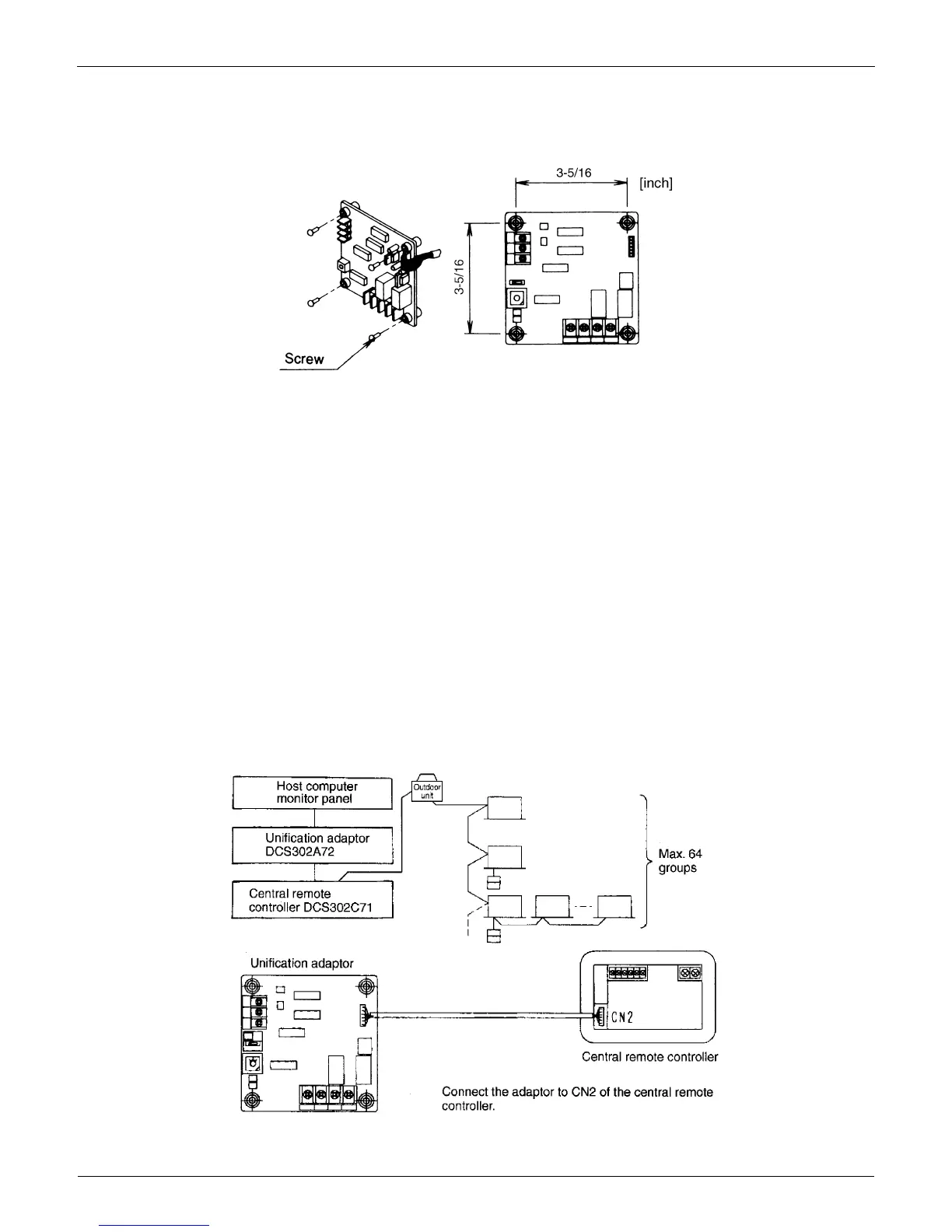
Securely install the adaptor inside the electric panel box (field supplied) with the 4 attached screws.
Install the adaptor 16 feet from the central remote controller to enable cable connection.
Note
1. Do not damage the PC board with your screwdriver or other tools.
2. Install the adaptor inside an electric panel box to protect from electromagnetic waves and dust.
3.6.4 Electrical Wiring Work and Initial Setting
First, wire between the indoor and outdoor units, and between each unit and the power supply source. Then, wire
between the indoor unit and remote controller. Finally, check that operation is normal.
For details, refer to the installation manuals for the indoor and outdoor units.
Next, wire between the indoor unit and the central remote controller. Then, wire the central remote controller to the
power supply source and make the necessary settings. Finally, check that operation is normal.
For details, refer to the installation manuals for the central remote controller.
Wire between the unification adaptor for computerized control and the central remote controller.
Refer to manual: WIRING TO THE CENTRAL REMOTE CONTROLLER
Set the CHANGE OVER SWITCH and CONTROL MODE SWITCH. Wire to the host computer monitor panel or other
external input device.
Refer to manual: WIRING TO EXTERNAL INPUT DEVICES
Wiring to The Central Remote Controller
C:1P127045


 To Next Page