Operation manual BRC1E52A7
45
4PW71265-1 – 10.2011
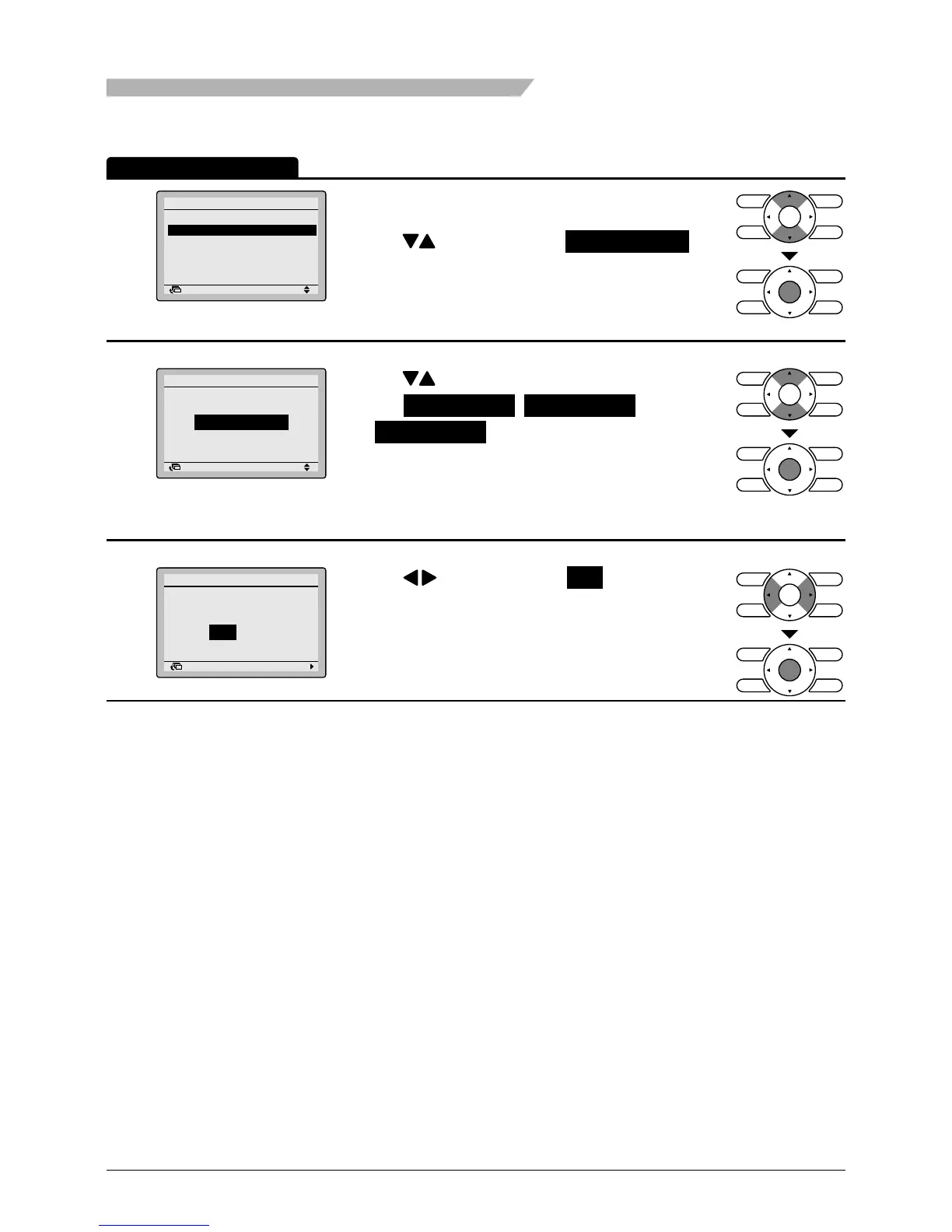
Schedule Number Set
1
Setting
Schedule
Enable/Disable
Schedule nr set
Holidays
Settings
2/2
Return
• Bring up the schedule settings screen. (See
page 47.)
• Press buttons to select Schedule nr set on
the schedule settings screen.
The Schedule Number Set screen will appear
when the Menu/Enter button is pressed.
2
Setting
Schedule nr set
Schedule
Schedule nr 1
Return
• Press buttons to
select Schedule nr 1 , Schedule nr 2 ,
or Schedule nr 3 on the Schedule number set
screen.
The conrmation screen will appear when the
Menu/Enter button is pressed.
3
Save the settings?
Schedule
Yes No
Return Setting
• Press buttons to select Yes on the
conrmation screen.
Pressing the Menu/Enter button conrms the daily
patterns in the schedule and takes you back to the
basic screen.
Operation Method
Menu Manipulation



 To Next Page