BRC1E52A7 Operation manual
4PW71265-1 – 10.2011
30
Individual Air Flow Direction
Individual setting
1
Return Setting
Main Menu
1/2
Quick Start
Air Flow Direction
Main menu screen
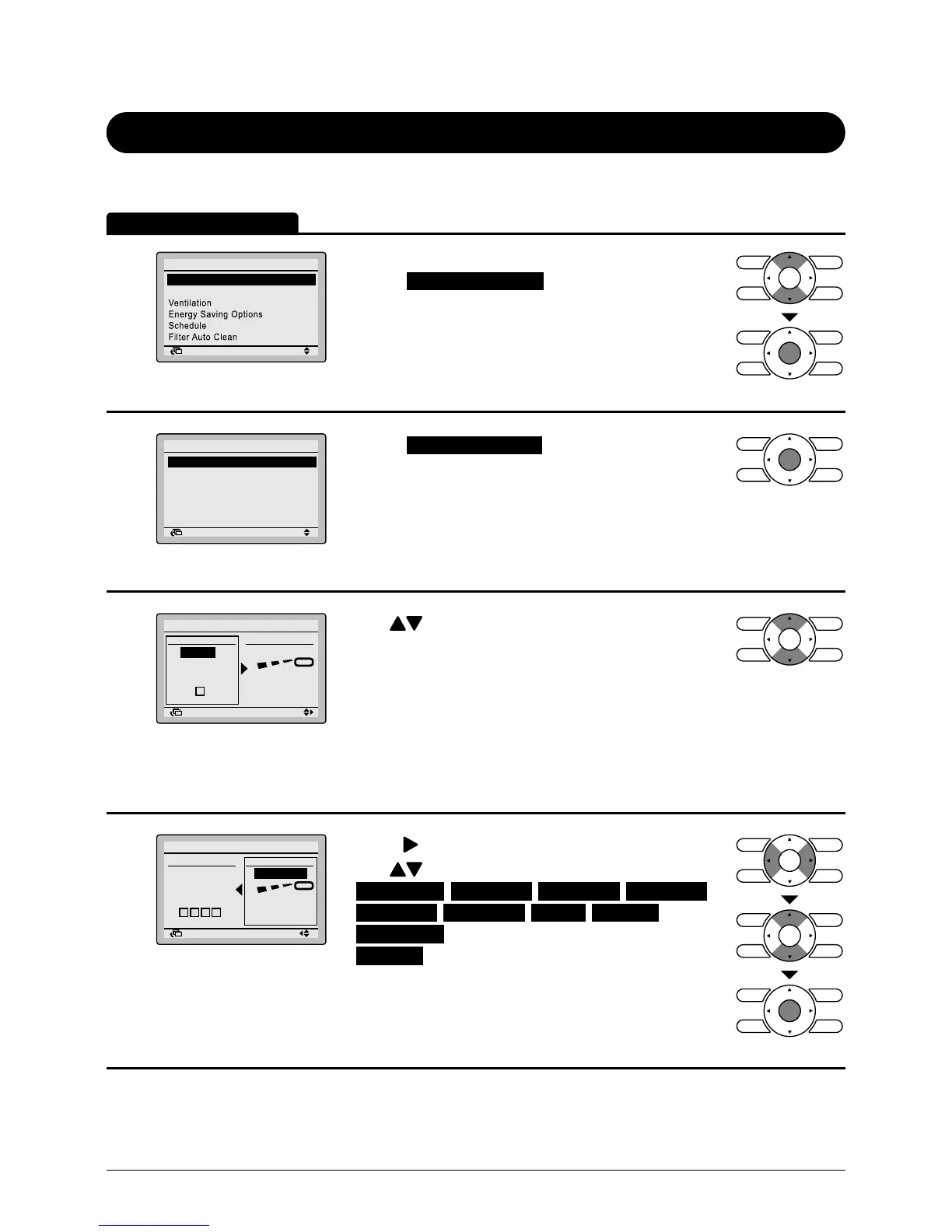
• Display the main menu screen (see page 29).
• Select
in the main menu.
• Press Menu/Enter button to display the Air Flow
Direction settings screen.
2
Return Setting
Air Flow Direction
Individual Setting
Individual setting list
Individual set all reset
Air direction range select
Main menu screen
• Select
in the menu.
• Press Menu/Enter button.
3
Return Setting
Return Setting
Individual Setting
Outlet Direction
No Ind Set
Outletmark
Unit A
Main menu screen
• Use buttons to select the unit and outlet
mark.
• In case of SkyAir, maximum 4 units (unit
A, B, C, D).
In case of VRV, maximum 16 units for each group
(unit 0 till 15).
In case of cassette type, you can control each 4
aps (£, £ £, £ £ £, £ £ £ £) individually.
4
Return Setting
Return Setting
Individual Setting
Outlet Direction
UnitA
Outletmark
No Ind Set
Main screen
• Press
button to select air ow direction setting.
• Use buttons to change the following settings:
: Individual air ow is blocked.
• Pressing Menu/Enter button conrms the settings
and takes you back to the basic screen.
Operation Method



 To Next Page