5.13 Quiet Function Setting
Quiet function consists of 2 types: quiet and auto quiet.
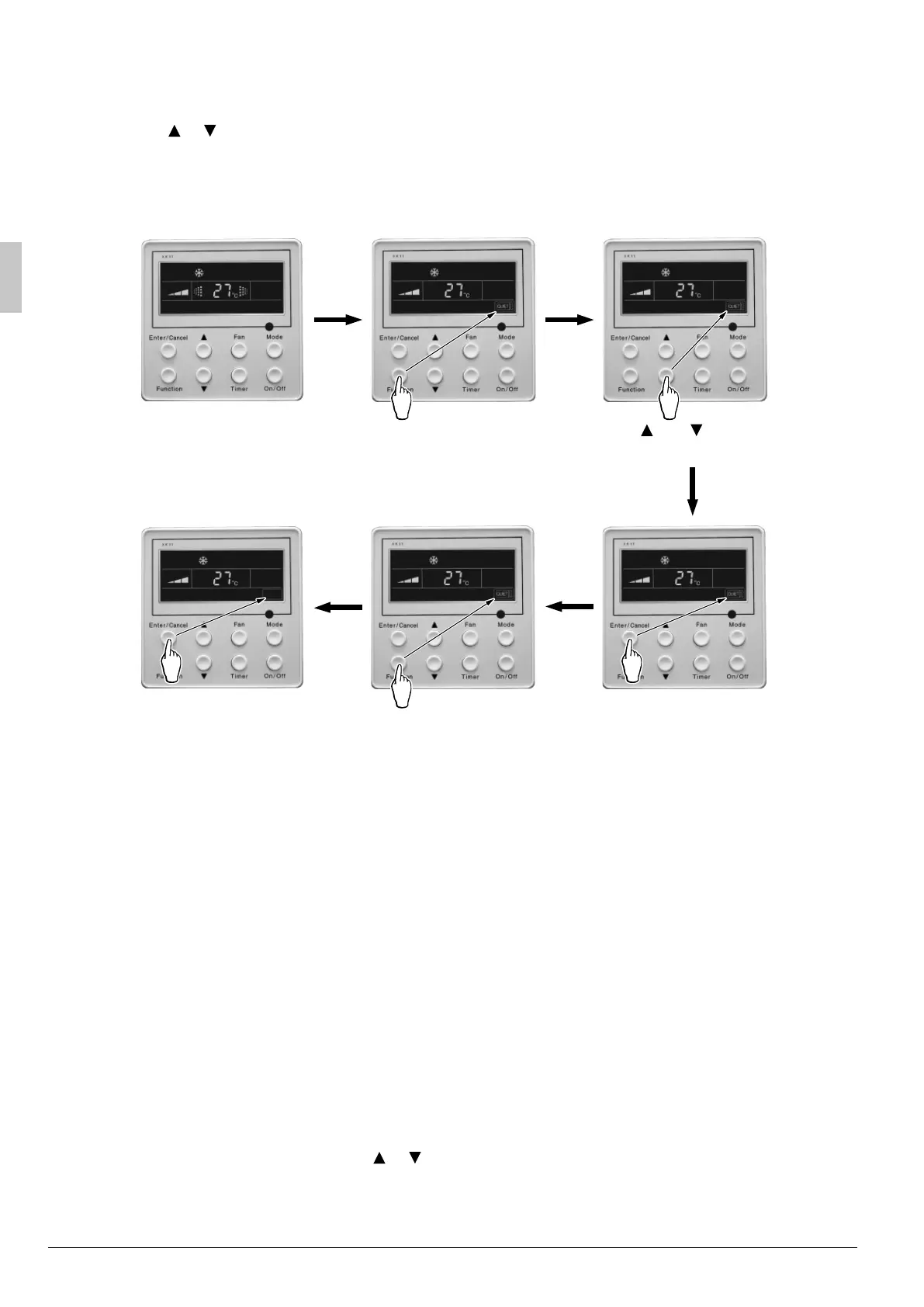
Press Function button till the unit enters quiet function setting state, QUIET or AUTO QUIET mark blinks. In
this case, press
or button to switch between QUIET and AUTO QUIET and then press Enter/Cancel
button to turn on this function.
In quiet mode, press Function button till the unit enters quiet function. In this case, QUIET or AUTO QUIET
icon blinks and then press Enter/Cancel button to cancel this function.
Quiet function setting is shown in Fig.5.13
Press “Function” button
into quiet function
Press “Function” button
into quiet function
Press “Enter/Cancel” button
to turn on the type of quiet
function
Turn on the unit, without
turning on quiet function
Press “Enter/Cancel” button
to turn off the quiet function
Press “ ” or “ ” button
switch to auto quiet function
5.13 Quiet function settingFig.
Note:
During quiet function, fan speed is un-adjustable.1.
When turning on auto quiet function, the unit will enter quiet running state according to temperature 2.
difference between room temperature and setting temperature. In this case, fan speed is adjustable. If
temperature difference between room temperature and setting temperature ≥ 4°C, fan will keep its
current speed; if 2°C ≤ temperature difference ≤ 3°C ; fan speed will be reduce one grade ,but if it is at
min. grade, it is un-adjustable.; if temperature difference ≤ 1°C, fan speed will be at min.
In auto quiet mode, fan speed can not be raised but reduced. If high fan speed is manually adjusted, 3.
auto quiet mode will quit.
There is not auto quiet function in fan or dry mode. Quiet off is default after power failure and then 4.
power recovery.
If quite function is set, turbo function will be canceled.5.
5.14 Field Setting
Under off-state of the unit, press Function and Timer buttons continuously for 5s into debugging menu. Press
Mode button to adjust the setting items and
or button to set the actual value.
01_EN_EM09A058A.indd 2001_EN_EM09A058A.indd 20 5/13/2010 11:43:24 AM5/13/2010 11:43:24 AM



 To Next Page