15
Basic Operation
To change the temperature setting
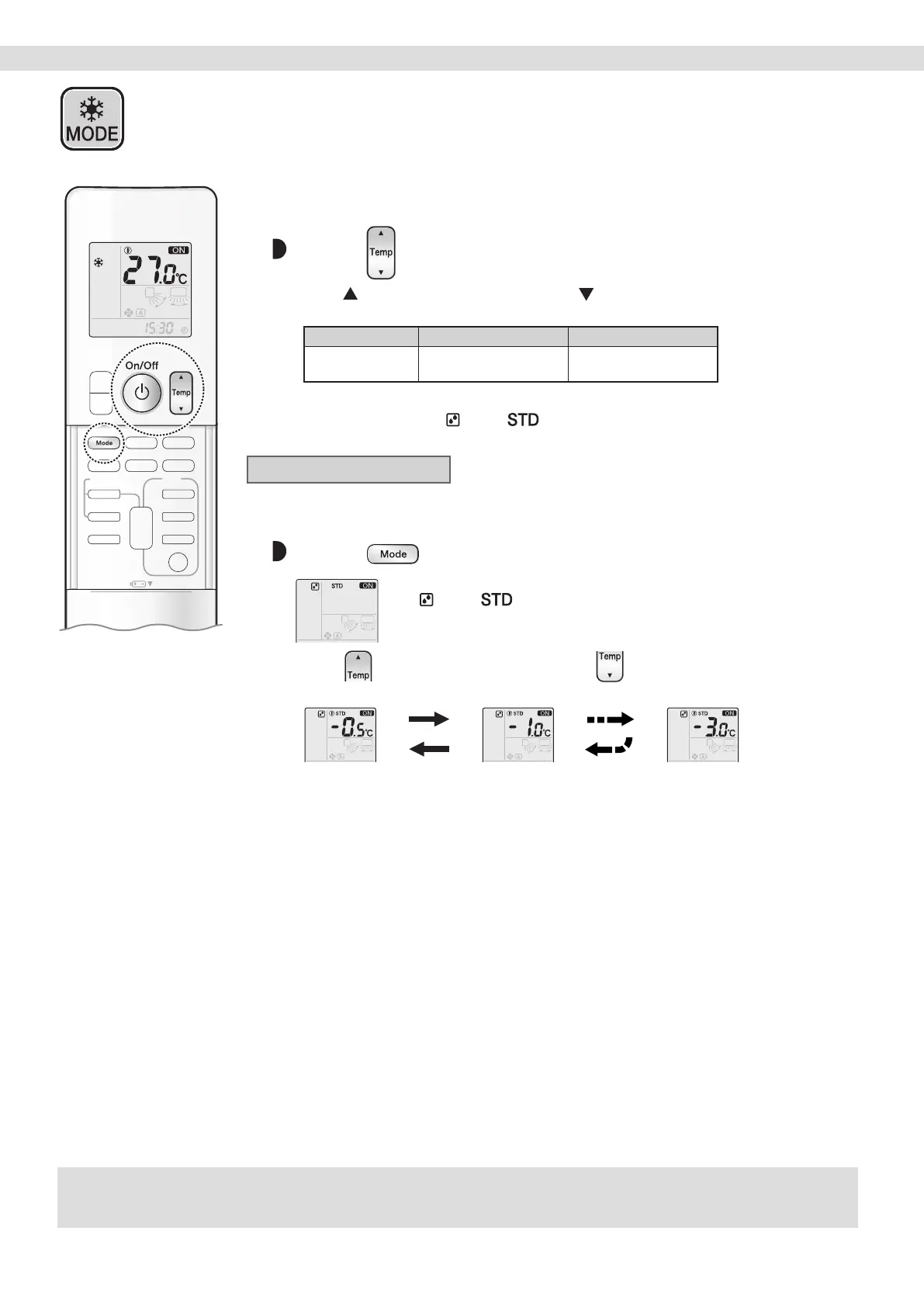
Press .
• Press to raise the temperature and press to lower the temperature.
Each pressing of the button changes the temperature by 0.5°C.
COOL operation DRY operation FAN operation
16.0~32.0°C “STD~(STD−3.0°C)”
*1, *2
The temperature setting
cannot be changed.
*1 STD (Standard).... Indoor temperature at the time when the DRY operation is started.
*2 STD (Standard).... “
” and “ ” appear on the LCD.
Dry (Dehumidifying)
To use Dry (Dehumidifying) mode
Press and select DRY operation mode.
• “ ” and “ ” appear on the LCD.
• DRY operation starts.
• Press
to raise the temperature and press to lower the temperature by 0.5°C
with each press.
• This mode mixes dehumidied cool air with room air to adjust the air outlet temperature
and remove moisture.
• When the outdoor temperature is lower than the indoor temperature, dehumidifying is less
effective.
NOTE
Notes on DRY operation
• In order to lower the humidity, the airow rate during the DRY operation is automatically controlled.
• When the indoor temperature rises, COOL operation automatically starts.
COOL · DRY · FAN Operation


 To Next Page