5
Read Before Operation
Names of Parts
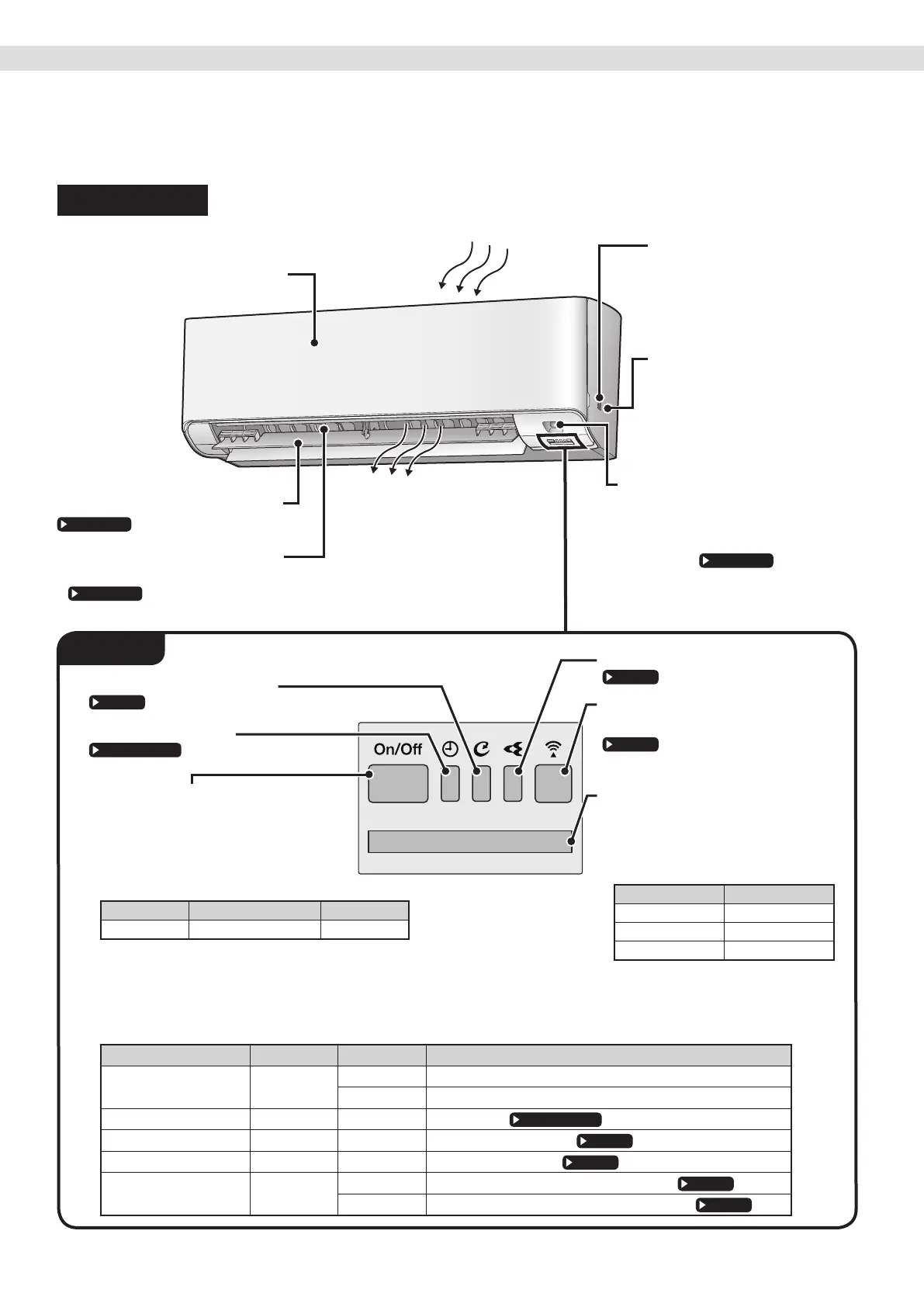
Indoor Unit
Air outlet
Air inlet
Front panel
Louvres (vertical blades)
• The louvres are inside of the air outlet.
Flaps (horizontal blades)
Room temperature
sensor and Room
humidity sensor
•
Sense the air temperature
and humidity around the unit.
Streamer air inlet
• Air inlet for streamer
operation.
INTELLIGENT EYE sensor
• Detects the movements of people
and automatically switches between
normal operation and energy saving
operation.
Signal receiver
• It receives signals from the remote
controller.
• When the unit receives a signal,
you will hear a beep sound.
Case Sound type
Operation start beep-beep
Setting change beep
Operation stop long beep
Indoor unit ON/OFF switch and
OPERATION lamp (Green)
• Press this switch once to start operation.
Press once again to stop it.
• For the operation mode setting,
refer to the following table.
Mode Temperature setting Airow rate
COOL 22.0°C AUTO
• This switch can be used when the remote controller
is missing or out of batteries.
List of lamps
Lamp Colour State Description
OPERATION lamp green
Lights up The air conditioner is running.
Blinks Check the error code.
TIMER lamp orange Lights up TIMER is set.
MOLD PROOF lamp green Lights up MOLD PROOF operation.
STREAMER lamp green Lights up STREAMER operation.
Wireless LAN
connecting adapter lamp
orange
Lights up Wireless LAN connecting adapter operation.
Blinks Wireless LAN connecting adapter is connected.
Wireless LAN connecting adapter
lamp (Orange)
STREAMER lamp (Green)
MOLD PROOF lamp (Green)
TIMER lamp (Orange)
Display


 To Next Page