14
Basic Operation
English
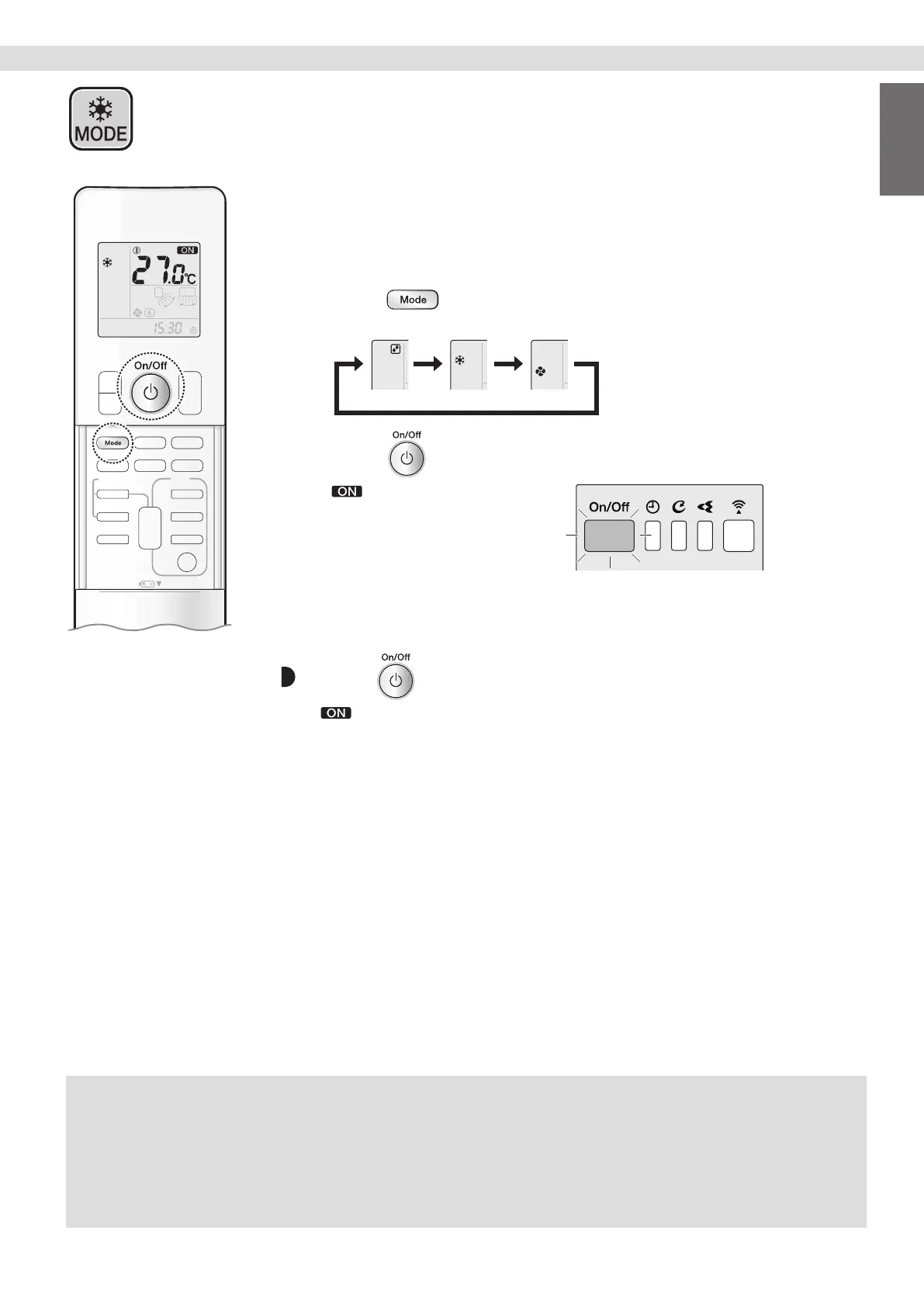
The air conditioner operates with the operation mode of your choice.
From the next time on, the air conditioner will operate with the same operation mode.
To start
1. Press and select an operation mode.
• Each pressing of the button changes the mode setting in sequence.
DRY COOL FAN
2. Press .
• “ ” appears on the LCD.
• The OPERATION lamp lights green.
Display
To stop
Press again.
• “ ” disappears from the LCD.
• The OPERATION lamp goes off.
NOTE
Note on COOL operation
• This air conditioner cools the room by releasing the heat in the room outside.
Therefore, the cooling performance of the air conditioner may be degraded if the outdoor temperature is high.
Note on DRY operation
• Eliminates humidity while maintaining the indoor temperature as much as possible. It automatically controls temperature and airow rate,
so manual adjustment of these functions is unavailable.
Note on FAN operation
• This mode is valid for fan only.
COOL · DRY · FAN Operation


 To Next Page