36
Care
English
Filter (small)
* For the applicable lter type, please refer to
.
Attaching
1. Open the front panel and
pull out the air lters.
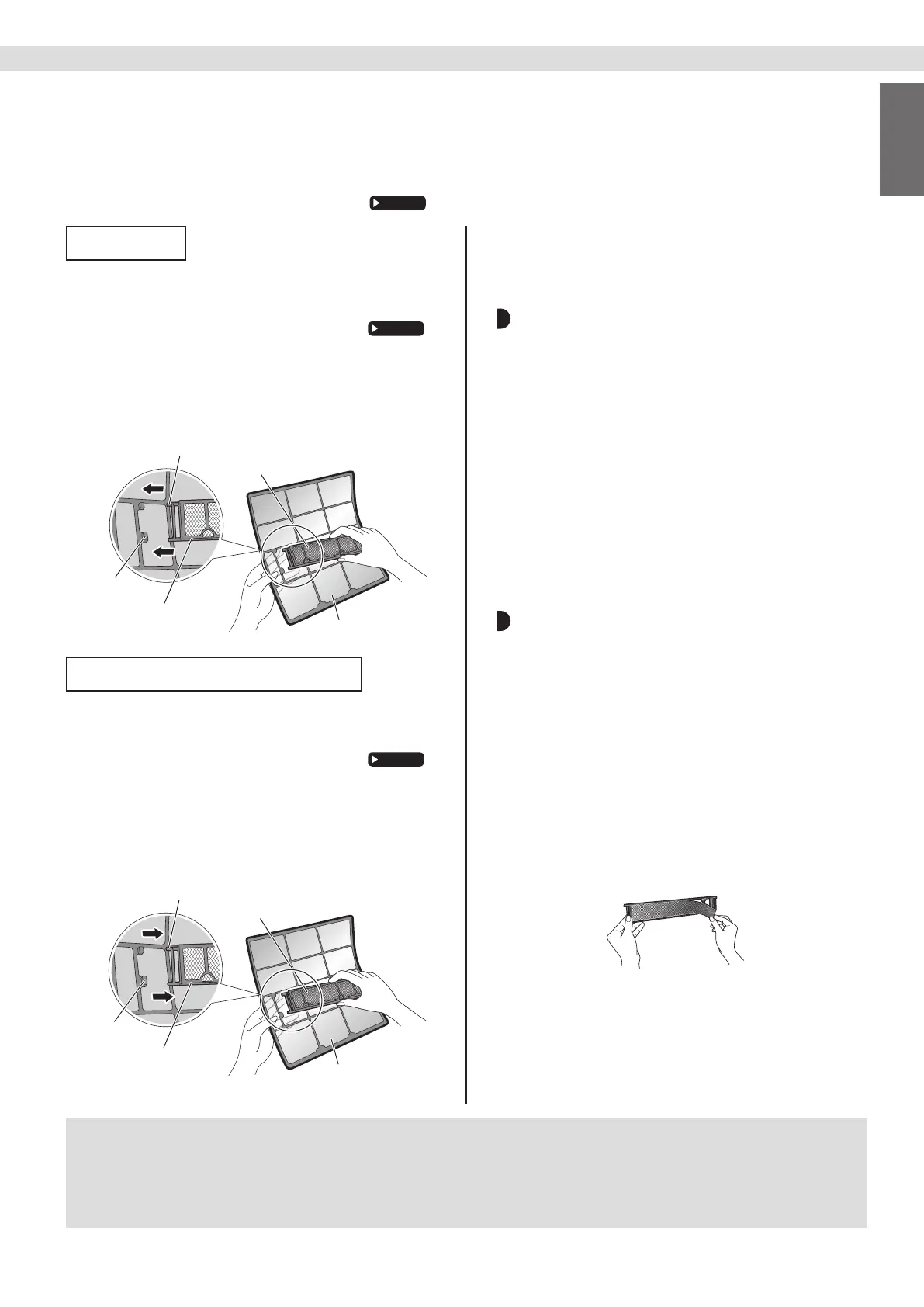
2. Insert the lter.
• Check that the lters are inserted securely under
the tabs.
Air filters
Filter (small)
Filter frame
Tab
Claw
Cleaning and Replacement
1. Open the front panel and
pull out the air lters.
2. Take off the lter.
• Hold the recessed parts of the frame and unhook
the 4 claws.
• Remove the lters from the tabs.
Filter frame
Claw
Air filters
Filter (small)
Tab
3. Clean or replace.
[Cleaning]
Deodorizing lter (enzyme blue) : Blue /
Titanium apatite deodorizing lter :
Blue-Black
3-1 Vacuum dust, and soak in lukewarm
water or water for about 10 to
15 minutes if very dirty.
3-2 After washing, shake off remaining
water and let them dry in the shade.
• This lter can be renewed by washing it with water
once every 6 months and we recommend replacing
it once every 3 years.
•
Do not wiring out the lter when removing water from it.
Air quality lter (enzyme blue with
PM2.5) : Blue-White /
Dust collection lter (PM 2.5) : White
•
Do not wash the lters as this will reduce their efciency.
• It is recommended to replace it once every 6 months.
[Replacement]
Remove each lter from the front
grille by detaching them from the 6
tabs and then install the new lters.
• Do not throw away the lter frame.
• Reuse the lter frame when replacing the lter.
• When attaching the lter, check that the lter is
properly set in the tabs.
4. Set the lters as they were
and close the front panel.
• Press the front panel at both sides and the center.
NOTE
• Operation with dirty lters:
− cannot deodorise the air,
− cannot clean the air,
− results in poor cooling,
− may cause odour.
• Dispose of old lters as non-ammable waste.


 To Next Page