10 | Configuration
Installer reference guide
46
FTXP20~35N5V1B + ATXP20~35N5V1B
Split system air conditioners
4P519439-20U – 2022.09
10 Configuration
10.1 To set a different channel of the indoor unit infrared signal receiver
In case 2 indoor units are installed in 1 room, different addresses for 2 user
interfaces can be set.
1 Remove the batteries from the user interface.
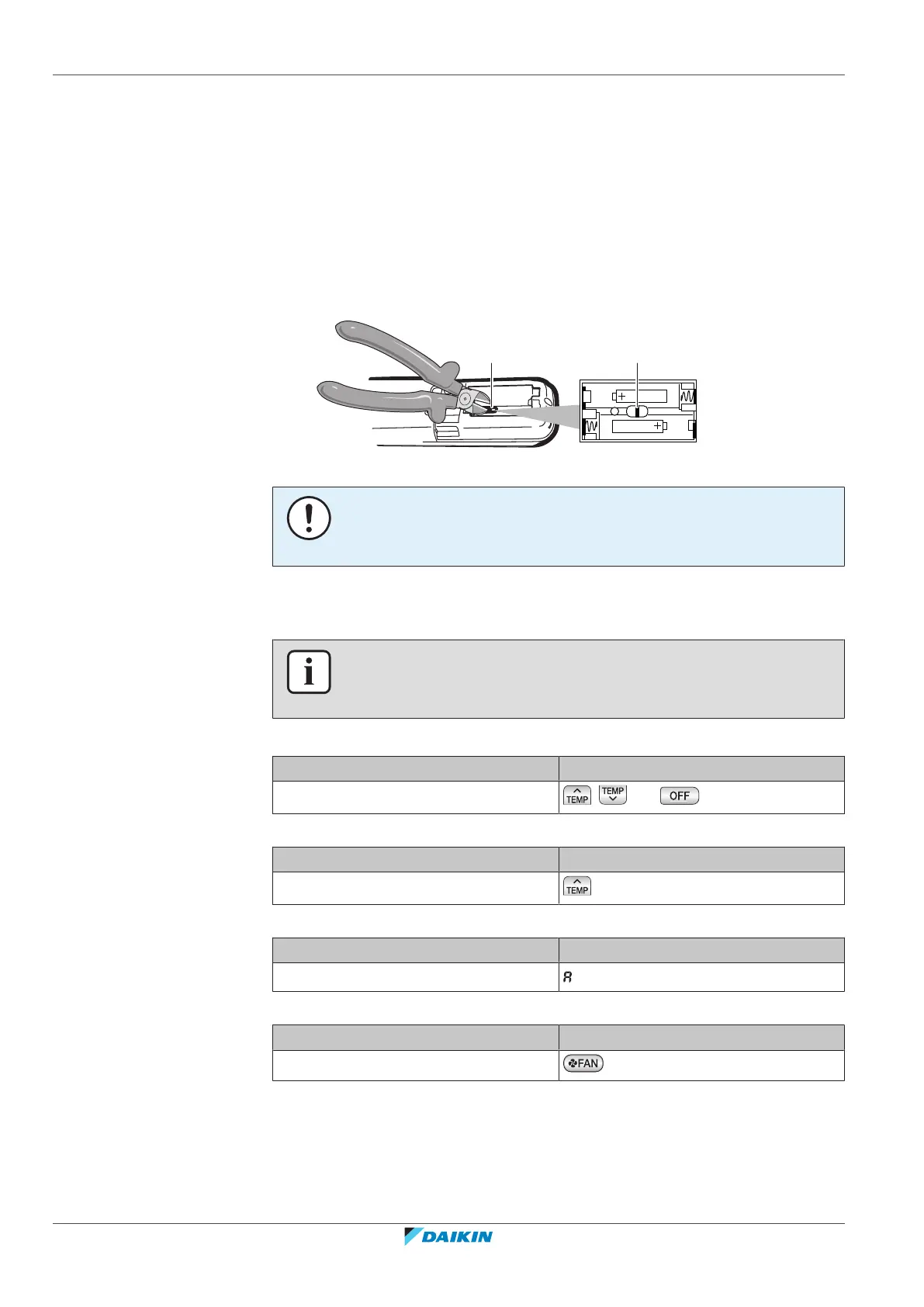
2 Cut the address jumper.
a Address jumper
NOTICE
Be careful NOT to damage any of the surrounding parts when cutting the address
jumper.
3 Turn the power supply on.
Result: The flap of the indoor unit will open and close to set the reference position.
INFORMATION
In case you could NOT complete the setting in time, turn the power supply off and
wait at least 1minute before turning the power supply back on.
4 Press simultaneously:
Model Buttons
FTXP and ATXP
, and
5 Press:
Model Buttons
FTXP and ATXP
6 Select:
Model Symbol
FTXP and ATXP
7 Press:
Model Button
FTXP and ATXP



 To Next Page