5 | Operation
User reference guide
29
FTXTA30A2V1BW
Split system air conditioner
4P518786-4F – 2020.05
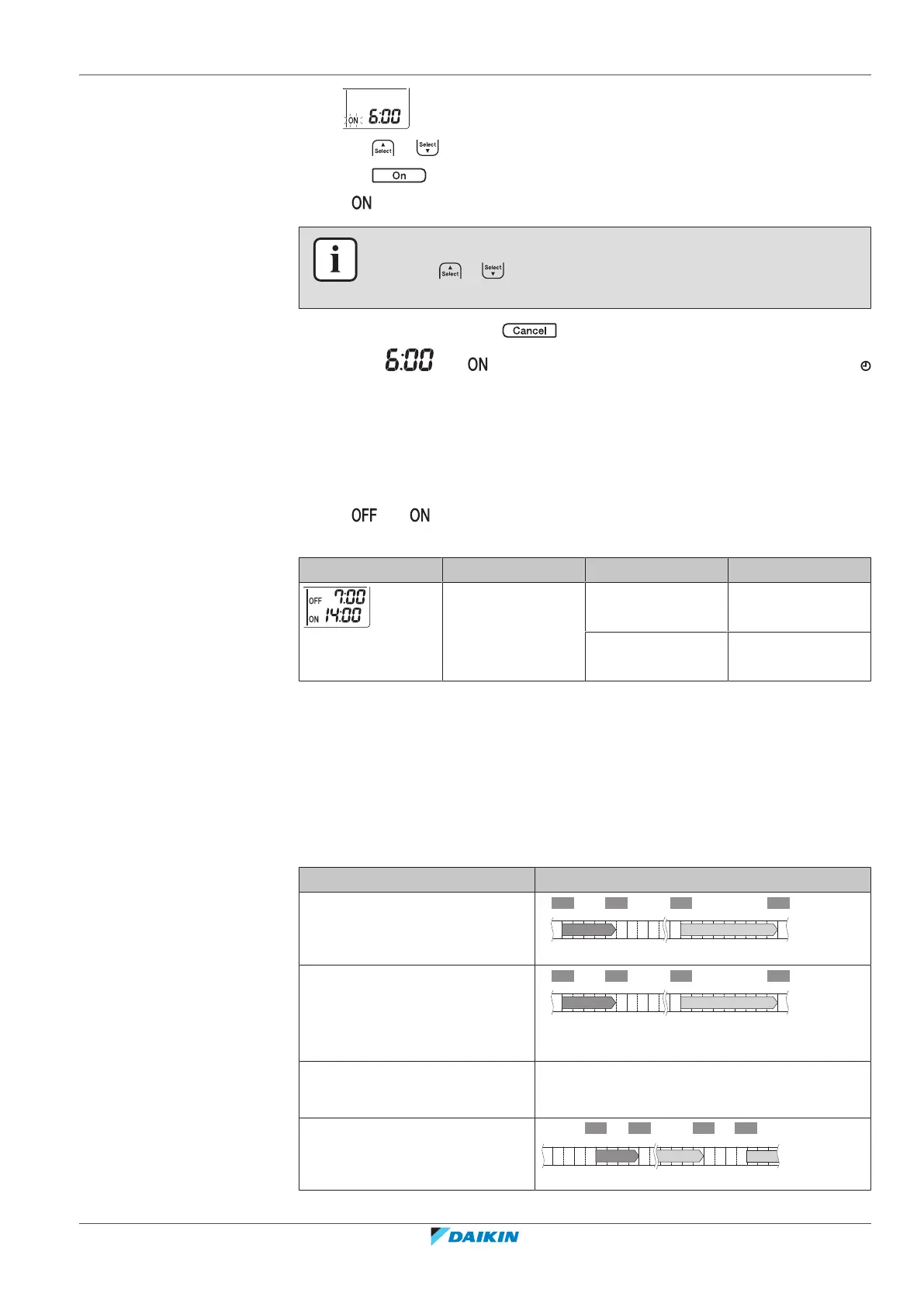
2 Press or to change the time setting.
3 Press again.
Result: and the set time are displayed on the LCD. The timer lamp lights up.
INFORMATION
Each time or is pressed, the time setting advances by 10minutes. Holding
the button down will change the setting rapidly.
4 To stop operation, press .
Result: and disappear from the LCD and the timer lamp goes off.
and the day of the week are displayed on the LCD.
5.10.3 To combine OFF timer and ON timer
1 To set the timers, refer to "5.10.1 To start/stop OFF timer operation" [4 28]
and "5.10.2To start/stop ON timer operation"[428].
Result: and are displayed on the LCD.
Example:
Display Current time Set while… Operation
6:00 the unit is
operating.
Stops at 7:00 and
starts at 14:00.
the unit is NOT
operating.
Starts at 14:00.
Note: If the timer setting is active, the current time is NOT displayed on the LCD.
5.11 Weekly timer operation
With this operation, you can save up to 4 timer settings for each day of the week.
Example: Create a different setting from Monday to Friday and a different setting
for weekends.
Day of the week Setting example
Monday
▪ Make up to 4settings.
6:00 8:30 17:30
25°C 27°C
22:00
1 2 3 4
ON OFF ON OFF
Tuesday~Friday
▪ Use the copy mode if the
settings are the same as for
Monday.
6:00 8:30 17:30
25°C 27°C
22:00
1 2 3 4
ON OFF ON OFF
Saturday
▪ No timer setting
—
Sunday
▪ Make up to 4settings.
27°C 27°C25°C
ON OFF OFF ON















 To Next Page