1.
Select
Network
at Screen 2(A) on page
63.
2.
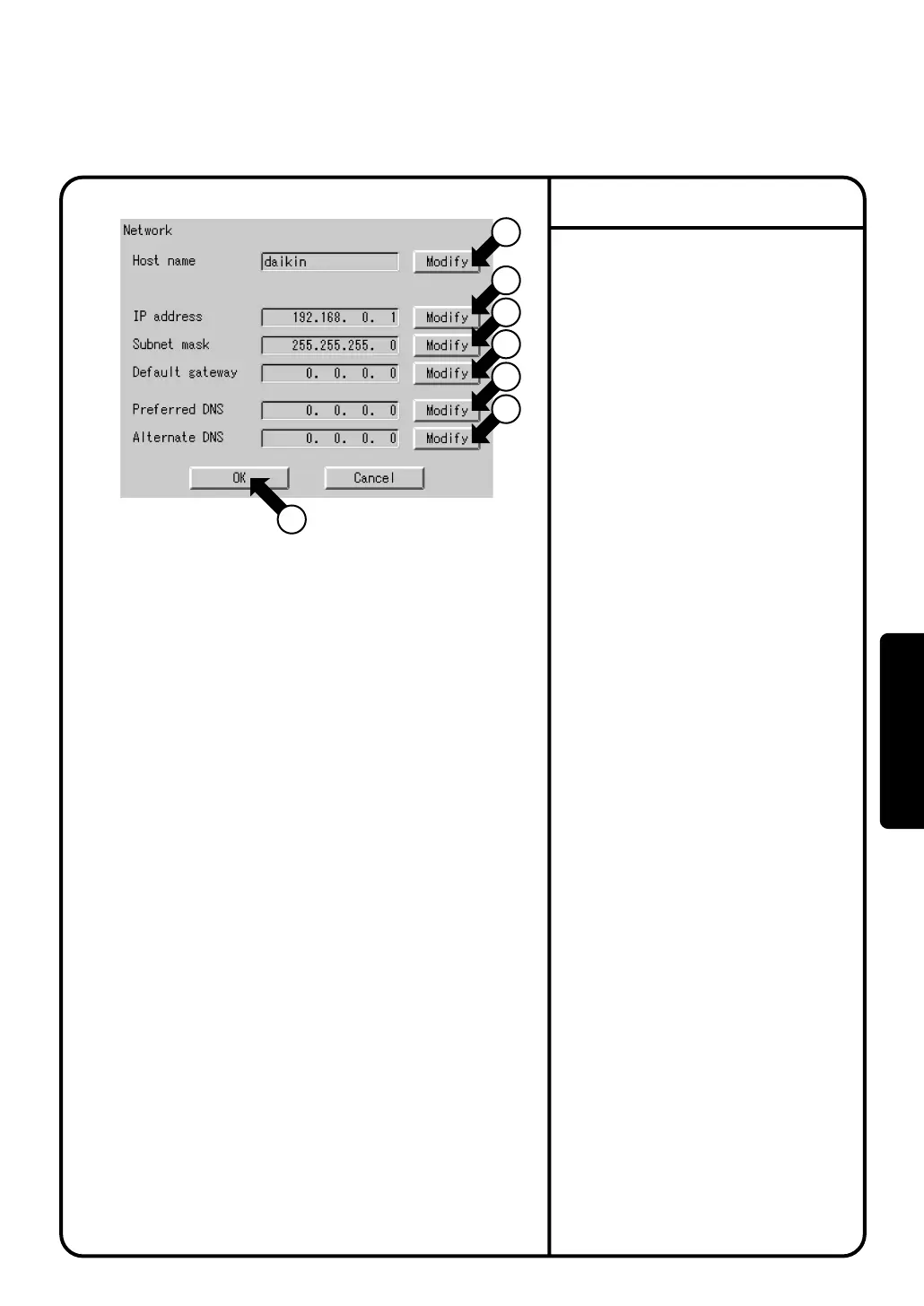
Confirm that the Network screen
Screen 1 will be displayed as shown in
the left-hand column.
3.
Push the [Modify] button q and enter a
Host name
on the resulting input
4.
Push the [Modify] button w and enter
an
IP address
on the resulting input
screen.
5.
Push the [Modify] button e and enter a
Subnet mask
on the resulting input
screen.
6.
Push the [Modify] button r and enter a
Default gateway
on the resulting input
screen.
7.
Push the [Modify] button t and enter a
Preferred DNS
on the resulting input
screen.
8.
Push the [Modify] button y and enter a
Alternate DNS
on the resulting input
screen.
9.
After making the settings, push the [OK]
button u.
To cancel the settings made, push the
[Cancel] button.
Network
Screen 1 Network
7
1
2
3
4
5
6
System Settings Menu Operation
70
Operation



 To Next Page