1.
Web Server
at Screen 2(A) on page 63.
2.
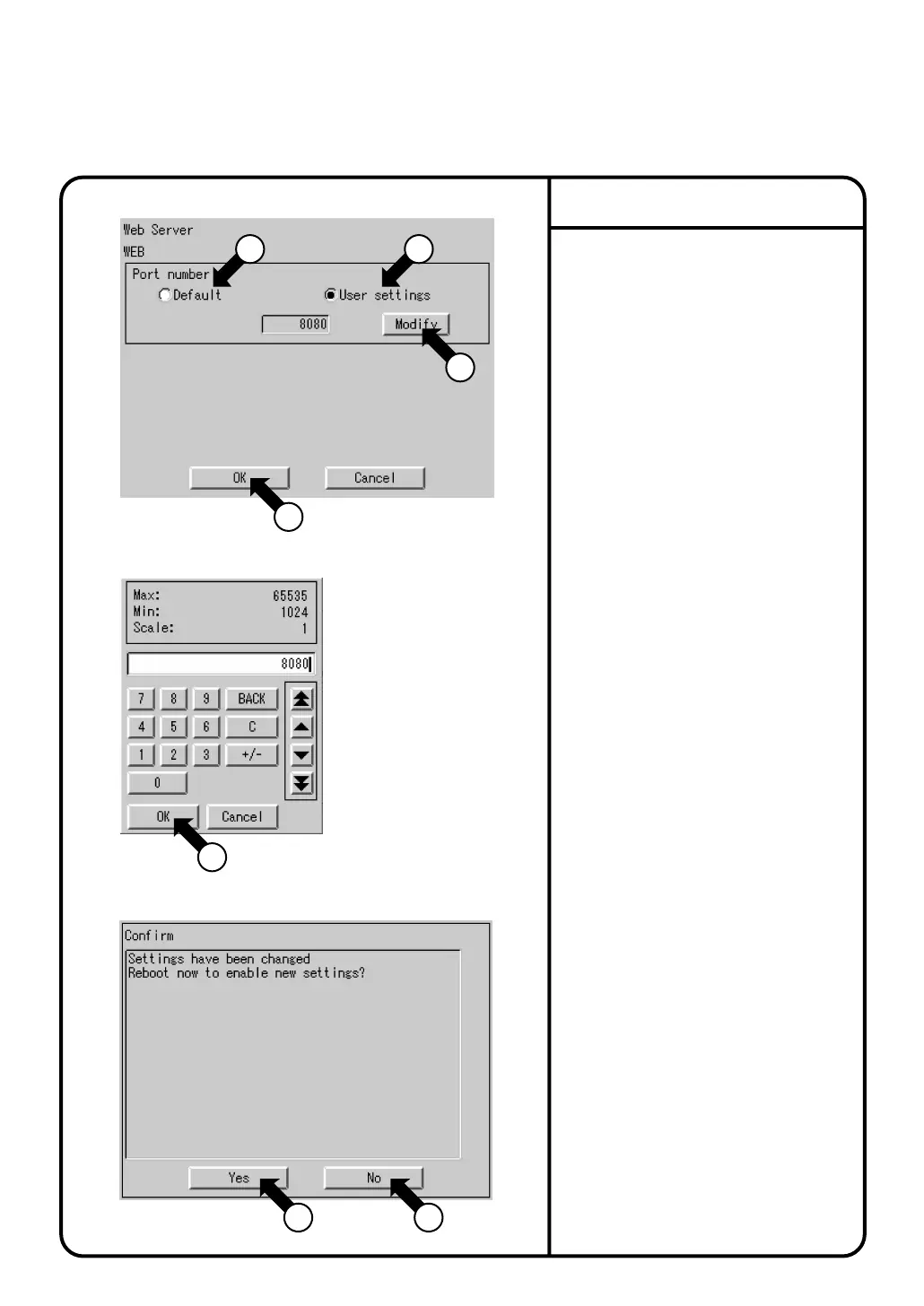
Screen 1 Web Server as shown on the
left will be displayed.
3.
Set the desired port number.
Select either
Default
q,
or
User settings
w.
When selecting
Default
q, continue
from 5. below. The default value is 80.
When
Default
is selected the [Modify]
button e will not be displayed.
4.
After selecting
User settings
w, click
the [Modify] button e.
Screen 2 Input dialog as shown on the
left will be displayed. Enter the desired
value.
The user settings default value is 8080.
The input range is 1024-65535.
5.
After the desired value has been
entered, click the [OK] button r.
Screen 1 Web Server will be displayed.
6.
Push the [OK] button t. Screen 3
Confirmation as shown on the left will
be displayed.
7.
If you wish to enable the setting push
the [Yes] button y. Rebooting will
commence and the setting will be
completed.
If you do not wish to enable the setting,
push the [No] button u. Screen 1 Web
Server will be displayed.
Web Server Setting
Screen 1 Web Server
Screen 2 Input dialog
5
1 2
System Settings Menu Operation
Screen 3 Confirmation
3
4
6 7
71



 To Next Page