1.
See page 63 and select
Automatic Changeover
.
2.
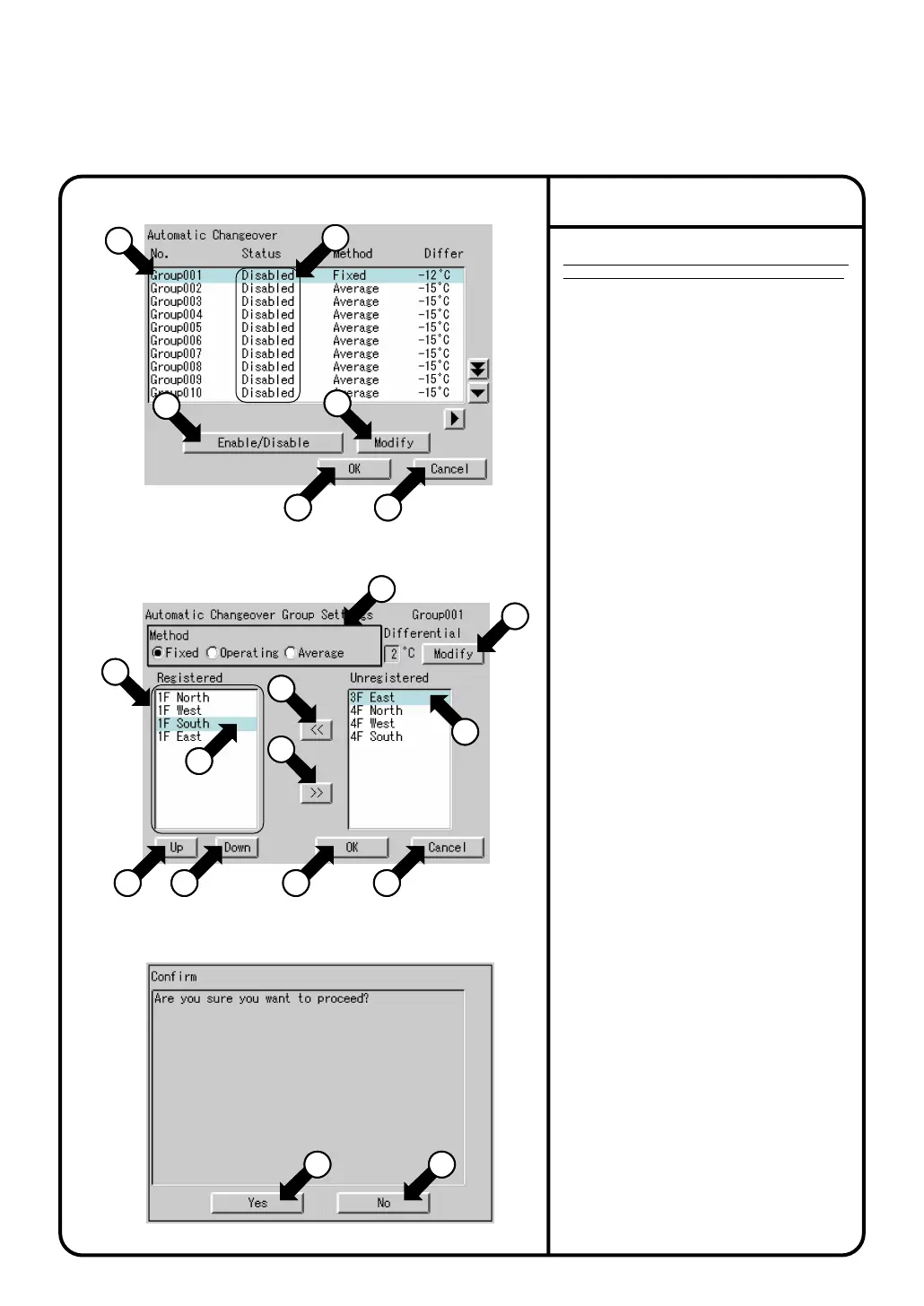
Screen 1 Automatic Changeover, which is shown on
the left, appears.
This screen shows current status (enabled / disabled)
of each cooling / heating automatic change over group,
control method, set value of temperature difference, and
the number of the registered indoor unit groups.
3.
Touch a cooling / heating automatic change
over group to be set or changed as shown by
q, and press the [Modify] button w.
4.
Screen 2 Cooling / Heating Automatic
Changeover Group Settings, which is shown
on the left, appears. First, select a control
method at e. The following three control
methods are available.
5.
Set a temperature difference value for cooling
/ heating automatic change over with the
[modify] button r.
Setting range: 1°C - 7°C
6.
At t, select an indoor unit to be added to the
cooling / heating automatic change over
group which is currently selected, and press
the button y to add.
To delete an indoor unit from the cooling /
heating automatic change over group, select
it at u, and press the button i.
7.
To change the order of the registered indoor
group o, select an indoor unit to be changed
at u, and move it with the [Up] button or the
[Down] button !0.
Memo: When the control method
Fixed
is
selected, the indoor unit displayed on the top
in the box o becomes the representative one.
When the operation method
Operating
is
selected, a search for representative unit is
performed starting from the top.
9.
On the screen 1, select the cooling / heating
automatic change over group to be enabled at
q
,
and press the button
!5
to enable. (Confirm the
group status (enabled / disabled) displayed on
!6
.)
Only the cooling / heating automatic change over
group set to enabled is controlled automatically.
10.
Lastly, when all the setting changes are correct, press the
[OK] button
!7
. (To cancel, press the [Cancel] button
!8
.)
When the [OK] button
!7
is pressed, the screen 3
Confirmation Display appears.When there is no problem
in setting change, press the [Yes] button
!3
. This menu is
ended, and System Settings Menu appears.
(When the [No] button
!4
is pressed, the screen 1
appears.)
8.
When all settings for this cooling / heating automatic change
over group (control method, temperature difference, indoor
unit registration) are completed, press the [OK] button !1
(To cancel, press the [Cancel] button !2.)
Screen 3 Confirmation Display appears.When there is no
problem in setting change, press the [Yes] button !3.
Screen 1, which is shown on the top on this page, appears.
(To add or change the settings in the cooling / heating
automatic change over group mentioned above, press the
[No] button !4. Screen 2 appears.)
For details of each control method, see page 37.
Before performing Automatic Changeover,
thoroughly read the Automatic Changeover section
on page 37, and perform the following procedures:
Operation of Automatic Changeover
Screen 1 Automatic Changeover
Screen 2
Cooling/Heating Automatic Change Over Group Settings
Screen 3 Confirmation
System Settings Menu Operation
¡Fixed ¡Operating ¡Average
16
16
4
16
3
17
17
18
18
17
10
17
7
17
10
17
11
17
12
17
5
3
1
3
9
3
6
3
8
3
15
3
2
16
13
16
14
81



 To Next Page