1.
See page 63 and select
Temperature Limit
.
2.
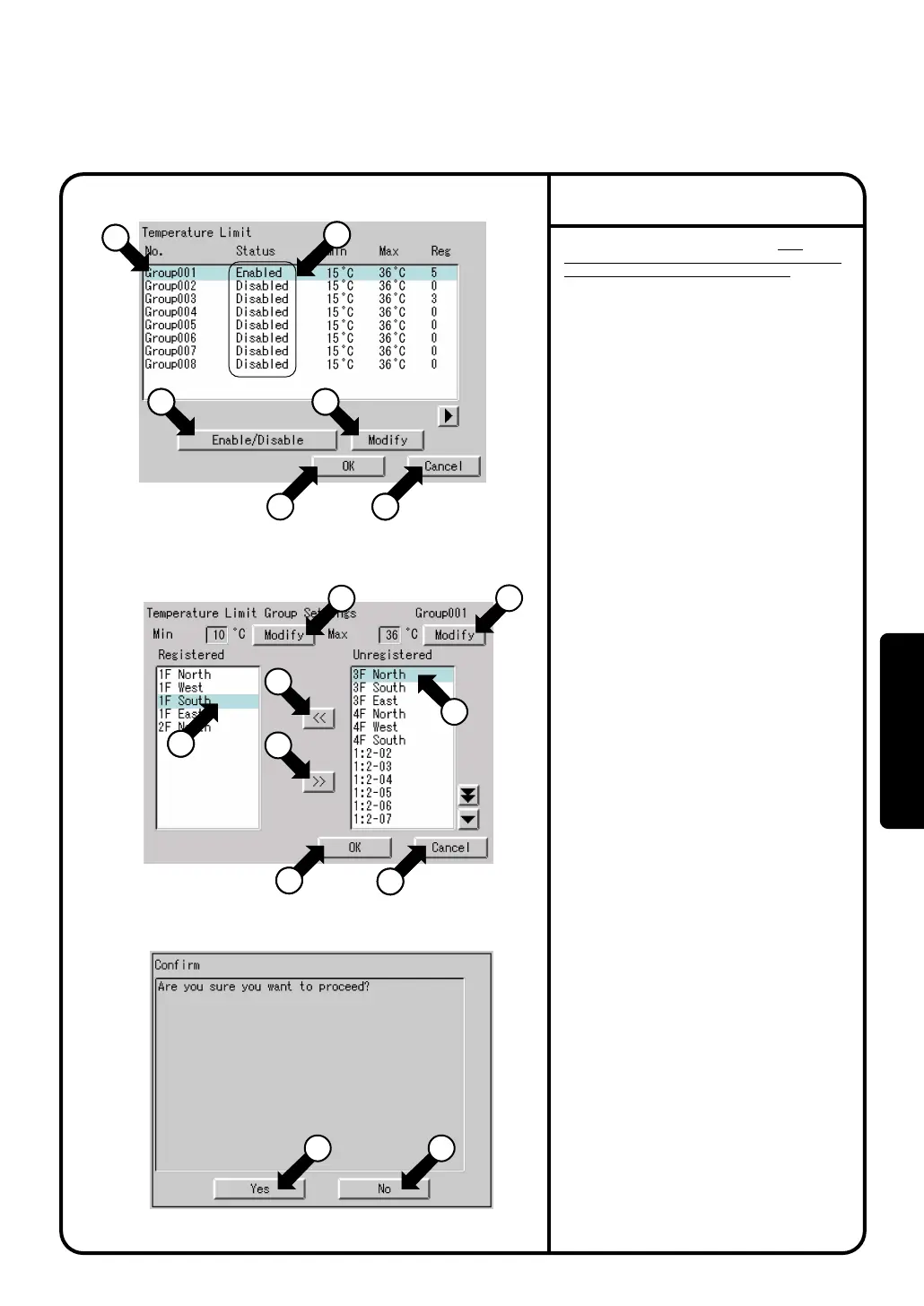
Screen 1 Temperature Limit, which is shown
on the left, appears.
This screen shows current status (enabled /
disabled) of room temperature upper / lower
limit control group, and
setting status of lower temperature limit,
upper temperature limit, and the number of
registered indoor unit groups.
3.
Touch a room temperature upper / lower limit
control group to be set or changed as shown
by q, and press the [Modify] button w.
4.
Screen 2 Room Temperature Upper / Lower
Limit Control Group Settings, which is shown
on the left, appears. First, at e, select the
indoor unit to be added to the room
temperature upper / lower limit control group
which is currently selected, and press the
button r to add. To delete an indoor unit
from the group, select it at t, and press the
button y.
5.
Set a lower limit of room temperature with the
[Modify] button u, and an upper limit of room
temperature with the [Modify] button i.
Setting range : 2°C - 16°C for lower limit,
32°C - 50°C for upper limit
6.
When all settings for this room temperature
upper / lower limit control group (indoor unit
registration, settings of upper limit and lower
limit) are completed, press the [OK] button
o.
(To cancel, press the [Cancel] button !0.)
Screen 3 Confirmation Display appears.
When there is no problem in setting change,
press the [Yes] button !1.
Screen 1, which is shown on the top on this
page, appears.
To add or change the settings in the room
temperature upper / lower limit control group
mentioned above, press the [No] button !2.
Screen 2 appears.
7.
On the screen 1, select a room temperature
upper / lower limit control group to be enabled
at q, and press the button !3 to enable.
Confirm the group status (enabled / disabled)
displayed on
!4.
Only the room temperature upper / lower limit
control group set to enabled is controlled
automatically.
8.
Lastly, when all the setting changes are correct,
press the [OK] button !5. (To cancel, press the
[Cancel] button !6.)
When the [OK] button !6 is pressed, the
screen 3 Confirmation Display appears.When
there is no problem in setting change, press
the [Yes] button !1. This menu is ended, and
System Settings Menu appears. (When the
[No] button !2 is pressed, the screen 1
appears.)
Before performing Temperature Limit, read
thoroughly the section Temperature Limit on page
42, and perform the following procedure.
Operation of Temperature Limit
Screen 1 Temperature Limit
Screen 2
Room Temperature Upper/Lower Limit Control Group Settings
Screen 3 Confirmation
1
1
1
13
1
2
14
14
7
8
11 12
15 16
3
3
6
4
5
5
9
9
10
10
System Settings Menu Operation
82
Operation



 To Next Page