1.
Select
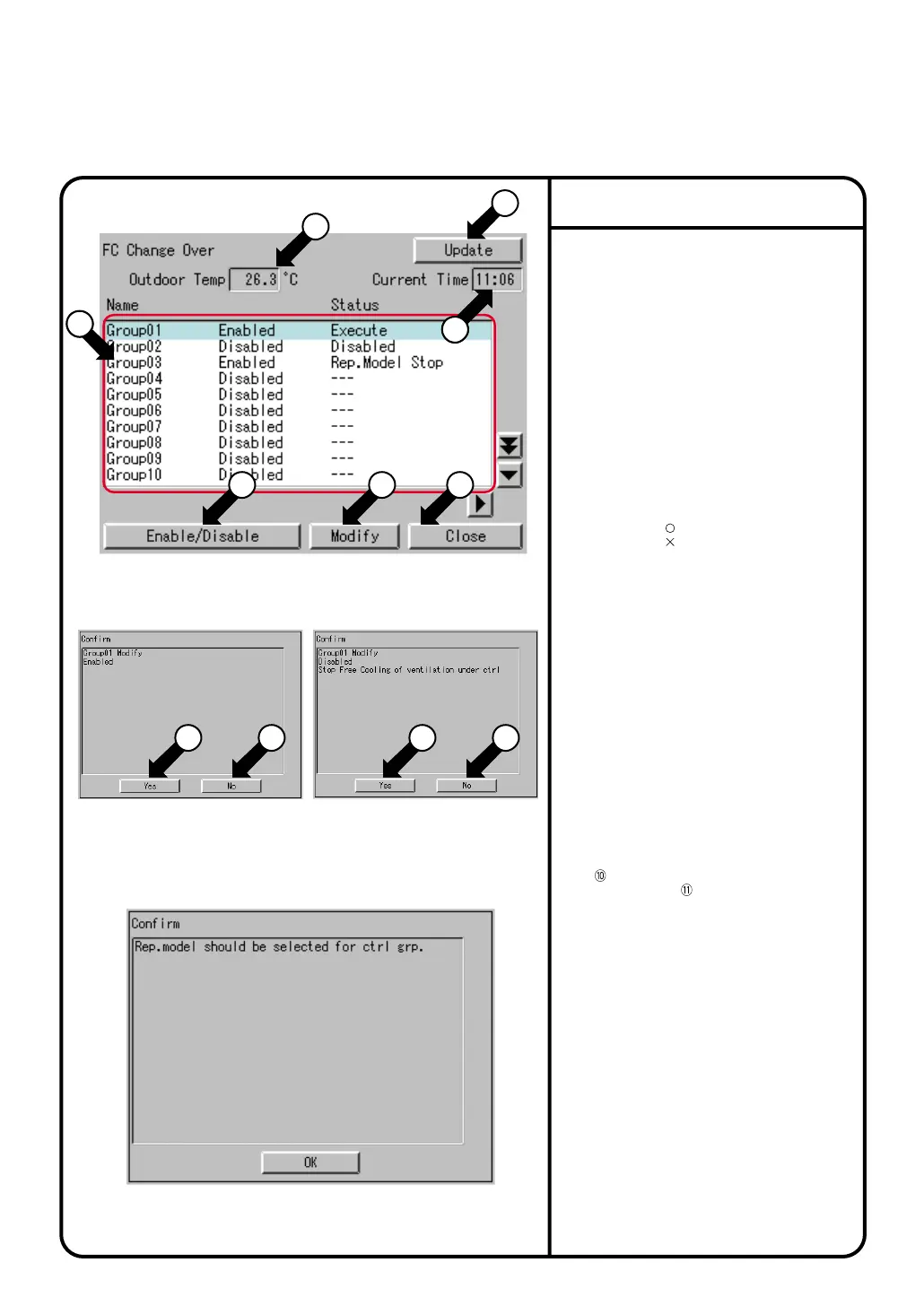
FC Change Over
in the menu window
shown in page 63 to show screen 1.
2.
Press [Update] button r to update the description.
3.
Select a control group and press [Enable/Disable]
button t, and screen 2(when Enable) or screen 3
(when Disable) is shown. Press [Yes] button i or
to switch between Enable and Disable. Press
[No] button o or to cancel the settings.
* When control is present to Disable, no FC Change
Over will be conducted.
* When control is present to Enable, and
Rep.model is not registered the screen 4 is shown.
4.
When changing the settings of a control group,
select any given control group and press
[Modify] button y to show the Control group
setting screen. When control is Enable, the
screen appears in the read-only mode. (See
page 86.)
5.
Press [Close] button u to close the FC Change
Over screen.
Read page 47 for the function of FC Change Over.
This chapter explains how to make settings for
FC Change Over.
[Restrictions]
- Use the Master ITC to make settings.
(No setting is possible from the Slave ITC.)
[Description of the FC Change Over window]
q
Outdoor Temp: Indicates the present outdoor
temperature.
w
Current time: Indicates the current time.
e
The control group list shows the following items:
Name: Name of control group
Status of Enable/Disable control
Status:
Rep. Model Err
,
Out Temp Sense Err
Rep. Model Stop
,
Disabled
,
Execute
Free Cooling: (when executed),
(when not executed)
Operation mode:
Cool
,
Heat
,
Fan
Rm Temp: Suction temperature of the
representative model
Cool Setup: Preset cooling temperature
(Highest comfortable temperature)
Heat Setup: Preset heating temperature
(Lowest comfortable temperature)
[Anomalies]
- When the representative model suffers an
anomaly, the indication shown for
Free cooling
Rm Temp
and
Operation mode
in e The control group list is “---.”
- When the outside temperature sensor
malfunctions, “---” is shown for
Outdoor Temp
and
Free Cooling
.
Setting of the FC Change Over
Screen 1 FC Change Over
Screen 2 Confirm Screen 3 Confirm
Screen 4 Confirm
1
5
8 9 10 11
6 7
4
18
2
3
3
85
System Settings Menu Operation



 To Next Page