Advanced Settings
24
English
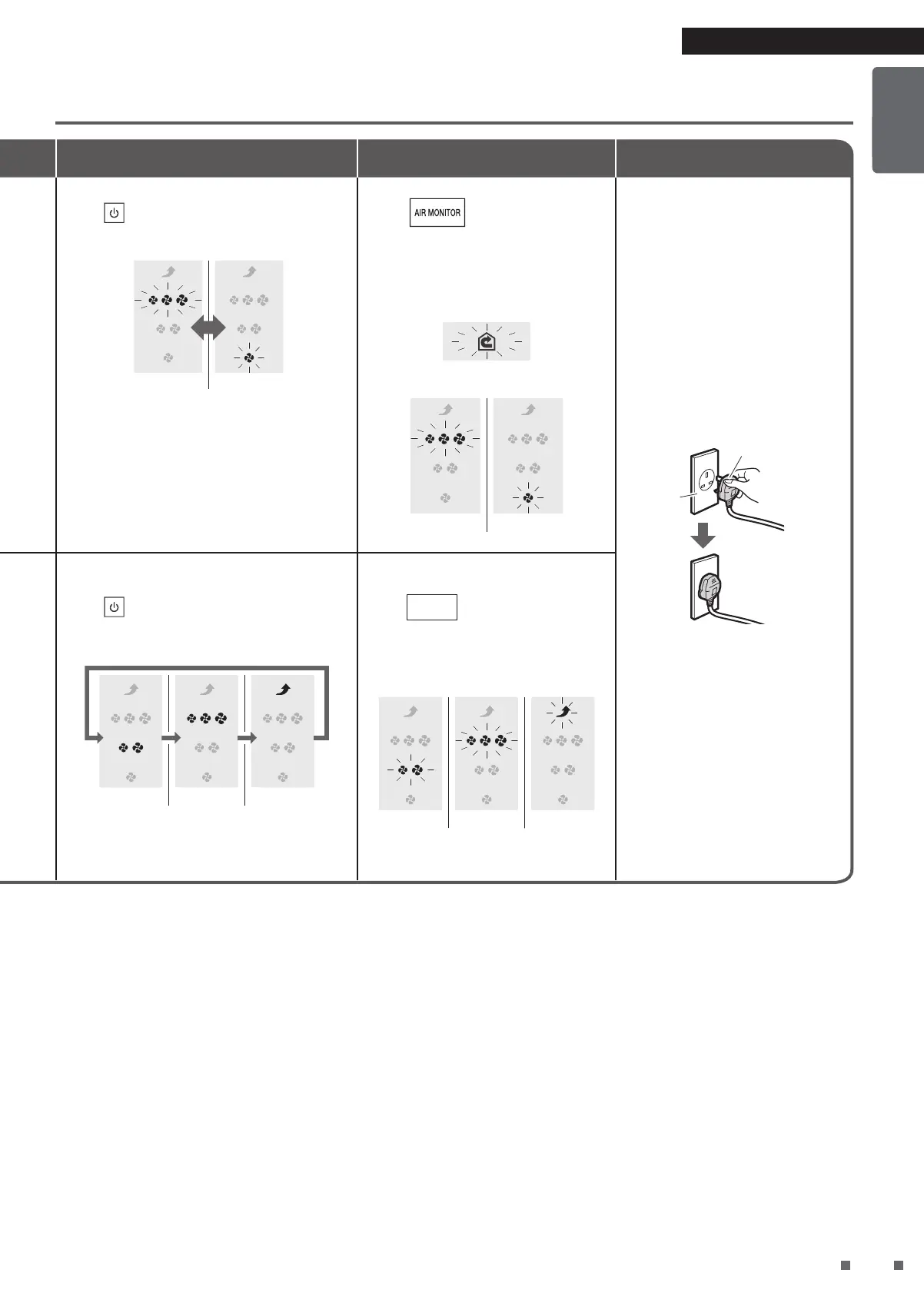
Press to change the setting*.
Each press cycles between ON and OFF.
ON OFF
Press
.
A short beep sounds with the
CIRCULATOR MODE lamp blinking
while the FAN lamp blinks according to
the new setting.
Blinking
ON OFF
While the lamp is blinking,
unplug the power supply plug,
wait at least 5 seconds, and
then insert the power supply
plug again.
Setting is now complete.
Power supply
plug
Power
socket
• If this procedure is not
performed, the unit will not
return to the regular operation
mode.
• Settings are remembered even
if the unit is unplugged.
Press
to change the setting*.
Each press cycles between Low, Normal, High.
Low
Normal High
Press
FAN
.
A short beep sounds and the
FAN lamp blinks according to the
new setting.
NormalLow High
234
* If the lamps do not change even after the settings were changed, unplug the unit, wait at least 5 seconds, then re-insert the
power supply plug and repeat the above procedure from the beginning.


 To Next Page