Maintainance
30
English
Streamer Unit
Replace
Do not soak or wash
If the Streamer lamp blinks
Replacement timing
Estimated lifespan is about 10 years in the case where unit is operated for 24 hours everyday
using AUTO FAN MODE at a house where 5 cigarettes are burned everyday. However,
depending on the location where the unit is used (places where oils are present, or dust and
humidity is abundant, or sprays and chemical agents are used, etc.), replacement timing may
become shorter.
Page 3 - 6
Both units must be replaced simultaneously.
Contact the place of purchase.
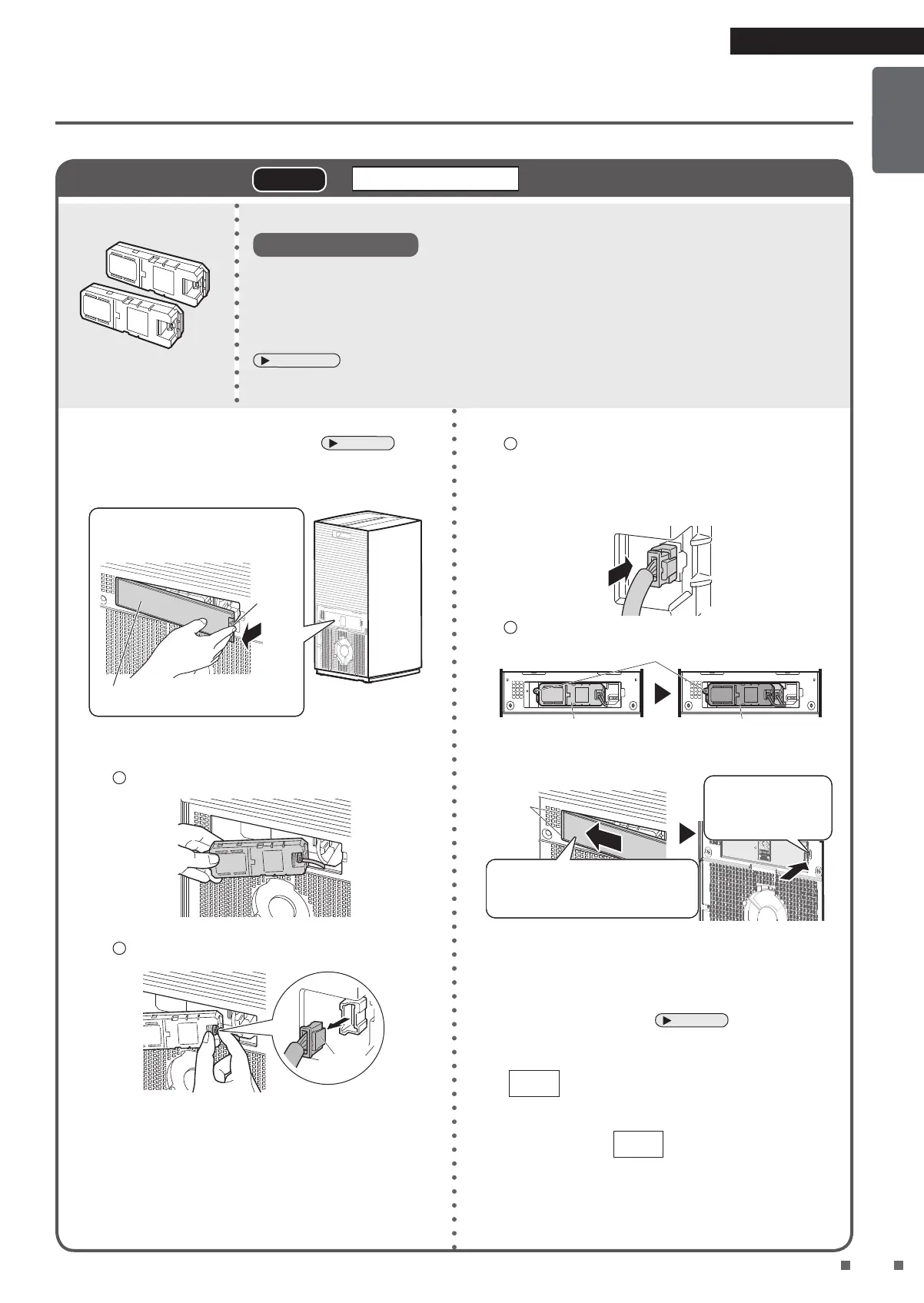
1. Remove the pre-filter on the left side viewing
from the front of the main unit.
Page 27
2. Remove the Streamer unit cover.
Place your finger on the hook
and pull it towards you.
Streamer unit cover (black)
Left side view of the
unit
Hook
3. Remove the Streamer units.
1
Remove both Streamer units.
2
Remove the connectors of the Streamer units.
Hook
1. Push the hook on the connector.
2. Pull it out while pushing the hook.
The lock will not release unless the hook is
pushed.
(Breakage may result from forcibly pulling)
4. Attach the new Streamer units.
1
Pay attention to the direction of the hook on the
connector, make sure it is facing to the right, and
fully insert the connector.
The connectors need not be inserted in any
particular order.
2
Attach both Streamer units.
Match the Streamer unit holes to the protrusions
1st unit (Back) 2nd unit (Front)
5. Attach the Streamer unit cover.
Push until you
hear a catching
sound.
Secure the hooks (2
locations) on the left side
of the Streamer unit cover.
Hook
• Ensure you don’t pinch the connector cord.
• If the Streamer unit cover is not properly attached,
the safety switch will engage, and the unit cannot
operate.
6. Attach the pre-filter.
Page 27
7. Insert the power supply plug while pressing
FAN
on the unit, and wait until a short beep
sounds.
• The Streamer lamp will turn off.
• If you release
FAN
and attempt operation
before the short beep sounds, the Streamer lamp
will blink again.
• If you perform this step and the Streamer lamp still
blinks, please check that the connector is properly
inserted.


 To Next Page