Troubleshooting
34
English
Before making an inquiry or a request for repair, please check the following.
If the problem persists, contact the place of purchase.
In the event of malfunction during operation.
If the indicator lamps light up, or become inoperable, due to a lightning strike etc., remove the power supply plug,
wait at least 5 seconds then re-insert the power supply plug and turn the unit ON again.
Not a problem
This case is not a problem.
Check
Please check again before requesting repairs.
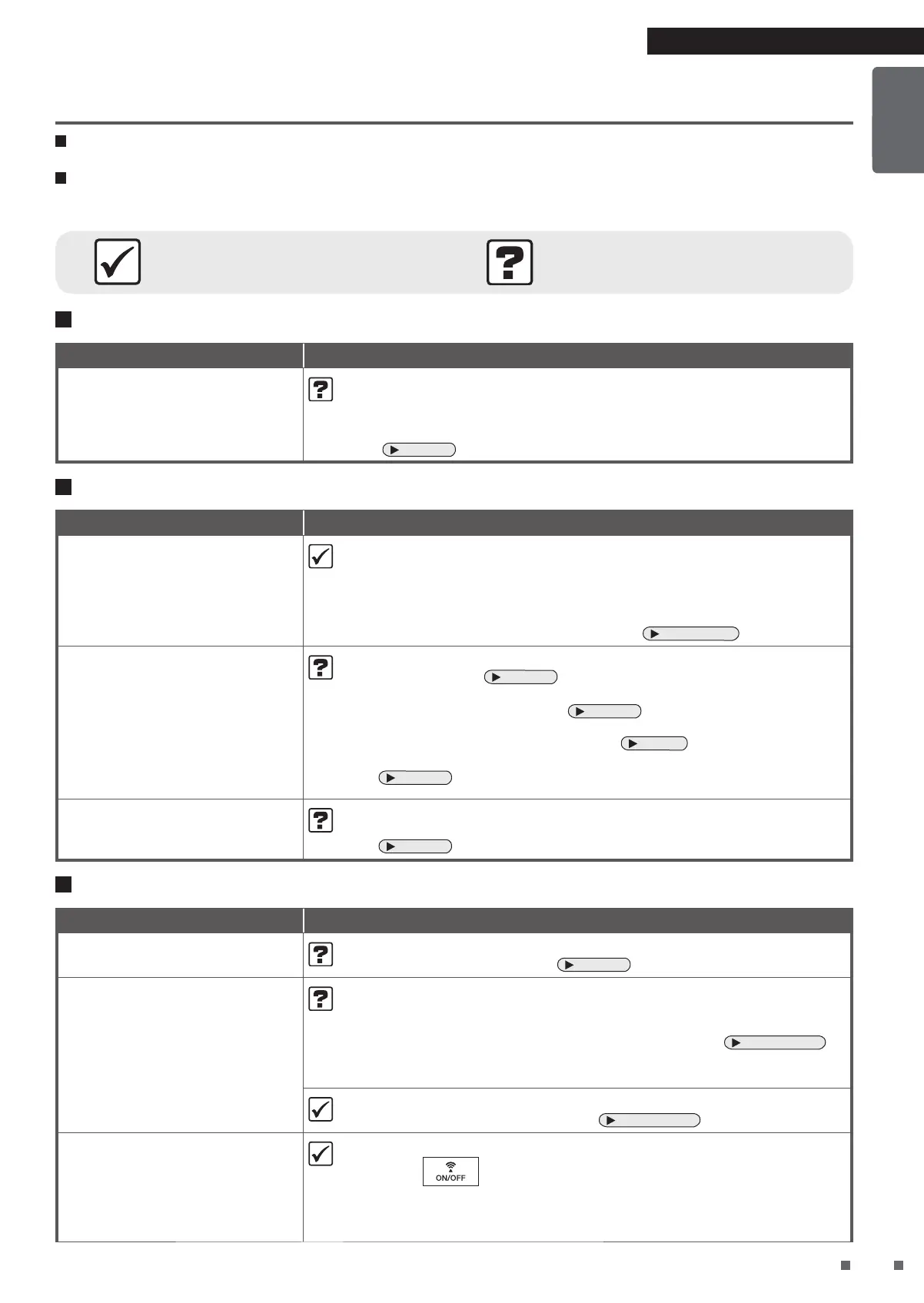
Unit does not respond
Phenomenon Check points
Unit will not operate • Is the Streamer unit cover attached?
If it is not attached, the safety switch will engage, and the unit cannot
operate.
¼
Install the Streamer unit cover properly and attempt operation again.
Page 30
Sounds can be heard
Phenomenon Check points
Hissing sound during
operation
• A hissing sound is generated when there is Streamer discharge during
Streamer operation.
Depending on usage, the sound may lessen or change to a crackling, whirring
or guzzling sound. However, this is normal.
If the sounds are an issue, try moving the unit to a different location.
• You can also set the Streamer output to Low.
Page 21, 22
Whistling and fluttering
sound during operation
• Is there a buildup of dust on the pre-filter?
¼
Clean this part.
Page 27
• Is the dust collection filter clogged up?
¼
Please perform maintenance.
Page 28
Depending on usage conditions, the dust collection filter may become
clogged up, shortening its service life.
Page 6
If the problem persists even after cleaning, replace the dust collection filter.
Page 29
Operating sound is loud
• Is the dust collection filter properly attached?
¼
If it is not properly attached, operating sounds may become louder.
Page 29
Indicator lamps
Phenomenon Check points
Odour sensor lamp blinks • Is the deodorising filter attached?
¼
Attach the deodorising filter.
Page 14
Communication lamp
remains red
• Is the router turned off?
¼
Please turn the router on.
• Are you using a different router from before?
¼
Perform connection settings again with the new router.
Page 16 - 17
• Is the router connected to a network?
¼
Check the network connection.
• The signal between the router and the unit may be weak.
¼
Move the router nearer to the unit.
Page 16 - 17
The Communication lamp
blinks red
• An electrical component may be malfunctioning.
¼
Press to turn off the Communication lamp, then turn it on again.
If the Communication lamp blinks again after about 3 minutes, an electrical
component is malfunctioning.
Contact the place of purchase.
Troubleshooting


 To Next Page