Advanced Settings
25
```
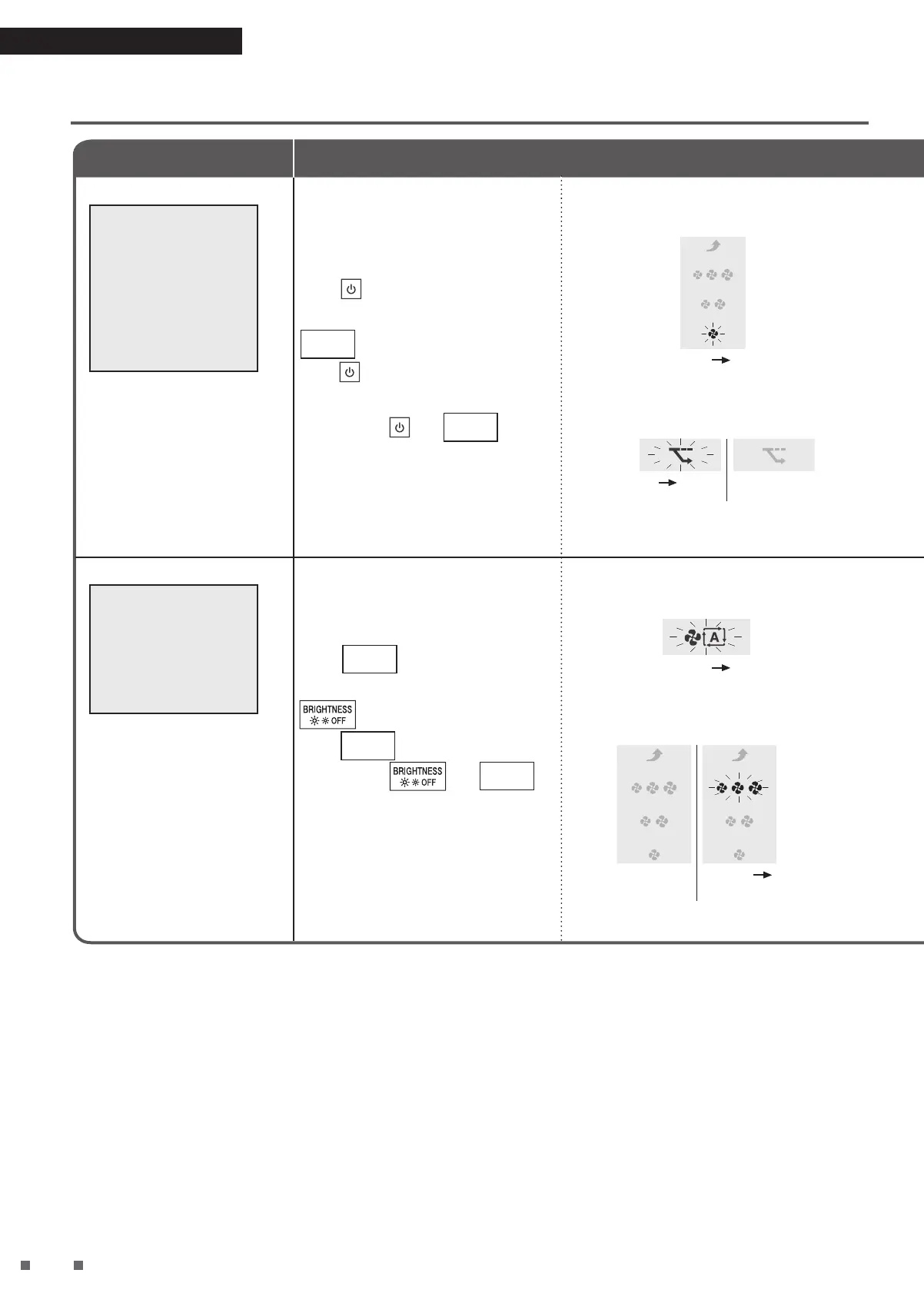
Monitoring mode
within AUTO
Operation and
ECONO MODE
(ON/OFF)
Setting at time of
purchase: ON
The sensitivity of the sensors
decrease while the fan is
stopped during Monitoring
mode.
If you do not want the
sensitivity of the sensors to
be decreased, set to OFF.
• When set to OFF, Monitoring
mode will not be performed.
Can be performed either during
operation or while operation is
stopped.
Press
for about 5 seconds and
when a short beep sounds, press
MODE
while continuing to hold
down .
Release both and
MODE
when a
short beep sounds.
The FAN lamp (Quiet) blinks, then lights up.
Blinking Lit up
According to the current setting, the ECONO
MODE lamp will be displayed as follows.
Blinking Lit up
ON
Unlit
OFF
Airflow rate range
for AUTO FAN MODE
(4 Levels/3 Levels)
Setting at time of
purchase: 4 Levels
If operating sound is a
concern during AUTO FAN
MODE, switch from 4 Levels
to 3 Levels.
• Airflow rate range
4 Levels: Quiet, Low,
Standard, High
3 Levels: Quiet, Low,
Standard
Can be performed either during
operation or while operation is
stopped.
Press
MODE
for about 5 seconds
and when a short beep sounds, press
while continuing to hold
down
MODE
.
Release both
and
MODE
when a short beep sounds.
AUTO FAN MODE lamp will light up after
blinking.
Blinking Lit up
FAN lamp (Standard) will display the current
setting.
Unlit
4 Levels
Blinking
Lit up
3 Levels
1Function
Changing the Setting


 To Next Page