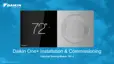
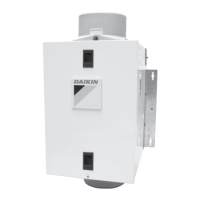
The Daikin One+ Smart Thermostat is a sophisticated device designed to provide intelligent control over your home's HVAC system, aiming for optimal comfort and energy efficiency. It integrates seamlessly with Daikin One home air monitors and other smart home ecosystems, offering a comprehensive solution for indoor climate management.
Function Description
The Daikin One+ Smart Thermostat serves as the central control unit for your heating, ventilation, and air conditioning system. Its primary function is to maintain desired indoor temperatures and air quality levels. It operates in various modes, including auto, cool, heat, and off, allowing users to select the most appropriate setting for their comfort needs. In "auto" mode, the thermostat intelligently switches between heating and cooling based on the set temperature and current conditions.
Beyond basic temperature control, the thermostat offers advanced air quality management when connected to a Daikin One home air monitor. It displays indoor air quality levels (AQI), outdoor air quality, and even local weather information (when connected to the internet). This holistic approach ensures not only thermal comfort but also a healthier indoor environment.
The device is designed to be user-friendly, featuring a clear digital display that shows the current temperature, system mode, and navigation icons. The physical interface includes a dial for adjusting set-points, providing a tactile and intuitive way to interact with the device.
Usage Features
The Daikin One+ Smart Thermostat offers a rich set of usage features, accessible both directly on the device and through a dedicated mobile app.
On-Device Interaction:
- Home Screen: Displays current temperature, system mode, and quick access icons to other main screens (Home, Adjust, Schedule, Away, Air Quality).
- Adjust Screen: Allows users to view current indoor temperature and easily modify heating and cooling set-points by dragging them on the screen or turning the physical dial.
- Schedule Screen: Shows upcoming set-point changes and scheduled times. Users can enter an edit mode to adjust their weekly schedule, creating different settings for various days and times.
- Away Screen: Displays energy-saving set-points, which can be activated manually or automatically when the mobile app detects that everyone is away from home.
- Air Quality Screen: Provides detailed information on indoor and outdoor air quality, including AQI levels, and local weather forecasts.
- Mode Switching: Users can easily switch between "auto," "cool," "heat," or "off" modes directly from the home screen by tapping the mode icons on the left side of the temperature display. Alternatively, mode selection is available through the settings menu under "system mode."
- Customized Settings: The thermostat allows for personalization through its settings menu. Users can adjust language, units (Fahrenheit/Celsius), display brightness, enable/disable sound for the analog dial, control the light bar, set screen saver preferences, and lock the device.
- Light Bar: An optional visual indicator that changes color to show whether the system is heating or cooling.
- Analog Dial Sound: Provides audible feedback when the physical dial is rotated.
- Screen Savers: Users can choose from a selection of screen savers to be displayed when the thermostat is inactive.
- Night Mode: When enabled, this feature automatically turns off the display and light bar during selected scheduled times, promoting better sleep and energy savings.
Mobile App Integration (Daikin One+ Home Mobile App):
The mobile app significantly enhances the thermostat's functionality, offering remote control and advanced management capabilities.
- Remote Control: Manage and monitor your thermostat from anywhere, allowing you to adjust settings, change modes, and view status remotely.
- Multi-Thermostat Management: Control multiple Daikin One+ smart thermostats in different zones or homes from a single app.
- Geo-fencing: This intelligent feature detects when you leave or approach your home, automatically adjusting the thermostat to energy-saving "away" settings or returning to your preferred comfort settings, thereby reducing energy costs.
- Alerts: Receive notifications and alerts, for example, when you are away from home and the system detects unusual activity or requires attention.
- Scheduling: Create and modify detailed schedules for your HVAC system through the app, offering a more convenient interface for complex programming.
- Schedule Templates: The app provides pre-defined schedule templates (e.g., "early to rise," "basic awake/sleep," "9 to 5 workweek") that users can select as a starting point and then customize to fit their lifestyle. This simplifies the initial setup of a schedule.
- Copy Schedules: Easily copy a day's schedule to other days of the week, streamlining the process of creating consistent weekly programs.
- Voice Control Capabilities: When connected to Amazon Alexa or Google Assistant devices, the thermostat can be controlled using voice commands, adding a layer of convenience to daily operation. The app guides users through the setup process for these integrations.
- WiFi Connectivity: The app facilitates the connection of the thermostat to your home WiFi network, which is essential for remote control, software updates, and integration with other smart home services. The process involves navigating through the thermostat's settings to find available networks and entering passwords.
- Pairing to App: A secure pairing process ensures that only authorized users can control the thermostat via the app. This involves generating a unique code on the thermostat and entering it into the mobile app.
Maintenance Features
The Daikin One+ Smart Thermostat is designed with minimal direct user maintenance in mind, focusing instead on automated processes and user-friendly diagnostics.
- Automatic Software Updates: When connected to WiFi, the thermostat automatically receives and installs software updates. This ensures that the device always has the latest features, performance enhancements, and security patches without requiring manual intervention from the user. These updates can improve energy efficiency algorithms, add new smart home integrations, or refine the user interface.
- Diagnostic Information: While not explicitly detailed as a "maintenance screen," the thermostat's ability to display air quality data and system status indirectly aids in maintenance. For instance, if the air quality monitor indicates consistently poor indoor air, it might prompt the user to check air filters or consider professional HVAC maintenance.
- Troubleshooting Support: Daikin provides dedicated customer support for any issues encountered during setup or operation. Users can contact Daikin support via a toll-free number, where they can receive assistance with WiFi connectivity, app pairing, or any other functional problems. This support system acts as a key maintenance feature, ensuring that users can resolve problems efficiently and keep their thermostat operating correctly.
- Screen Cleaning: The settings menu includes an option for "screen cleaning," which likely temporarily disables touch input to allow users to wipe down the screen without accidentally changing settings. This helps maintain the clarity and responsiveness of the display.
In essence, the Daikin One+ Smart Thermostat is a comprehensive climate control solution that combines intuitive on-device controls with powerful mobile app capabilities and smart home integrations. Its focus on user convenience, energy efficiency, and indoor air quality makes it a valuable addition to any modern home.

 Need help?
 General

 To Next Page