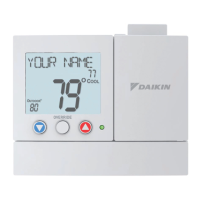
The Daikin Digital Thermostat (Models: TSTAT*1100-2, 2100-2, 1152-2, 2152-2, *2200C-2, *4271C, *4272C, *2111-2, *4272, *4273) is a 5+2 day programmable thermostat designed for residential use. This device allows users to control their heating and cooling systems with precision and offers various features for enhanced comfort and energy efficiency.
Function Description:
The primary function of this thermostat is to regulate the temperature in a residential space by controlling heating and air conditioning units. It offers both manual and programmed operation modes. In manual operation, users can set a desired temperature, and the system will maintain it until manually changed. In programmed operation, the thermostat follows a pre-set schedule for different times of the day and days of the week, automatically adjusting the temperature to optimize comfort and energy usage. The 5+2 day programming allows for distinct schedules for weekdays (Monday-Friday) and weekends (Saturday-Sunday).
Important Technical Specifications:
- Power Source: The thermostat operates on two Alkaline "AA" batteries. If connected to a 24V power source, batteries are still recommended for backup but not strictly required for operation.
- Temperature Display: The display shows the current room temperature and the desired set temperature.
- Temperature Units: The thermostat can display temperature in either degrees Celsius or Fahrenheit, selectable in the Advanced Setup.
- Deadband Adjustment: Users can adjust the temperature deadband from 1 to 6 degrees, which refers to the temperature differential between when the heating/cooling system turns on and off.
- Cycles Per Hour (CPH): The CPH setting monitors and limits the number of times per hour the HVAC unit energizes (adjustable from 2 to 6 cycles per hour). A "d" setting indicates no limit (for zoning applications), and "d1" indicates no compressor lockout.
- Filter Run Time Counter: The thermostat includes a filter run time counter that tracks blower operation hours (adjustable from 0 to 1950 hours). A "FILTER" icon appears on the display when the set hours are reached, indicating that the filter should be serviced. A setting of 0 disables this feature.
- Backlight Operation: The backlight can be configured to turn on for a specified duration (2, 4, 6, or 8 seconds) when a button is pressed, or to be always off, or always on (if system powered).
Usage Features:
- Program Switch: This three-position switch (RUN, OFF, SET) is central to operating the thermostat.
- RUN: Executes the programmed time period schedule.
- OFF: Disables programmed operation, making the thermostat function as a manual heat or cool only device.
- SET: Used for setting the clock, day, and programming time periods.
- Mode Switch: Allows selection between "Cool," "Off," or "Heat" modes for the HVAC system.
- Fan Switch: Offers "On" (continuous fan operation) and "Auto" (fan runs only with heating or cooling demand) settings.
- Cooler & Warmer Buttons: Used to adjust the desired set temperature, set the clock time, and modify programming values. Holding these buttons down can slew the time or temperature more rapidly.
- NEXT Button: Essential for navigating through programming and advanced setup screens, advancing from one step to the next. Holding it for 5 seconds (when the clock is flashing in SET mode) enters Advanced Setup.
- RESET FILTER Button: Press and hold to clear the "FILTER" icon from the display and reset the filter run time counter to 0.
- Bi-Color LED: A visual indicator of system demand: Red for Heat, Green for Cool.
- Time Period Indicators: Displayed as "Morning," "Day," "Evening," and "Night" to show the active program segment.
- Temporary Override: When in programmed operation, the desired set temperature can be temporarily overridden. The thermostat will revert to the programmed settings in the subsequent time period.
- Advanced Setup: Provides access to installer-level settings such as deadband, cycles per hour, backlight operation, and temperature units (C/F). This is typically configured during initial installation.
- Factory Defaults: A feature to reset all stored settings, including time period and advanced programming, back to their original factory settings. This is accessed through the Advanced Setup menu.
Maintenance Features:
- Battery Replacement: The thermostat uses two "AA" alkaline batteries, which should be replaced at least once every 12 months. A "Low Battery" icon (Fig. 1) appears on the display when replacement is needed. Immediate replacement is crucial to prevent improper operation, especially in locations prone to freezing temperatures where exhausted batteries could prevent the heating system from turning on. The battery door is located on the bottom front of the thermostat for easy access.
- Filter Service Reminder: The "FILTER" icon serves as a reminder to service or replace the HVAC system's filter, based on the accumulated blower run time. This helps ensure optimal system performance and air quality.
- Calibration: While not typically required, the temperature sensor can be calibrated by a trained HVAC technician if necessary, accessible through the Advanced Setup menu.
The Daikin Digital Thermostat is designed for user-friendly operation with clear display indicators and intuitive button controls, making it an effective tool for managing home climate.

 Need help?
 General

 To Next Page