Need help?
Do you have a question about the Daikin TSTATD2152-2 and is the answer not in the manual?
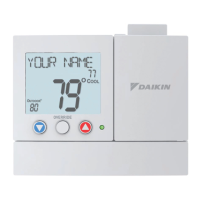
The Daikin Digital Thermostat is a programmable heat pump thermostat designed for residential use, offering 5+2 day programming capabilities. This device allows users to control their heating and cooling systems with precision and efficiency, providing both manual and programmed operation modes.
The primary function of the Daikin Digital Thermostat is to regulate the temperature within a residential space by controlling a heat pump system. It supports both heating and cooling operations, as well as auxiliary heat functions. The thermostat features a clear digital display that shows the current time, day of the week, desired set temperature, and current room temperature. It also indicates the active time period (Morning, Day, Evening, Night) when operating in programmed mode.
The thermostat is equipped with a PROGRAM SWITCH that allows users to select between three modes: RUN (for programmed operation), OFF (for manual operation without a program), and SET (for programming time periods and advanced settings). A MODE SWITCH enables selection between Cool, Off, or Heat modes, determining whether the system will cool, remain off, or heat the space.
An AUX HEAT SWITCH provides control over auxiliary heating. The "Emergency" setting disables compressor functions and energizes only auxiliary heat. "Normal" allows auxiliary heat to run alongside the heat pump if needed. "Lockout" prevents auxiliary heat from turning on regardless of demand.
The FAN SWITCH offers "On" or "Auto" options. In "Auto" mode, the fan runs only when there is a demand for heating or cooling. In "On" mode, the fan operates continuously.
The Daikin Digital Thermostat offers a user-friendly interface with several buttons for easy operation. The COOLER and WARMER buttons are used to adjust the desired set temperature in manual mode and to modify settings during programming. The NEXT button is crucial for navigating through programming and advanced setup screens, advancing from one step to the next.
For manual operation, users simply select the desired mode (Cool or Heat) with the Mode Switch, set the fan to Auto or On, and adjust the temperature using the Cooler and Warmer buttons. In this mode, the thermostat will maintain the manually set temperature.
For programmed operation, users select the desired mode (Cool or Heat) and then set the Program Switch to RUN. The thermostat will then follow the pre-set time period programs. The device comes preprogrammed from the factory for 1 or 2-stage equipment, but users can customize the 5+2 day program to fit their schedule.
Time period programming involves setting specific start times and desired cool and heat setpoints for four daily periods: Morning, Day, Evening, and Night. This can be done for weekdays (Monday-Friday) and weekends (Saturday-Sunday) independently. The process involves sliding the Program Switch to SET, using the Cooler and Warmer buttons to adjust blinking icons (time, day, setpoints), and pressing NEXT to advance through the settings.
A temporary override feature allows users to adjust the desired set temperature during programmed operation. The thermostat will revert to the programmed settings at the start of the next time period.
Advanced Setup features allow for further customization, typically performed during initial installation. These settings include adjusting the deadband (temperature differential before the system activates), cycles per hour (limiting how often the HVAC unit energizes), backlight operation (off, 2/4/6/8 seconds, or always on), and temperature display units (Celsius or Fahrenheit). Accessing advanced setup requires sliding the Program Switch to SET and holding the NEXT button for 5 seconds when the clock is flashing.
The Cycles Per Hour (CPH) setting helps monitor and limit the number of times the HVAC unit energizes per hour, promoting system longevity. For example, a setting of 6 CPH means the unit will energize once every 10 minutes. This limit can be temporarily overridden by pressing the WARMER or COOLER buttons.
Two-stage operation is supported, where the second stage of heat (auxiliary heat) activates when the room temperature falls below the setpoint by a certain differential, taking into account both the first and second stage deadbands.
The thermostat also includes a factory defaults reset function. If users wish to return all stored settings to their original factory configuration, they can do so through the advanced setup menu. This action will permanently erase all custom time period and advanced programming.
Calibration of the temperature sensor is also possible, though typically not necessary. If required, it should be performed by a trained HVAC technician through the advanced setup menu.
The Daikin Digital Thermostat is powered by two Alkaline "AA" batteries, which should be replaced at least once every 12 months to ensure proper operation. A low battery icon will appear on the display when replacement is needed. Although the thermostat can be connected to 24V power, batteries are still recommended to maintain clock operation during power interruptions. Immediate battery replacement is crucial when the low battery icon appears, as the manufacturer is not liable for improper operation due to exhausted batteries, especially in locations prone to freezing temperatures where heating system failure could be critical.
The battery compartment is conveniently located on the bottom front of the thermostat, accessible by pulling out and swinging down the battery door.
The thermostat also features a "RESET FILTER" icon, which indicates when the air filter should be serviced. This icon appears after a user-adjustable number of blower operation hours (0 to 1950 hours). Users can press and hold the RESET FILTER button to clear the icon and reset the filter counter to zero. The number of hours before the icon appears can be adjusted in the advanced setup. This filter counter tracks blower run time in heating, cooling, or standalone fan operation.
 General
| Programmability | 7-Day Programmable |
|---|---|
| Programmable | Yes |
| Wi-Fi Capable | Yes |
| Product Type | Thermostat |
| Power Source | 24VAC |
| Connectivity | Wi-Fi |
| Stages | 2 Heat / 2 Cool |


 To Next Page