EasyManua.ls Logo

Daikin RYS50B2VMB - Removal of PCBs; Electrical Box; Panel and Wire Disconnections

Daikin RYS50B2VMB
28 pages
Print Icon
To Next Page IconTo Next Page
To Previous Page IconTo Previous Page
Loading...
Removal of PCBs / Electrical Box Si00-876
10 Removal Procedure
3. Removal of PCBs / Electrical Box
Procedure Warning Be sure to wait for 10 minutes or more after turning off all power
supplies before disassembling work.
Step Procedure Points
1. Remove the right side
panel.
Preparation
Remove the top panel and
the front panel according to
the “Removal of Outer
Panels”.
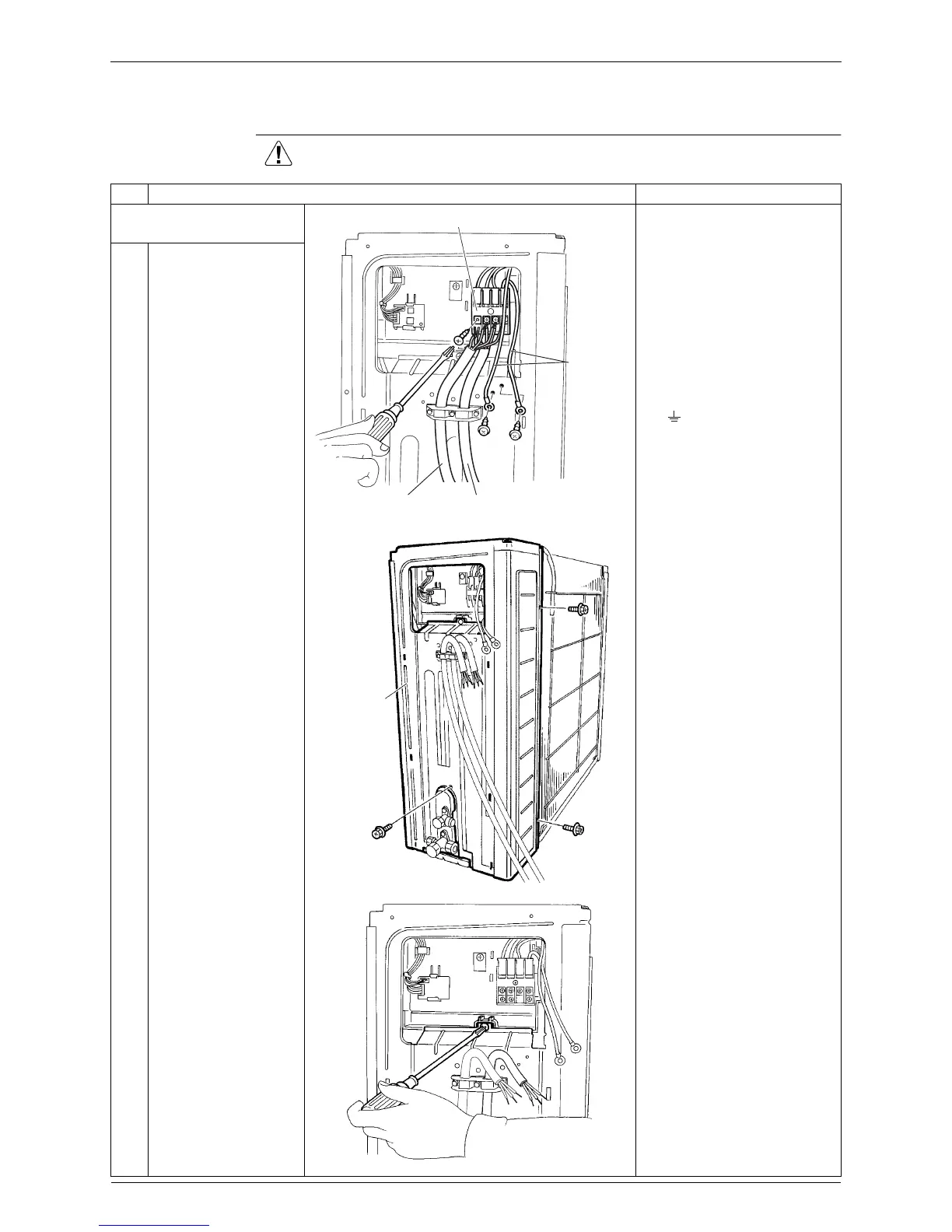
Colors of the connection
wires are as follows.
(1) black
(2) white
(3) red
( ) yellow / green
1
2
Remove the 4 screws
and disconnect the
connection wire and the
power supply wire.
Remove the 2 screws
and detach the earth
wires.
3
Remove the 3 screws
of the right side panel.
4
Remove the screw of
the electrical box.
(R16505)
Terminal board
Earth wire
Connection
wire
Power supply
wire
(R16506)
Right side
panel
(R16507)

Related product manuals