EasyManua.ls Logo

Daikin RYS50B2VMB - PCB Removal

Daikin RYS50B2VMB
28 pages
Print Icon
To Next Page IconTo Next Page
To Previous Page IconTo Previous Page
Loading...
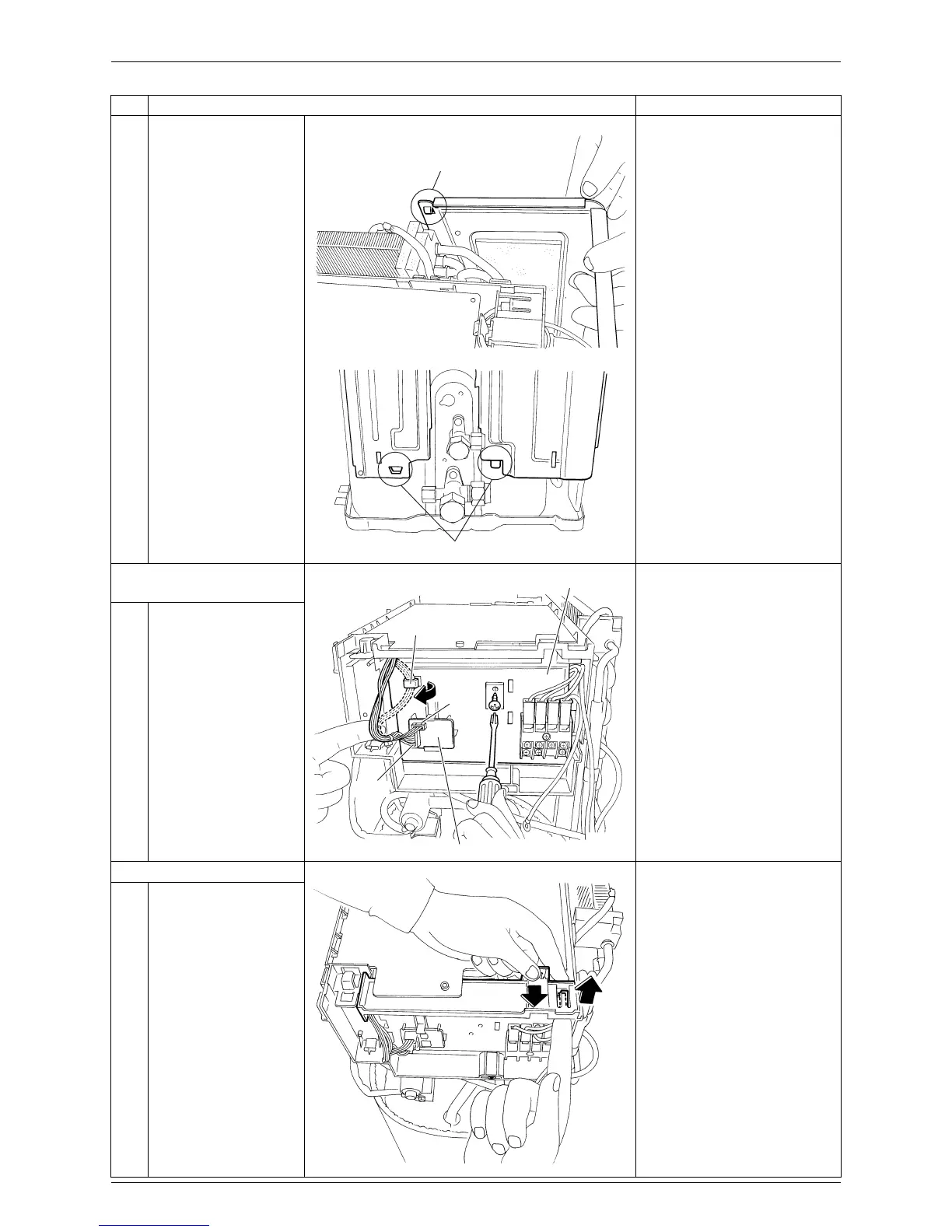
Si00-876 Removal of PCBs / Electrical Box
Removal Procedure 11
5
Unfasten the hooks and
remove the right side
panel.
When reassembling, insert
the upper hook and the 2
lower hooks back into place.
2. Remove the service
monitor PCB.
1
Release the harness
from the hook.
2
Disconnect the
connectors [S52]
[S102] from the service
monitor PCB.
3
Remove the service
monitor PCB.
4
Remove the screw of
the terminal board.
3. Remove the main PCB.
1
Unfasten the hook to
release the terminal
board.
Open the terminal
board.
Step Procedure Points
(
R7028
)
Hook
(R7026)
Hook
(R17064)
Terminal board
Hook
[S52]
Service monitor PCB
[S102]
(R2705)

Related product manuals