SiBE18-821_C Test Operation
Test Operation and Field Settings 135
BRC1E51A7
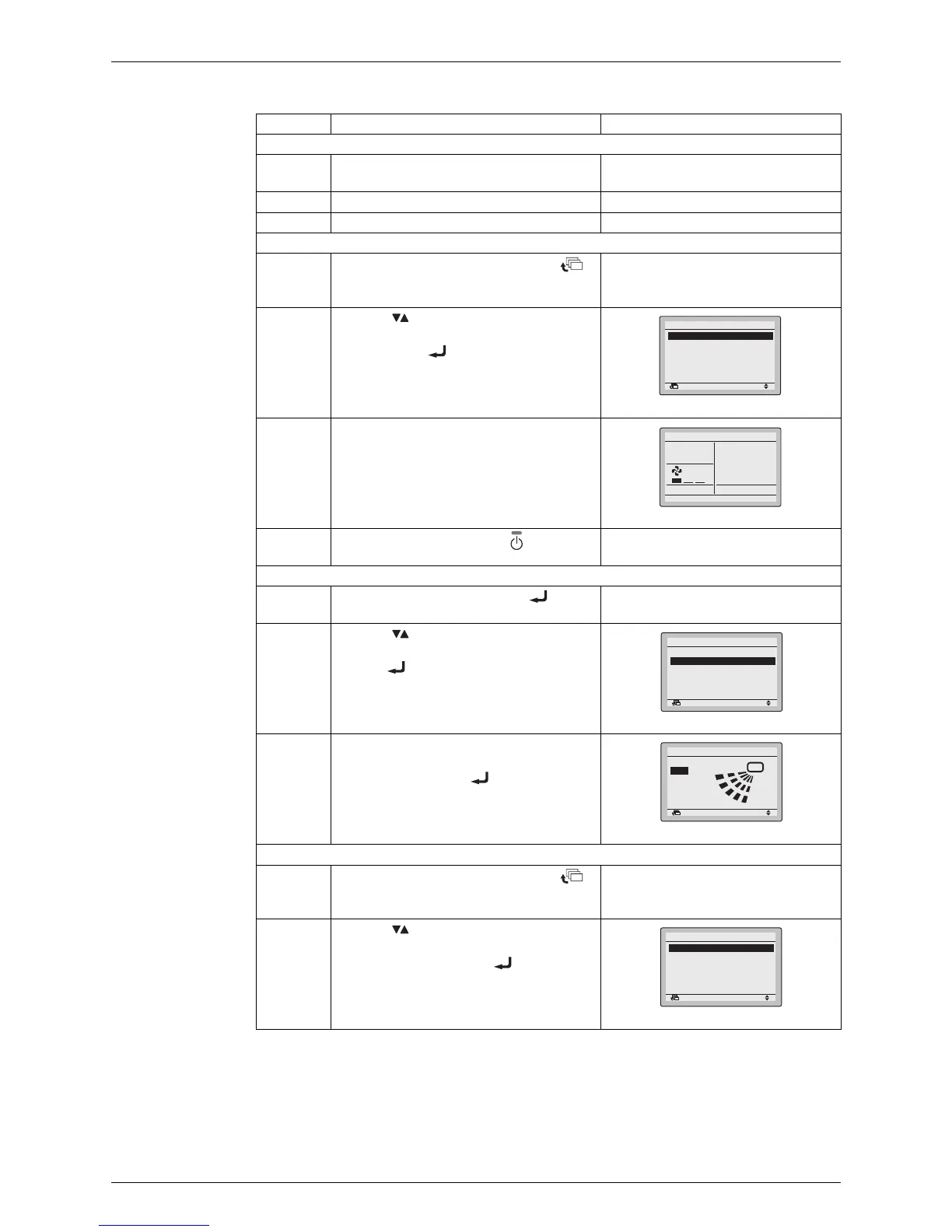
Step Action Remote controller
Before test operation
1 Turn on the power supply more than 6
hours before test operation.
2 Open the gas stop valve.
3 Open the liquid stop valve.
How to activate test operation
4 Press and hold the [Cancel] button ( )
for 4 seconds to enter the Field setting
menu.
5 Use the buttons to select Test
operation ON/OFF and push the [Menu/
Enter] button ( ).
6 Test operation is displayed on the bottom
of the basic screen.
7 Push the [ON/OFF] button ( ) within 10
seconds to start the test operation.
How to check airflow direction
8 Push the [Menu/Enter] button ( ) to
enter the Main Menu.
9 Use the buttons to select Airflow
direction and push the [Menu/Enter]
button ( ).
10 Check that the airflow direction is actuated
according to the setting and push the
[Menu/Enter] button ( ).
How to deactivate test operation
11 Press and hold the [Cancel] button ( )
for 4 seconds to enter the Field setting
menu.
12 Use the buttons to select Test
operation ON/OFF in the menu and push
the [Menu/Enter] button ( ).
(R12872)
Test operation ON/OFF
Register Service Contract
Field setting list
Group No. setting
Indoor unit Airnet No. set
Outdoor unit Airnet No. set
1/2
Return Setting
Field setting
(R12873)
Test Operation
Cool
(R12874)
Set temp mode changeover
Airflow Direction
Quick Cool/Heat On/Off
Ventilation
Timer setting
Service Contact/Model Info
MainMenu
1/2
Return Setting
(R12875)
Return Setting
Airflow Direction
Swing
(R12876)
Test operation ON/OFF
Register Service Contract
Field setting list
Group No. setting
Indoor unit Airnet No. set
Outdoor unit Airnet No. set
Return Setting
Field setting
1/2






 To Next Page