SiBE18-821_C SA Indoor Unit - FFQ, FCQ, FDBQ, FBQ, FHQ Series
Operation Manual 305
48 English
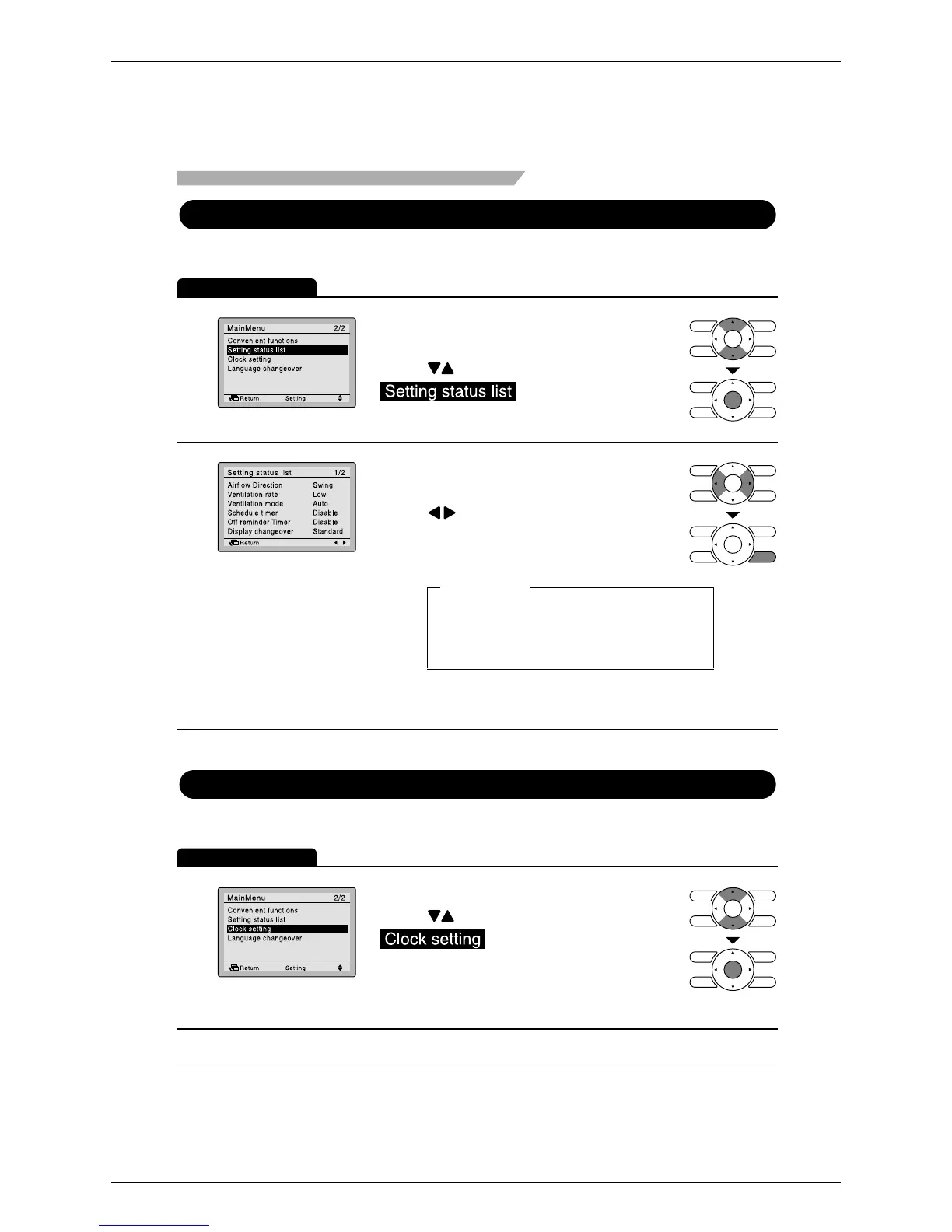
Setting Status List
Manipulating the setting status list
Operation Method
1
•
2
Display items
Clock Setting
Setting the clock
Operation Method
1
Display the main menu screen. (See page 26.)
•
•
Menu Manipulation
Press buttons to select
on the main menu
screen and press Menu/Enter button.
Airflow direction
Ventilation rate
Ventilation mode
Schedule timer
* Display items may differ depending on the model.
Only the items that can be set are displayed.
Off reminder timer
Quick Cool/Heat
Display changeover
Desired disp select
Press buttons to select
on the main menu
screen.
Press Menu/Enter button to display the
clock settings screen.
•
A list showing the current setting status
will appear.
Press buttons to go to the next item.
•
Pressing Cancel button takes you back
to the main menu screen.
• Display the main menu screen.
(See page 26.)






 To Next Page