SiBE18-821_C SA Indoor Unit - FFQ, FCQ, FDBQ, FBQ, FHQ Series
Operation Manual 297
40 English
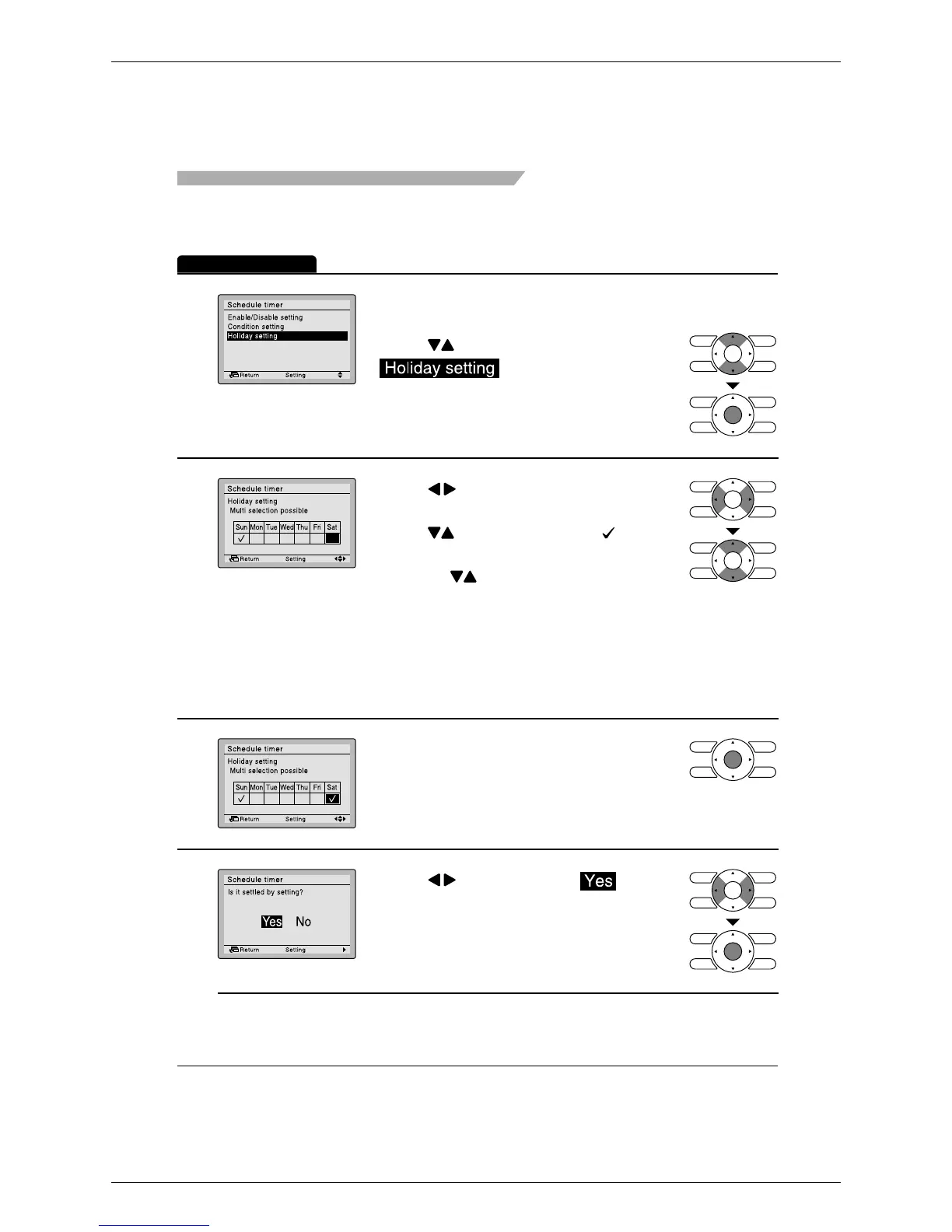
Holiday setting
(The schedule timer will be disabled for days that have been set as holiday.)
Operation Method
1
2
3
•
4
•
Menu Manipulation
To complete the holiday settings, press
Menu/Enter button.
The settings confirmation screen will
appear.
•
Bring up the schedule timer settings
screen.
(See page 35.)
•
Press buttons to select
on the schedule timer
settings screen.
Press Menu/Enter button to display the
holiday settings screen.
•
Press buttons to select the desired
day.
Press buttons to display “ ” to
make the holiday settings.
Pressing buttons switches the
setting between set and release.
Multiple days can be selected as
holidays.
Note: To able the schedule timer for the day
selected as a holiday, the holiday setting
must be released.
Press button to select on the
settings confirmation screen.
Pressing Menu/Enter button enters the
holiday settings and takes you back to
the schedule timer settings screen.






 To Next Page