• Press [New customer] to record data for a new customer with registration of customer information.
Proceeding to [Customer data input] screen. Please proceed to (3)
• To use existing customer information, please select desired customer and press [Select customer]
button to proceed [Network map selection] screen. Please proceed to (4)
• To use edit and use existing customer information, please select desired customer and press [Edit cust.
Data] button to proceed to [Edit cust. Data] screen. Please proceed to (3)
• In case of recording only without customer information management, please press [Record only]
button. Please proceed to (5)
(Note)
1. In case of [Record only], operation data will be overwritten every time. Please be aware.
2. In case of [Record only], VRV system will stand by every time. So it is recommended to enter customer
information to avoid unnecessary system stand-by.
• To delete existing customer, please press [Delete customer] button
• To return to main menu, please press [Back] button in the bottom left corner.
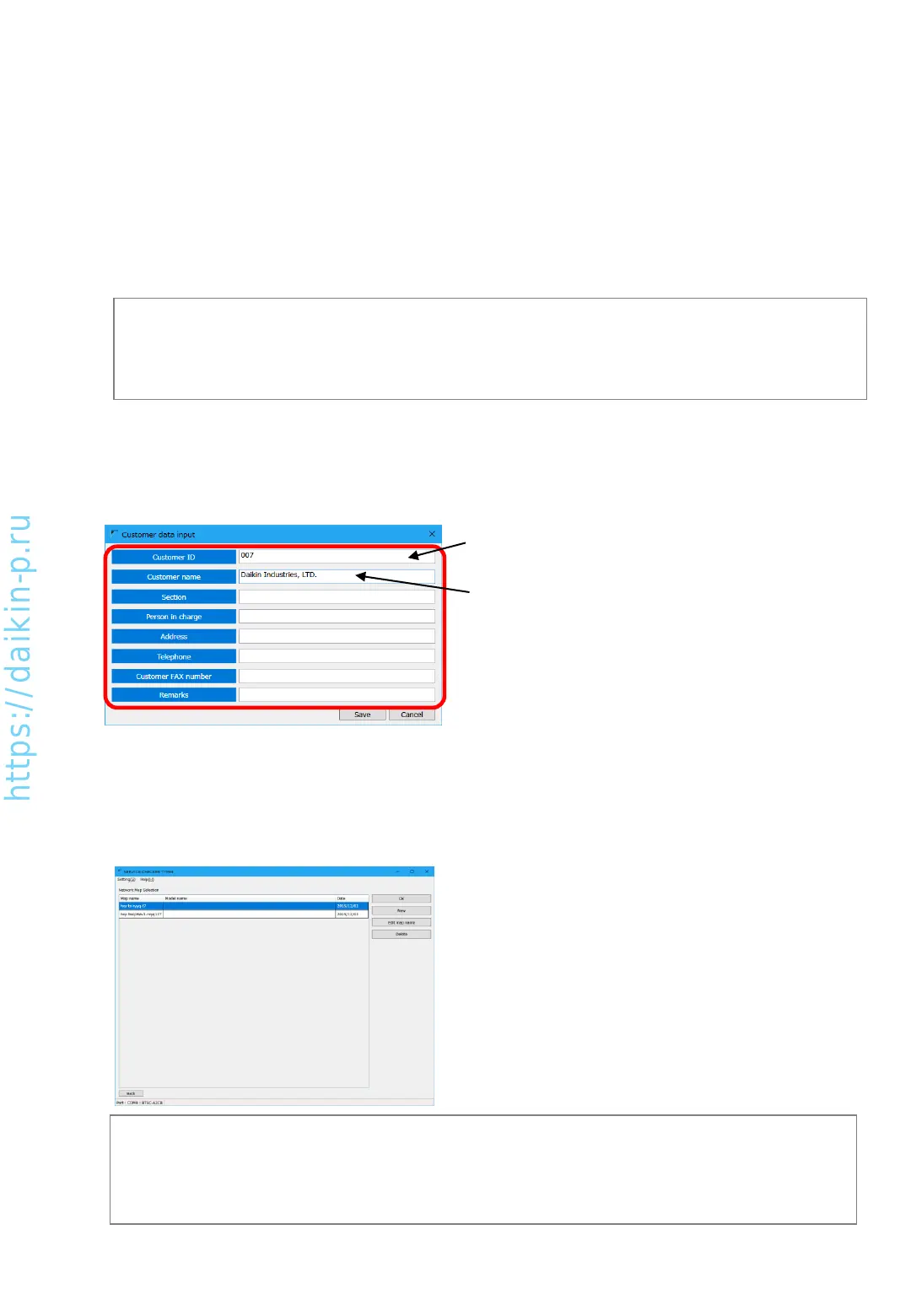
(3) [Customer data input] screen. Please enter customer information.
• [Customer ID] is mandatory field
• [Customer name] is used in [Operation data
selection] screen, so please use clear name.
• For the other items, please enter in case of
necessity.
After entry of all information, please press [Save] button. By pressing [Select customer] button,
you can go to [Network map selection] screen. If you need to return without saving, please press
[Cancel] button.
(4) [Network map selection] screen
(Note)
1. It is possible to manage multiple network map info under one customer name.
2. One D3-NET line is managed as one network map, but it is necessary to mange D3-NET line which is
split by DTA109 as different network map.
Select desired network map (D3-NET line name).
Select [New] or {OK] to use selected existing map.
AS0112-P-DENV
20


 To Next Page