5-3 Centralized operation
Checker software has centralized operation function.
It is possible to do centralized operation from checker software instead of centralized controller.
To execute centralized operation, centralized group number needs to be set to desired indoor units
beforehand.
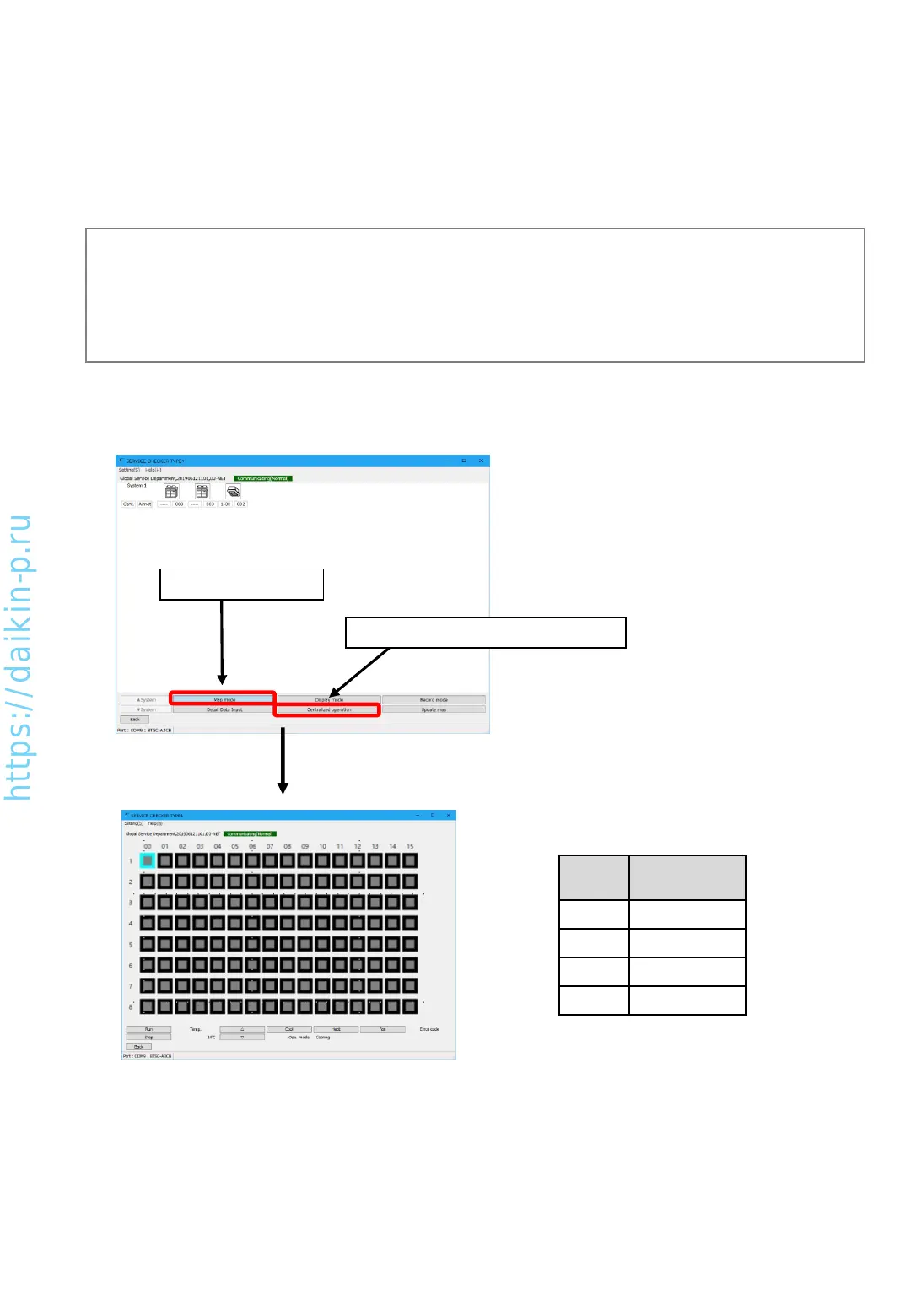
In [Network map display] screen, press [Centralized operation] button in [Map mode], [Centralized
operation] screen will appear.
2. Press [Centralized operation] button
1. [Map mode] button
[Centralized operation] screen
• In this screen, indoor unit which can be controlled centrally are listed as icon in the order of
centralized group number.
• Icon color will change based on the status
Color Status
Red Error
Violet Comm. Error
Green Running
Gray Stop
(Note)
If the centralized group number is not set yet, it is necessary to set them.
Connect TYPE4 checker box to D3-NET line and setup customer information from checker software, please
show [Network map display] screen. With this condition, centralized operation will be possible if you set
necessary centralized group number by indoor unit remote controller.
AS0112-P-DENV
34


 To Next Page