7-2 Customer information
[Procedure]
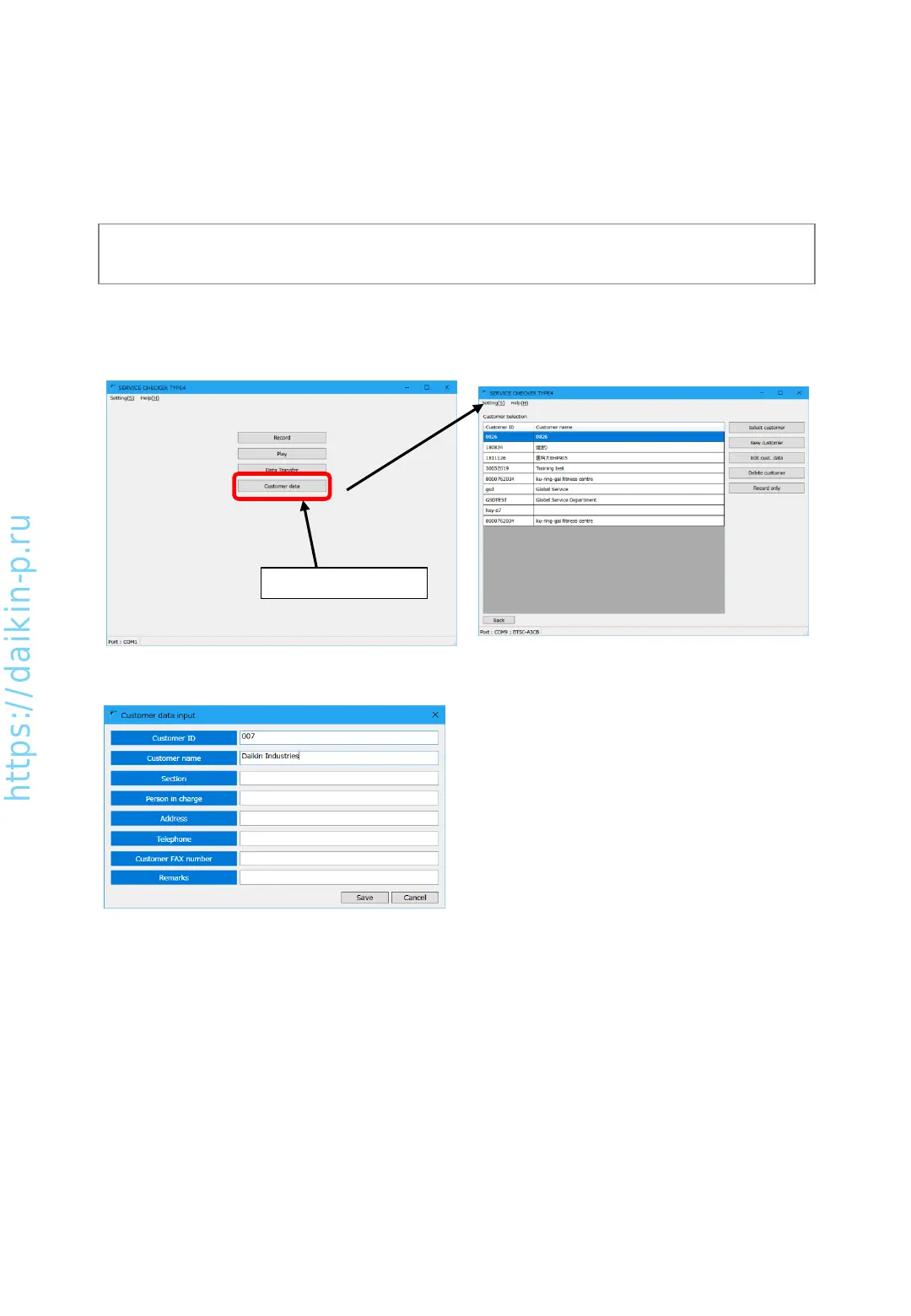
(1) In main menu, press [Customer data] button to proceed to [Customer selection] screen.
Press [Customer data]
(2) To create a new customer, press [New customer] button to proceed to below screen.
• To edit existing customer information, select
desired customer and press [Edit cust. Data]
button.
• To remove existing customer information,
press [Delete customer] button
(3) [Customer ID] is used for distinguishing customer, please enter in alphanumerical characters.
(4) [Customer name] is displayed in [Operation data selection] screen etc. It is highly recommended to enter.
(5) Other items are entered based on their necessities (they are not mandatory fields).
(6) After finishing entry, press [Save] button. Return without saving, press [Cancel] button.
(Note)
Other than [Customer data] menu, customer information can be entered from [Record] menu.
Checker software manages operation data by customer basis. Therefore customer ID is mandatory
field to enter in customer information. If the operation data is recorded from [Record only] without
managing data by customer information, every time VRV unit will be D3-NET initialization status and
thermostat-OFF condition. So customer information management is highly recommended.
AS0112-P-DENV
45


 To Next Page