5.2 Setting the speech synthesis system sound level
1 = low level
4 = average level (factory)
8 = high level
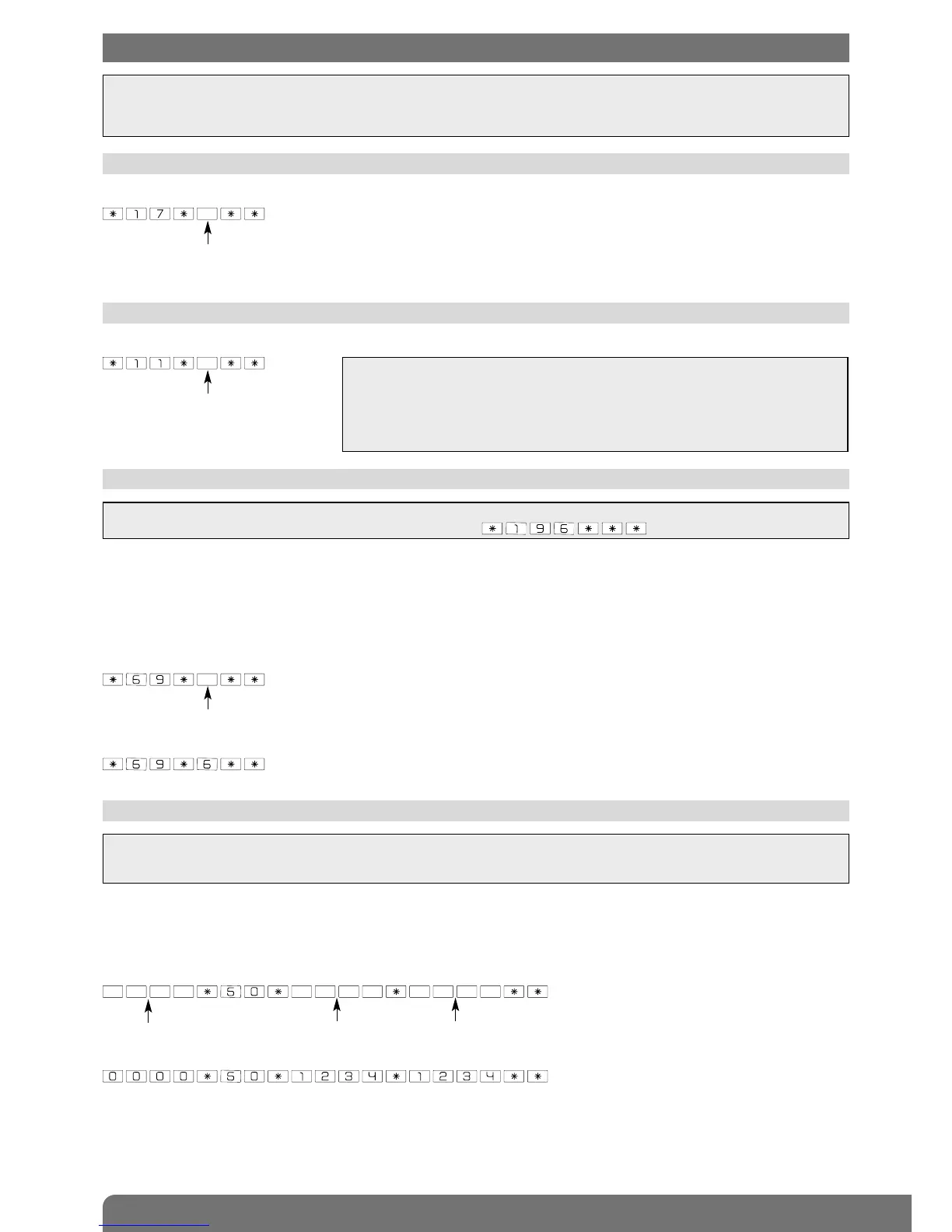
To set the speech synthesis system sound level, enter:
IMPORTANT
• Before setting any parameters, the keypad must first be in installation mode (see chapter 3. Changing the operating mode).
• A long beep is issued and the LED lights up green for 2 s to indicate correct programming. If an error is made, the red LED
flashes 3 times and the keypad issues 3 short beeps.
5. Parameter-setting
IMPORTANT: the number of access code digits can only be modified when all the access codes correspond to the factory
values. To do this, put the keypad in installation mode and enter: .
IMPORTANT
• This setting does not affect the sound level of the standard beep issued each time a
keypad key is pressed.
However, it does affect the sound level of the short beep, long beep and 3 error
beeps issued during programming.
• Below -5°C, the sound level automatically switches to low.
5.3 Number of access code digits
Before modifying the keypad access codes, the number of access code digits must be determined (4 digits in the factory
code).
If you extend the number of digits this will apply to all the following:
• the master code,
• the installer code,
• the 8 user codes.
To modify the number of digits, enter:
Example: to extend the access codes to 6 digits, enter:
number of digits (4 to 6)
IMPORTANT
• Forbidden access codes: 0000, 1111, 2222, 3333.
• The master code can be modified in the three operating modes: installation mode, test mode or user mode.
5.4 Modifying the master code
The master code is for use by the main user and enables:
• use of all keypad functions (all commands),
• access to TEST mode and USER mode,
• control (authorisation or non-authorisation) of User codes.
To ensure system confidentiality, the master code must be changed. To do this, enter:
Example: to replace the factory master code “0000” with the new code “1234”, enter:
old code
new code new code
0: French (factory)
1: Italian
2: German
3: Spanish
4: Dutch
5: English


 To Next Page