Scoreboard Troubleshooting 27
5.4 Replacing Digits
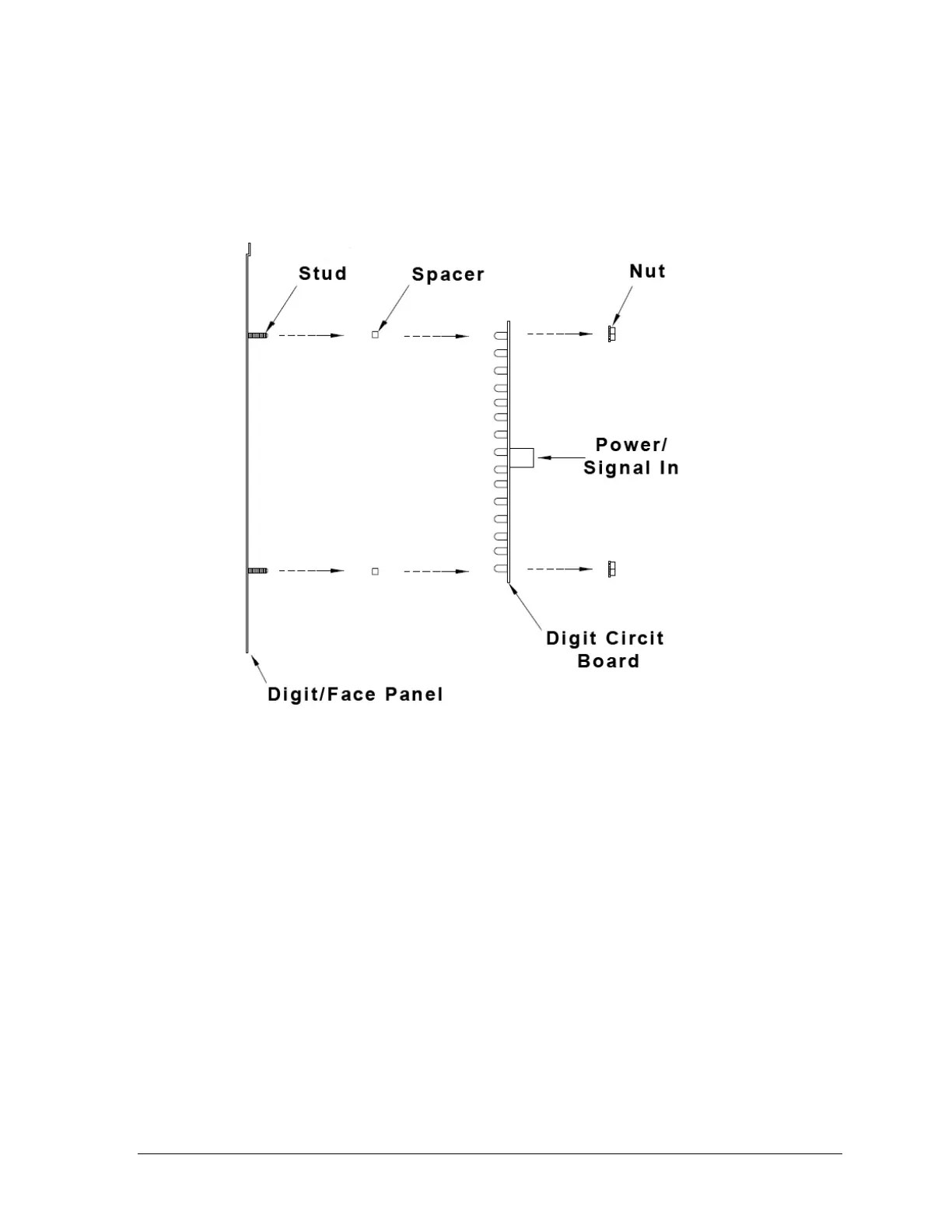
LEDs are embedded in a circuit board that is mounted to the back of the digit panel, as
shown in Figure 19. Do not attempt to remove individual LEDs. In the case of a
malfunctioning LED or digit segment, replace the entire digit circuit board.
To replace a digit circuit board:
1. Open the digit panel as described in Section 5.3.
2. Disconnect the power/signal plug from the back of the digit by squeezing together
the locking tabs and pulling the connector free.
3. Use a
9
/
32
" nut driver to remove the nuts securing the digits to the inside of the panel,
and then lift the digit off the standoff studs.
4. Position a new digit over the studs, making sure the rubber side of the rubber-backed
spacer is facing the digit circuit board.
5. Tighten the nuts.
6. Reconnect the power/signal connector.
Note: This is a keyed connector and it will attach in one way only. Do not attempt to
force the connection.
7. Close and secure the digit panel, then power up and test the scoreboard to see if
changing the digit has resolved the problem.
Figure 19: Digit Assembly



 To Next Page