32 Scoreboard Troubleshooting
Replacing a Power Supply
To remove a 150 W power supply:
1. Use the component location drawings listed in Appendix A to locate the enclosure.
2. Open an access panel as described in Section 5.3.
3. Loosen the wing nuts to remove metal cover from the enclosure.
4. Locate the power supply (Figure 22) and disconnect all wires connected to it.
5. Use a 9/32" nut driver to remove the hardware securing the power supply.
6. Fasten the new power supply in place and reconnect all wires.
To remove a 1000 W power supply:
1. Open an access panel as described in Section 5.3.
2. Loosen the wing nuts to remove metal cover from the enclosure.
3. Remove the mounting plate secured to the enclosure, remove the circuit board
attached to the power supply, and detach the power supply from the mounting plate.
4. Attach the circuit board to the new power supply and secure both to the mounting plate.
Note: If replacing the 1000 W power supply (Daktronics part # A-1856R) does not
seem to resolve the problem, try replacing its circuit board (part # 0P-1337-2000).
This circuit board also contains individual fuses for each output jack. If a single digit
doesn‟t work, a fuse may be blown. Replace the fuse(s) as needed with part # F-1058.
5.9 Radio Connections
To determine the settings for radio
connections between the scoreboard
and control console:
1. Power off any radio-equipped
consoles in the area.
2. Cycle power to the scoreboard,
and watch for the radio
settings. These settings appear
in different locations based on the scoreboard layout:
If there is no clock, the settings should appear in
the Home and Guest digits, but this may vary by
scoreboard model.
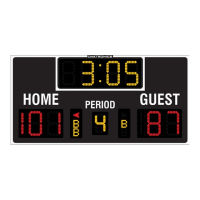
If there is a clock, the settings appear in the clock
digits (Figure 25).
Scoreboards capable of displaying speed of pitch
may also have separate radio settings for the
second All Sport console controlling those digits
(Figure 26).
The first values are the broadcast settings (“b1”), and the second are the channel settings
(“C1”). These values must match the settings within the console. The speed of pitch
controller must be set to a different channel than the main scoreboard controller.
Note: If these settings do not appear, the receiver(s) may need to be
repaired/replaced.
To make sure the current radio settings match the receiver in the scoreboard, refer to the
appropriate control console manual (see Section 1.4).
Figure 25: Radio Settings (Clock)
Broadcast # Channel #
Figure 26: Radio Settings (SOP)



 To Next Page