System Setup & Operations
9
Enable Practice Mode
Practice Mode changes the delay time between consecutive starts to three seconds
between beeps compared to the default delay time of eighteen seconds. Cycling the
power on the horn start will deactivate Practice Mode.
When in Practice Mode, the strobe will not ash until after ten seconds have elapsed
between strobes. Also, the Smart Start feature is disabled while in Practice Mode.
It is NOT recommended that Practice Mode be used for timed competitions�
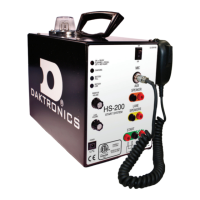
1� Plug the handheld microphone directly into the MIC jack on the HS-200.
2� Turn the power switch on and immediately press and hold both the PUSH TO TALK and
top buttons.
3� The horn start speaker will sound off a Start tone. The HS-200 horn start is now in
Practice Mode.
4� Cycling the power switch of the HS-200 to will set the horn start back to normal.
Equipment Storage
The HS-200 unit and speakers should be stored in a cool, dry place, away from the pool
environment. Coil and store all cables away from the pool.
The charging circuit is designed so the battery can be charged for extended periods;
however, it is not required that the HS-200 horn start be connected to the wall outlet
during the off-season. Before storage, plug the HS-200 horn start into the wall outlet for
24 hours to fully charge the battery. Allow 24 hours of recharge time after the HS-200
horn start has been taken out of storage as well. It is important to ensure the horn start’s
battery is not drained.
Using the Horn Start
Before Each Session
Follow these basic steps when preparing for a meet:
1� Connect the fully-charged equipment.
2� Verify that all speakers are working.
3� Test the microphone and set volume levels.
4� Test the start signal to the timing system.
5� Verify the strobe light ashes for a start.
6� Verify the HS-200 Horn Start is set to start tone. Refer to Horn Start Settings (p�7).
7� Verify the recall signal is ON or OFF as desired. Refer to Horn Start Settings (p�7).
8� Verify Smart Start is ON or OFF as desired. Refer to Horn Start Settings (p�7).
During Competition
Before starting the next heat, verify the start LED is ON-READY.
After the Competition
1� Remember to recharge the battery for 24 hours.
2� Turn the power switch to OFF.
3� Store the horn start in a clean, dry place.


 To Next Page