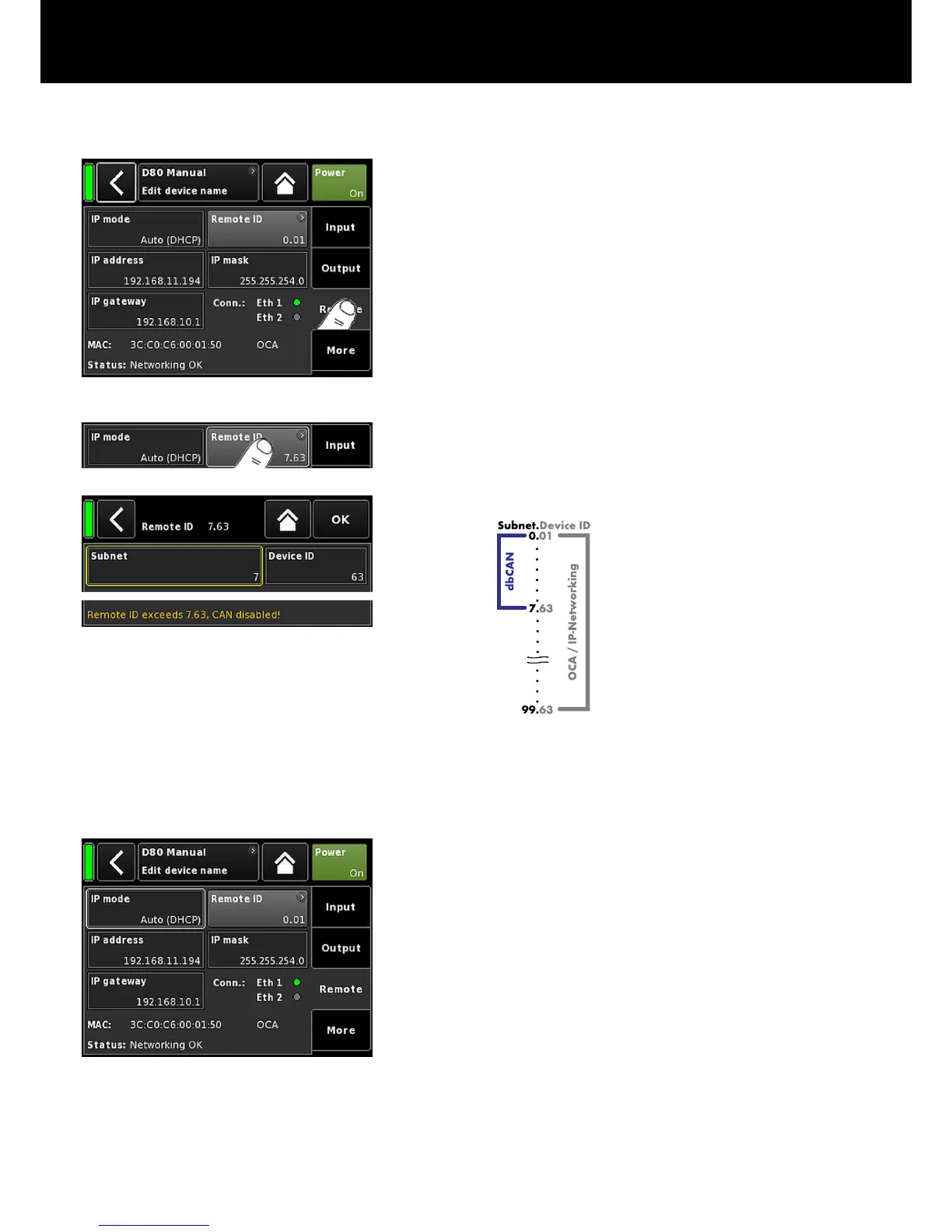
9.4. Remote
Selecting the «Remote» tab allows you to assign remote settings for
both Ethernet and CAN remote control.
9.4.1. Remote ID
Selecting the «Remote ID» button allows the setting of the unique
Remote identifier of the respective device in the format [nn].[nn].
Subnet
The first two digits represent the subnet.
Within an Ethernet network up to 100
subnets can be defined (values 0 to 99).
Within a CAN network up to eight subnets
can be defined (values 0 to 7).
Note: In case of a Subnet mismatch the
following message is issued at the bottom
of the screen:
Remote ID exceeds 7.63, CAN disabled!
Device ID Using the two digit device ID for each subnet,
you can define a total of 63 devices (values 1
to 63).
9.4.2. Ethernet settings
IP mode
Tapping the field allows the following settings:
Auto
(DHCP)
When the device is connected
to a network with a DHCP
server present, a matching IP
address will be assigned
automatically.
Manual
Allows the manual assignment
of IP settings.
d&b D80 Manual 1.8 en 41


 To Next Page