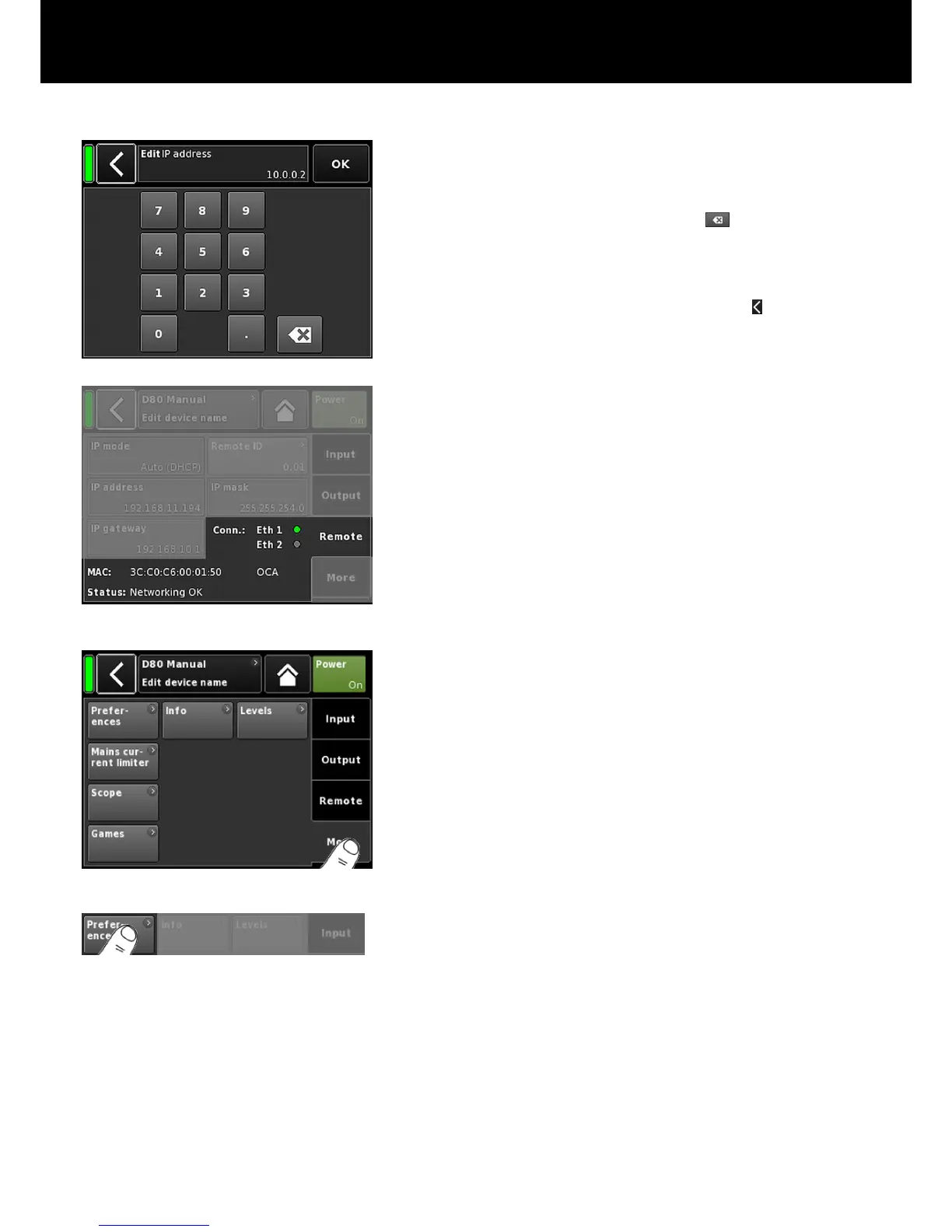
IP address
IP mask
IP gateway
Selecting either field opens the numerical input
mask and allows you to enter the relevant
data.
Wrong entries can be corrected by tapping
the Erase button ( ) on the bottom right.
Tapping «OK» on the top right confirms the
entry, closes the input mask and switches back
to the Remote screen.
Tapping the Back button (
) on the top left
cancels any entry and switches back to the
Remote screen keeping the previous entry.
Conn.:
Shows which of the etherCON connectors is
connected (busy).
MAC: Displays the fixed MAC address of the device.
Status: Provides status information on the network.
9.5. More
Selecting the «More» tab provides further subscreens such as:
– Preferences
– Info
– Levels
– Mains current limiter
– ...
9.5.1. Preferences
Selecting «Preferences» opens the corresponding subscreen with
the «Display» tab being active.
d&b D80 Manual 1.8 en42


 To Next Page