END USER MANUAL
OPERATION AND MAINTENANCE OF HIGH PRESSURE WATER MIST PUMP UNIT
REVISION 4, MAY 2016
VdS Unit Control Panel 3.14.3
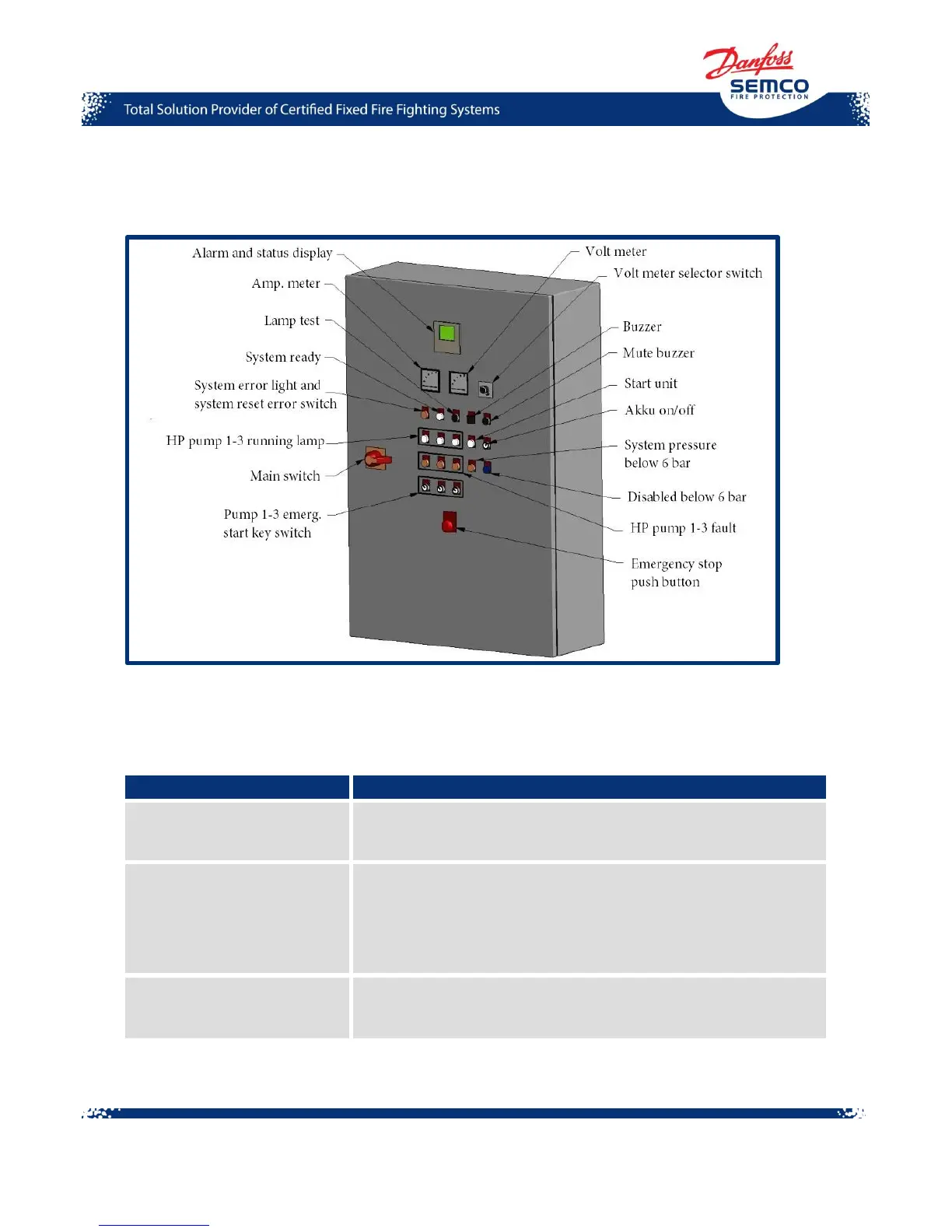
Figure 17. Example of VdS Unit Control Panel
A Functional description of buttons, lamps and switches placed on the unit control panel is
presented below. Please note that this is a description of unit control panel including all options, and
your SEM-SAFE
®
High-Pressure Water Mist Pump Unit might not contain all of them.
Displays the value of electric current (ampere) used by the Unit
Control Panel.
Press this button if you need to check if all lamps on the Unit
Control Panel are functioning properly. When pressed, all lamps
will turn on. If they do not, you should check the bulbs and
wiring of lamps.
Lamp is turned on when the SEM-SAFE
®
High-Pressure Water
Mist Pump Unit is ready to run. It indicates normal stand-by
operation when supply is turned on.



 To Next Page