INTRODUCTION
1
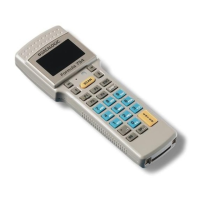
The F734-E series terminals have a backlit LCD graphic display of
16 characters by 4 lines plus a line in the upper part of the display
for the programmable icons:
The battery
charge status
Time
F734-E SERIES
TERMINALS
DATALOGIC S.P.A.
4 LINES 16 CHARS
The icons which can
be controlled by the
application program
Figure 5 - Terminal Display
1.2 APPLICATION DEVELOPMENT PROGRAMS
By using the optional EasyGen™ Application Generator or the DS
for Formula™ software package, developers can easily customize
applications according to the end user specific needs, solving the
most common data collection applications such as inventory,
picking and shipping/receiving.
EasyGen™ is the ideal solution for making
Formula 734-E batch
terminals productive instantly. In a familiar environment, developers
have all the instruments at their disposal to reduce programming
times (and therefore costs) while maintaining a high standard of
quality in the creation of personalized applications whatever their
nature, whether simple (e.g. a program for inserting
codes/quantities) or more sophisticated.
The EasyGen™ package includes Systools™ 2001, the efficient
software utility to transfer data to standard ASCII files, and OLE for
Formula, the software module ActiveX - OLE Custom Control or
OCX - allowing users to easily integrate their data into applications
such as Visual Basic, Excel, Access, Delphi, etc (see par. 1.2 or
par. 1.3 for details).
DS for Formula™ is a software package that provides instruments
for fully exploiting F734-E and F734-E/RF terminals by creating
fully-structured and personalized applications (see par. 1.2 for
details).
3


 To Next Page