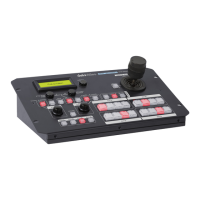
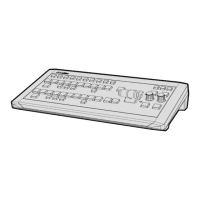
The Datavideo MCU-200P is a multi-camera control unit designed for remotely controlling Panasonic camcorders. It allows users to manage up to four Panasonic cameras using Ethernet cables and an adapter box, with a maximum transmission distance of up to 300 meters (using CAT-5 or CAT-6 cabling). This unit is particularly useful for OB Van setups, enabling quick alignment of settings across multiple cameras and reducing the need for extensive manpower and equipment.
Function Description:
The MCU-200P provides comprehensive remote control over various camera functions. It supports record and playback operations, allowing users to start/stop recording, rewind, fast forward, and perform record checks. The unit also offers control over camera user memory functions, enabling the storage and recall of camera settings. Users can navigate the camera's On-Screen Display (OSD) menu, adjust shutter speed and degree, control iris, and manage AWB (Auto White Balance) and ABB (Auto Black Balance) functions. White Balance A, B, and Preset functions are also controllable, alongside camera Knee & Bars functions, and camera gain adjustment. Fine-tuning of RGB Black Level, R&B Gain, and Master Pedestal controls is also available.
Important Technical Specifications:
- Model Name: MCU-200P
- Product Name: Multi-Camera Control Unit
- Input / Output Interface: RJ45 x 4, CV x 4
- Camera Adapter: AD-1P (required for connecting to Panasonic cameras)
- Remote Control Interface: Ethernet
- Number of Cameras Controlled: 4
- Maximum Transmission Distance: Up to 300m (CAT-5 or CAT6)
- Power Supply: DC 12V
- Power Consumption: 3.6 W
- Dimensions: 440mm(W) x 49mm(H) x 140mm (D)
- Compatible Panasonic Camera Models: AG-HPX255, AG-HPX300, AG-HPX301, AG-HPX302, AG-HPX304, AG-HPX370, AG-HPX370P, AG-HPX371, AG-HPX372, AG-HPX500, AG-HPX502, AG-HPX600, AG-HPX600P, AJ-HDX900, AJ-HPX2700, AJ-HPX2700G, AJ-HPX3000, AJ-HPX2000**, AG-HPX380, AG-HPX3100, AJ-PX800G, AJ-PX500, AG-HPX393. (Note: Some features/settings may be limited depending on the specific camera model, similar to the Panasonic AG-EC4G unit.)
Usage Features:
The MCU-200P features a user-friendly front panel with dedicated buttons and a select dial for intuitive control.
- Camera Selection: Four CAM buttons (1-4) allow users to select the camera they wish to control.
- MCU-200P Memory Stores: The LOAD SAVE button enables transferring settings between cameras or storing/recalling settings from three internal memory blocks (MU-1, MU-2, MU-3). Each memory block is divided into four segments, one for each camera.
- Recorder / Playback Functions: Dedicated buttons for REW, FF, REC S/S, STOP, PLAY, and REC CHK (2-second record review).
- User Defined Functions: USER MAIN, USER 1, and USER 2 buttons correspond to user-assigned functions on the camera's OSD menu.
- Data Save: A SAVE button allows storing MCU-200P settings into the chosen camera.
- Menu Navigation: A MENU button activates the camera's OSD menu, which can be navigated using the SEL (Select) dial. The OSD menu can be viewed on the camera's LCD/viewfinder, the AD-1P's composite output, or in some cases, the camera's SDI/HDMI output.
- Shutter Control: A SHUTTER switch allows users to turn off, fix, or enable synchro scan mode for shutter operation. The SEL dial adjusts shutter speed when the MENU button is inactive.
- AWB / ABB Switch: Triggers automatic White Balance or Black Balance adjustment. LEDs indicate progress or errors.
- W.BAL Switch: Recalls preset or stored white balance values (A, B, or PRST).
- CAM A.KNEE Switch: Selects video signals output from the camera, including BARS (color bars), CAM. AUTO KNEE OFF (images without auto knee), and CAM. AUTO KNEE ON (images with auto knee, potentially including MANUAL KNEE and DRS via camera menu).
- GAIN Switch: Adjusts video amplifier gain in dB steps.
- Master Pedestal Control: Buttons to adjust the level of the Master Pedestal.
- Painting Adjustment: ENABLE button in the Painting area allows adjustment of Red and Blue Gain or RGB Pedestal values.
- CHECK / Lock Button: Displays various settings (GAIN, SHUTTER speed, FILTER position, IRIS, Master Pedestal, R/B Gain, R/G/B Pedestal) sequentially. Holding this button for two seconds activates LOCK mode.
- LED Display: A seven-segment LED display shows current values and indicators for Deg (shutter angle/speed), SHTR (shutter speed), GAIN, and FILTER (ND filter mode). In LOCK mode, it displays "Lock".
- EXT LED: Illuminates when a lens extender is detected on the selected camera.
- IRIS Control: A dial for adjusting Iris value and a button to enable/disable Auto Iris.
- Operation Modes:
- NORMAL Mode: All functions are available.
- LOCK Mode: Activated by holding the CHECK button for two seconds. In this mode, only camera selection and CHECK functions are available to prevent unintended operations during live production. Iris control can be temporarily accessed by pressing the IRIS Dial once, returning to full lock after 3 seconds of inactivity. Deactivated by holding the CHECK button for two seconds.
Maintenance Features:
- Firmware Updates: The MCU-200P and its AD-1P adapter box can be updated via a micro USB 2.0 port. Firmware updates can add new features or fix bugs. The process involves connecting the unit to a PC, setting specific switches, and copying firmware files.
- Saving/Loading Settings to PC: Current camera settings from the MCU-200P can be saved to a PC as a "mu_param.bin" file for backup or transfer between units. This allows users to quickly restore preferred settings.
- Grounding Terminal: A grounding terminal is provided on the rear panel to ensure proper grounding when connecting to other components, enhancing safety and reliability.
- Warnings and Precautions: The manual provides extensive warnings regarding proper usage, cleaning, placement, power connections, and servicing to ensure the longevity and safe operation of the device. It advises against unauthorized repairs and emphasizes referring service issues to qualified personnel.

 Need help?
 General

 To Next Page