3KP64 - 1.12
3000PLUS WITH 5D64 INSTRUCTION MANUAL V. SB.2
Daytronic Corporation
2211 Arbor Blvd. Dayton, OH 45439 • (800) 668-4745
Tel: (937) 293-2566 • Fax: (937) 293-2586 • www.daytronic.com
1. INTRODUCTION
Modifying the Configurator
Shortcut Target
(ONLY IF MICROSOFT
OFFICE 2003 IS INSTALLED)
13. To RUN
the Configurator, go to your Windows
popup Start menu, select Programs, and click
3000PLUS Configurator.
PLEASE NOTE
IF MICROSOFT OFFICE 2003 IS INSTALLED ON
YOUR COMPUTER, you will have to modify the “tar-
get” specification for the Configurator shortcut in
the
Programs list, as follows (you only need to do
this the first time you try to run the Configurator):
a. RIGHT-CLICK on
3000PLUS Configurator in
the
Programs list.
b. Select
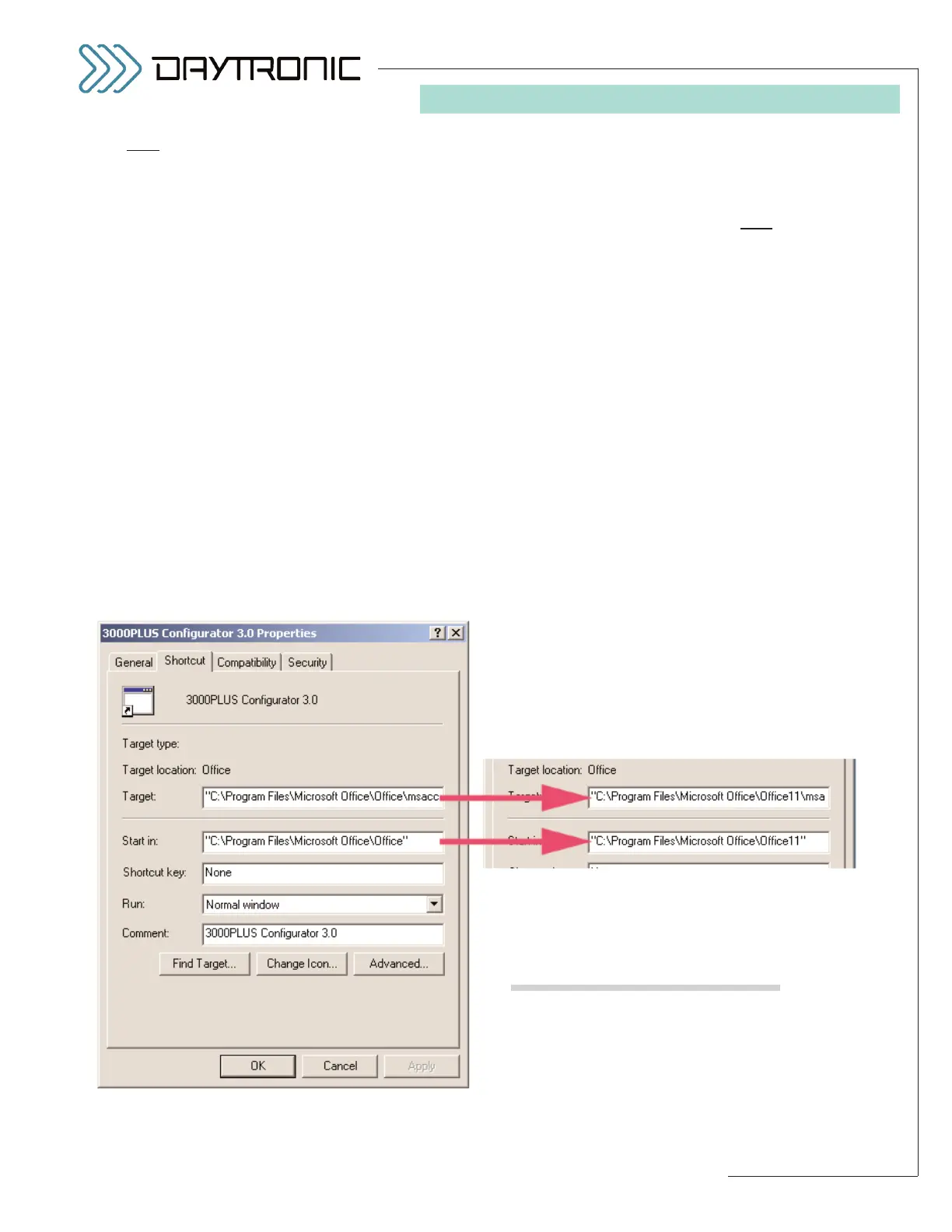
Properties. The dialog box shown
below will appear, with the cursor at the
extreme right of the “Target” field.
c. Press the
LEFT ARROW key (
←←
) to move the
cursor to just after “Microsoft Office\Office.”
d. Type “11” so that the target reads
“C:\Program Files\Microsoft Office\Office11\ . . .
e. In the Start in field, type “11” after “Microsoft
Office\Office” so that it reads
“C:\Program Files\Microsoft Office\Office11”
f. Click OK.
g. Now you can run the Configurator by clicking
on
3000PLUS Configurator in the Programs
list.
THE CONFIGURATOR IS A MICROSOFT ACCESS
2000 RUNTIME PROGRAM. DO N
OT ATTEMPT TO
OPEN THE “5DCONF.MDE” FILE OR ANY CONFIG-
URATION “*.MDB” FILE DIRECTLY THROUGH
MICROSOFT ACCESS.
ALSO NOTE:
• If Microsoft Access 97 (or an older version) is
installed on your computer, the first time you
attempt to open an Access 97 (or older) file
after installing Access 2000 Runtime, you may
have to do so through the Access 97 program
itself. That is, start Microsoft Access via the
Windows
Start / Programs menu, and use
Open an Existing Database... to open the file
in question. Otherwise, the system may try to
open it as an Access 2000 file and ask if you
want to convert it, etc.
• After installing Access 2000 Runtime, you may
have to rejoin any workgroup to which you
were previously joined, using
WRKGADM.exe
in the Windows System folder.
For proper viewing of the Configurator startup
page, your display should be set to at least 256 col-
ors.
(cont’d)



 To Next Page