3KP64 - 5.2
3000PLUS WITH 5D64 INSTRUCTION MANUAL V. SB.2
Daytronic Corporation
2211 Arbor Blvd. Dayton, OH 45439 • (800) 668-4745
Tel: (937) 293-2566 • Fax: (937) 293-2586 • www.daytronic.com
CAPTURING A PEAK: “BACKOUT” THRESHOLD
AND “HAVE PEAK” OUTPUT
After peak capture has been enabled, an actual
peak/valley “capture”—and the resulting transmission of
a TTL-level
“HAVE PEAK” logic output from the rear of
the 3000PLUS (see Section 2.E)—will occur when Chan-
nel 2’s reading
differs from that of the basic scaled out-
put (Channel 1) by more than a preset threshold
amount, called the peak “backout.” The presence of
the backout threshold prevents low-amplitude signal
noise from toggling the “HAVE PEAK” output on and off,
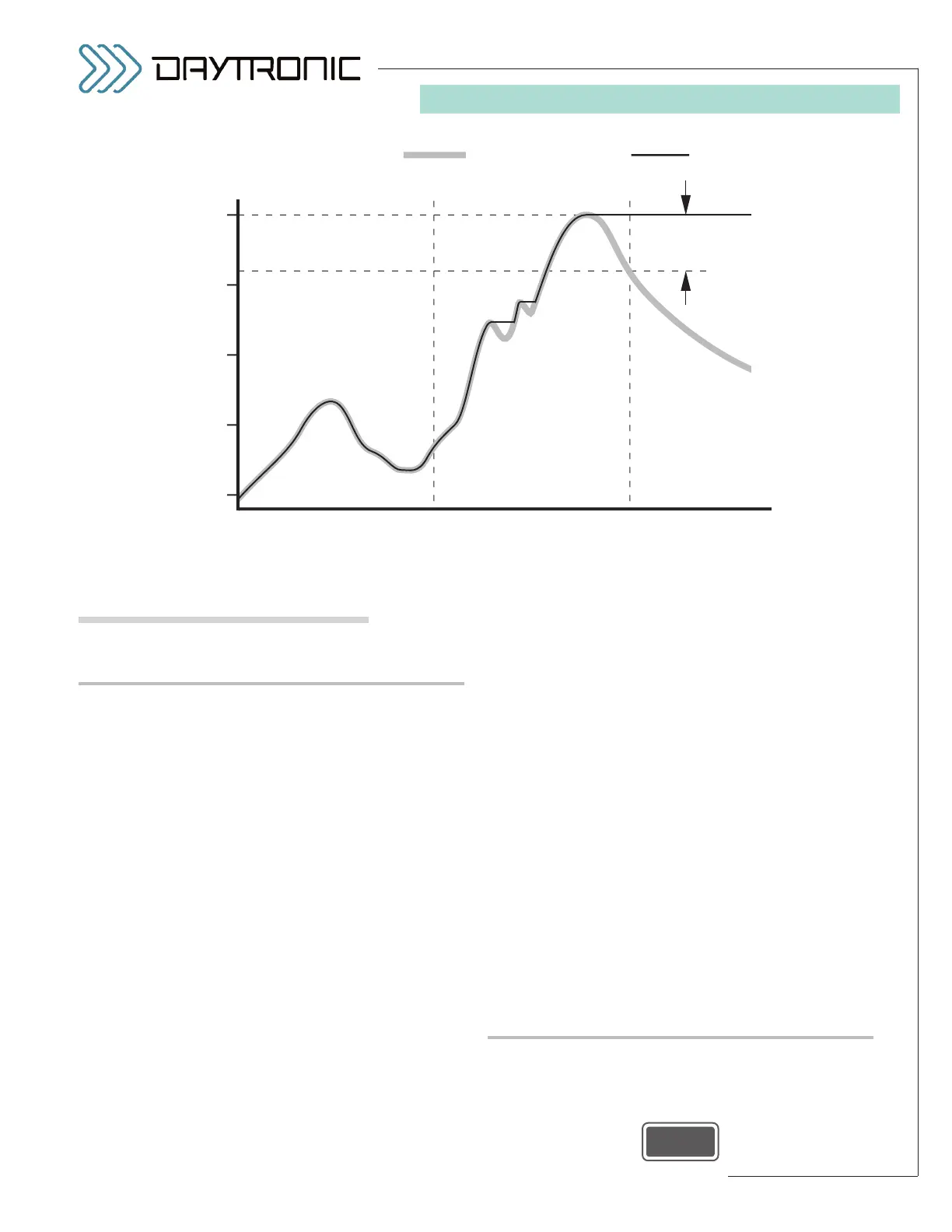
as illustrated in Fig. 16.
Suppose, for example, that the full-scale input range is
500 (engineering units) and that the input signal (repre-
sented by Channel 1) “peaks” at 300, as in Fig. 16. If the
backout threshold is currently set to indicate 0.8% of full
scale (see below), then the “HAVE PEAK” condition will
be registered only at time t
2
, when Channel 1 falls
below 296 (engineering units)—the “auxiliary” output
(Channel 2) remaining all the while at the “captured”
maximum of 300.
The first two (“noise”) peaks that occur between times
t
1
and t
2
are held only until a higher input value is
detected; they do not have sufficient backout to be
actually “captured.”
Like peak mode (above), the active backout threshold
can be specified as part of the normal 3000PLUS setup
procedure. It can be changed on a strictly
run-time
basis by entering the desired counts value in the “BKO”
field in the
“Live Output” window when Channel 2 is
being displayed (see Fig. 11). It may also be specified
at any time by issuing the “write” form of the
PEAK
BACKOUT THRESHOLD (BKO)
command to the
3000PLUS.
The initial (default) backout setting for a new configura-
tion is “256” (counts), which corresponds to a signal
change of approximately 0.8% of full scale. For best
results, the backout should not be less than “40”
(counts), corresponding to a signal change of about
0.1% of full scale.
By issuing a
HOLD (HLD) command as explained in
Section 5.C, you can indefinitely “freeze” a captured
peak or valley (within the limits imposed by the present-
ly effective
decay rate of the “auxiliary” output—see
below).
RESETTING PEAK CAPTURE
You can clear any currently captured peak value—thus
resetting the meter’s “Have Peak” output to
Logic 0—by
momentarily pressing the front-panel
Enter button dur-
ing RUN-TIME 3000PLUS operation (only)
,



 To Next Page