QUANTUM User Manual
Hardware
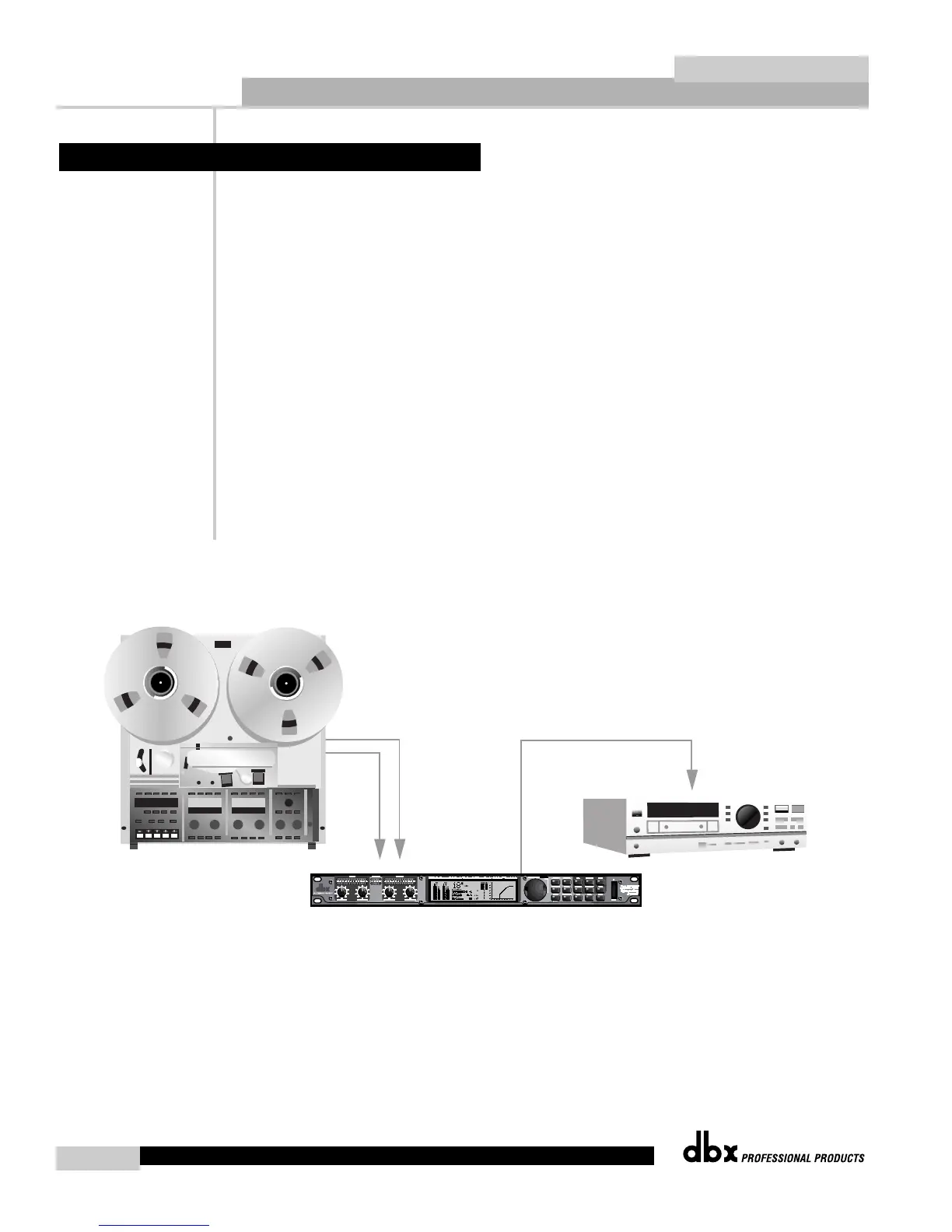
1. Connect 2-track left output to the QUANTUM’s channel one input.
2. Connect 2-track right output to the QUANTUM’s channel two input.
3. Connect the QUANTUM’s AES/EBU or S/PDIF OUTPUT to digital recorder.
Software
1. Press the UTILITY button to enter the QUANTUM’s utility section. Change the INPUT to
ANALOG.
2. Change the CLOCK to desired internal sample rate.
3. Set SRC to the final desired sampling frequency.
4. Press the NORM/OUTPUT button twice. This accesses the dither and noise shaping of the
output module.
5. Set QUANTUM to resolution of your recording device 8, 16, 20, or 24-bit.
6. Choose which type of dither you would like to use (refer to Section 4.16).
7. Choose which type of noise shaping you would like to use (refer to Section 4.16).
8. Press the NEXT PAGE button to scroll to next set of options.
9. Set dither out to All, if you are monitoring the dither.
10. Press OTHER button to access TYPE IV™ conversion system (refer to Appendix B).
11. Press STORE if you wish to save non-utility changes (refer to Section 3.4)
6.1 Analog Mastering


 To Next Page