QUANTUM User Manual
Hardware
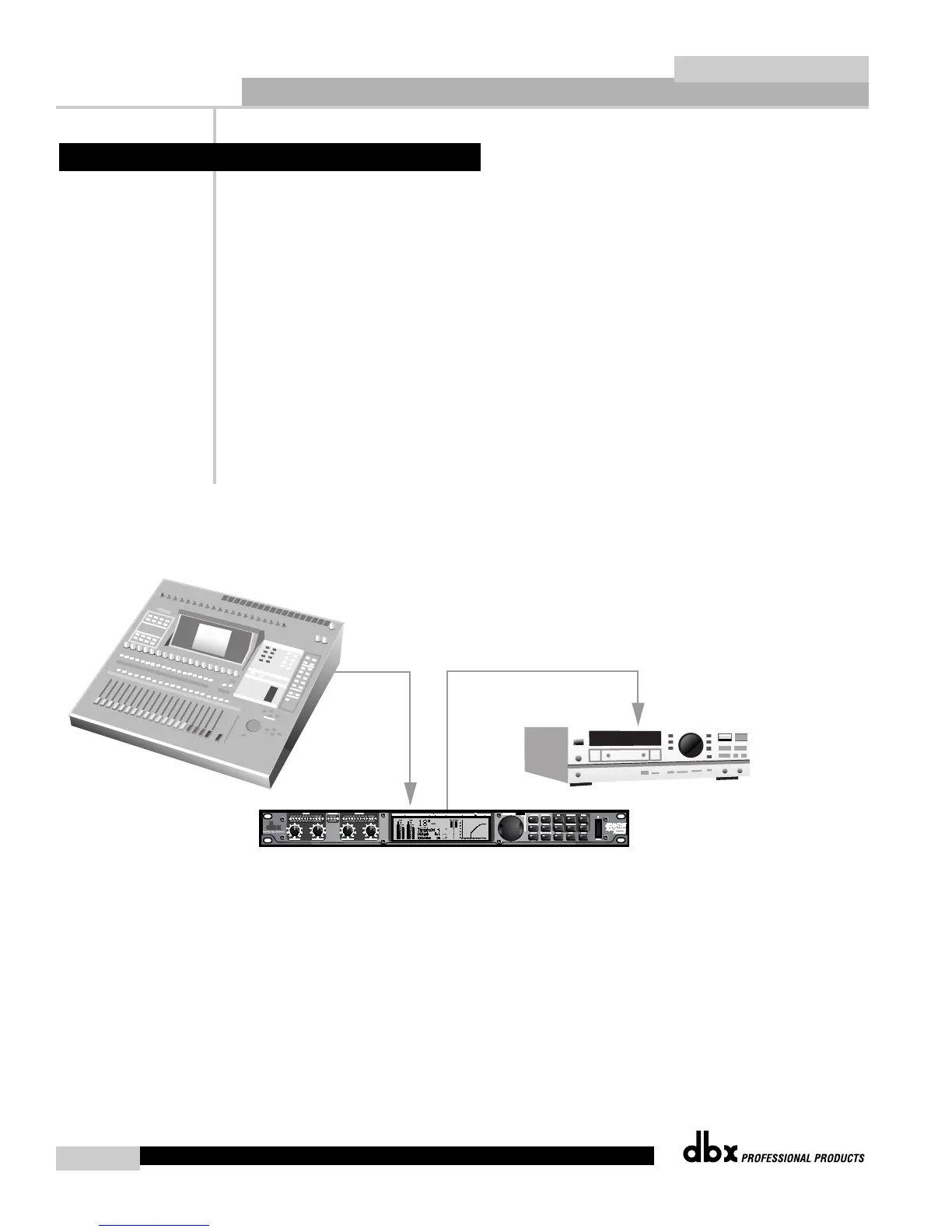
1. Connect AES/EBU or S/PDIF output of the digital console to the QUANTUM’s AES/EBU or
S/PDIF input.
2. Connect the QUANTUM’s AES/EBU or S/PDIF output to AES/EBU S/PDIF of DAT machine.
Software
1. Press the UTILITY button to enter the QUANTUM’s utility section. Change the INPUT to
AES/EBU or S/PDIF.
2. Change the CLOCK to AES/EBU or S/PDIF.
3. Press the NORM/OUTPUT button twice. This accesses the dither and noise shaping of the
output module.
4. Set the Bits to 16.
5. Choose which type of dither you would like to use (refer to Section 4.16).
6. Choose which type of noise shaping you would like to use (refer to Section 4.16).
7. Set the Dither Out to All if monitoring dither.
8. Press STORE if you wish to save non-utility changes (refer to Section 3.4)
6.7 Digital Mixing


 To Next Page