Embroidery
37
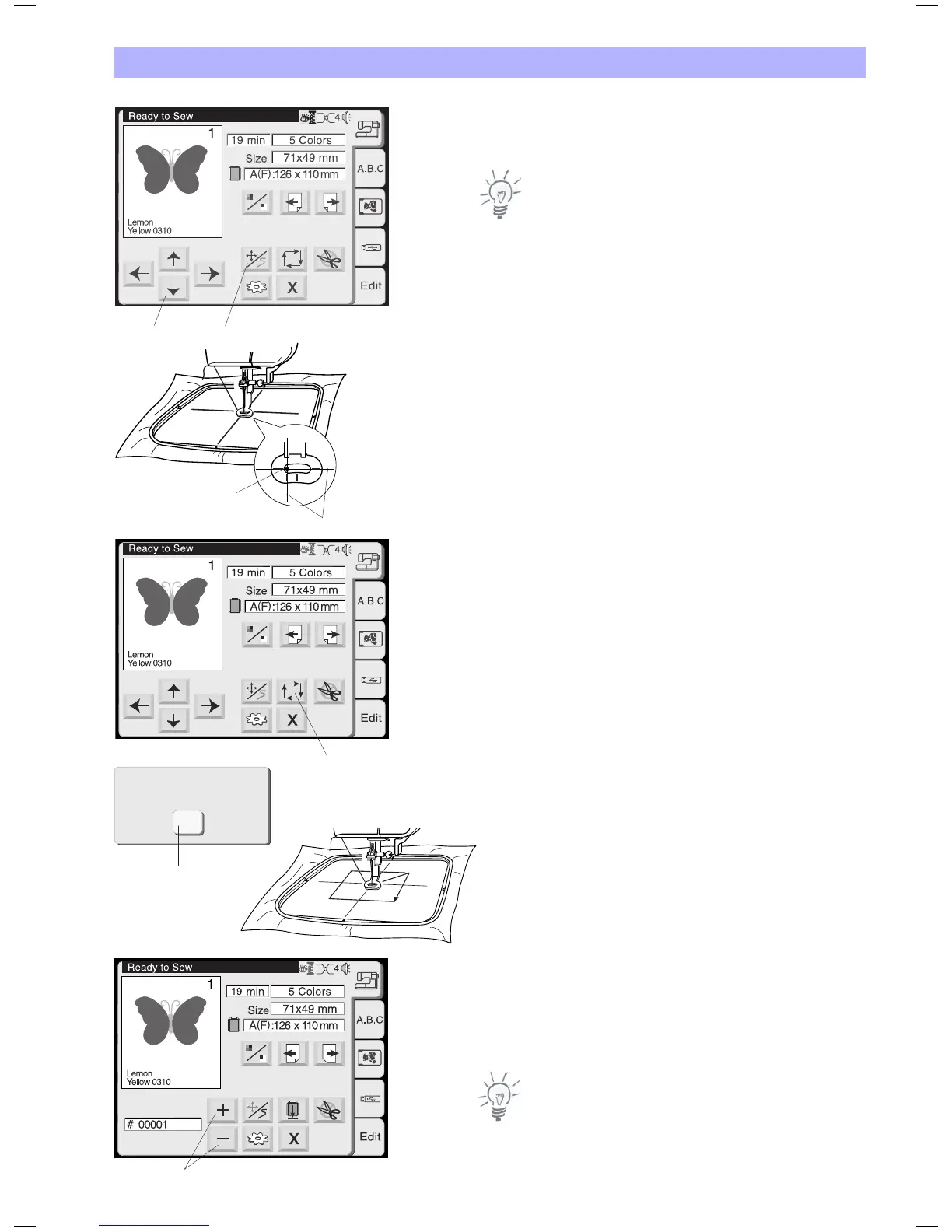
1 Jog / Stitch Key
Press this key to toggle between the jog keys and the stitch forward/
backward keys.
Note:
The display automatically switches between jog keys before stitching
and the stitch forward / backward keys while stitching a design out.
2 Jog Keys
Before starting to embroider adjust the hoop to the desired center
position using the jog keys.
3. Needle drop position (center position of design)
4. Centerlines
5 Trace key
After adjusting the position check the extents of the of the
embroidery area by pressing this key. The carriage will trace the
outline in a rectangle, circumscribing the selected embroidery
pattern without stitching.
The carriage will return to the starting position after tracing and the
screen will return to the previous display.
6 Close key
Press this key to close the window without tracing.
7 Stitch back/forward keys
Press the Jog / Stitch key to acitvate this mode. Use this mode to
trace the design as it is stitched out step by step.
Press the plus key to move the hoop 10 stitches forward in the
design
Press the minus key to move the hoop 10 stitches back.
Notes:
• Youcanusethesekeystomovetheembroideryhooptowhere
the thread has broken or run out.
• Atthestartofthedesignpressingthe+keywilladvancetostich
1. Press + key a second time to advance to stitch 10.
4
3
12
5
X
Trace outline
6
7


 To Next Page