Embroidery
38
Starting to Embroider
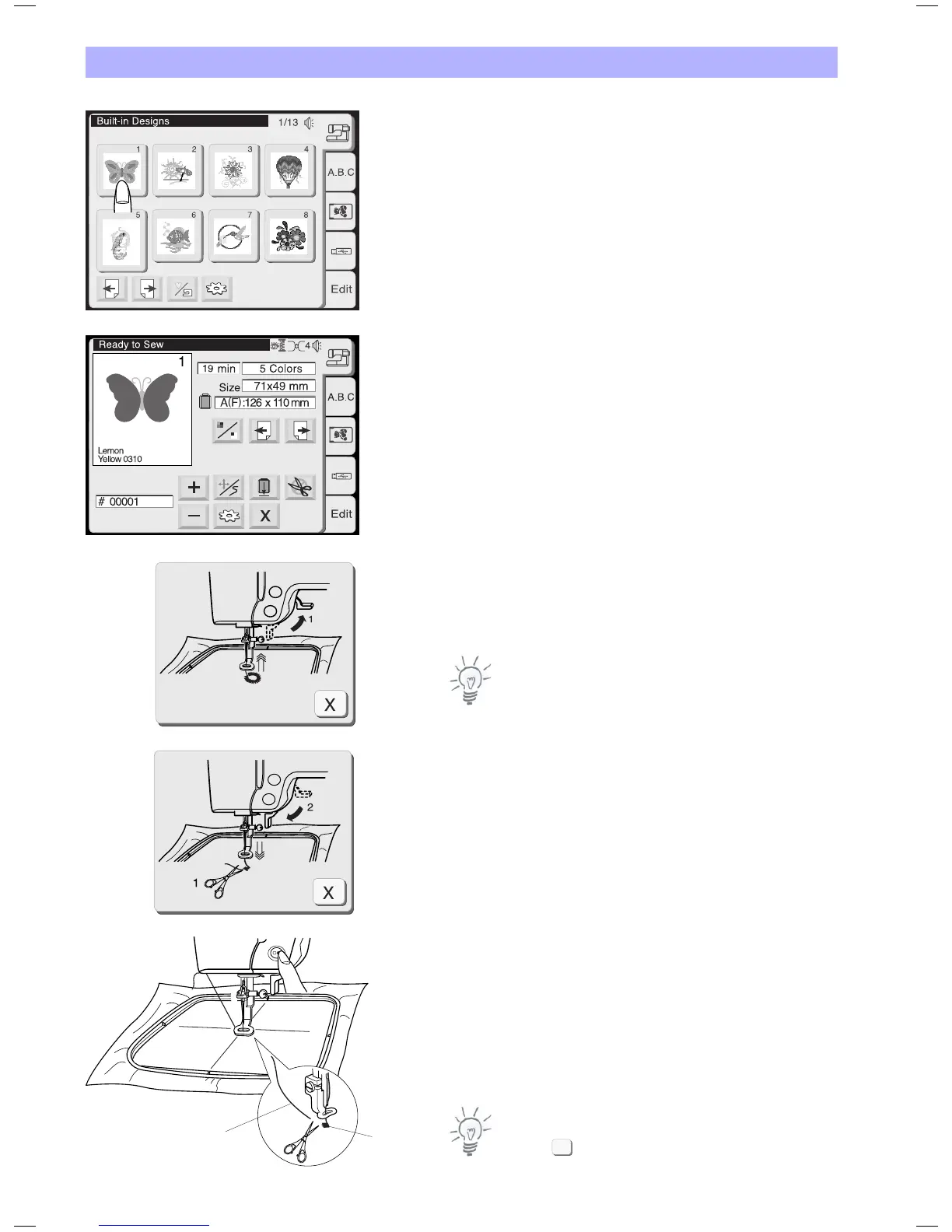
Select the desired pattern.
The image of the selected pattern will be shown in the embroidery
window.
Adjust the center lines on your fabric to the needle using the jog
keys. See last page for details.
Lower the presser foot. Press the start/stop button to start
embroidery.
The computer will stop automatically after stitching 5 stitches and
requests the user to cut the thread tail by showing the instruction
window (A)
Note:
The embroidery computer will not stop if Auto Stop is deactivated in
the setup.
Raise the presser foot. The screen will show the instruction window
(B).
Trim the thread tail close to the starting point and lower the presser
foot.
Press the Start/Stop button to start embroidering again and the
machine will stop automatically when the first section is finished.
1 Thread tail
2 Starting point
Note:
Press the close key to close the instruction window. This
operation is only required, when the stitching process is
discontinued. Otherwise the screens will disappear automatically
when the presser foot is moved.
1
2
X
A
B


 To Next Page