Lettering42
Programming Lettering
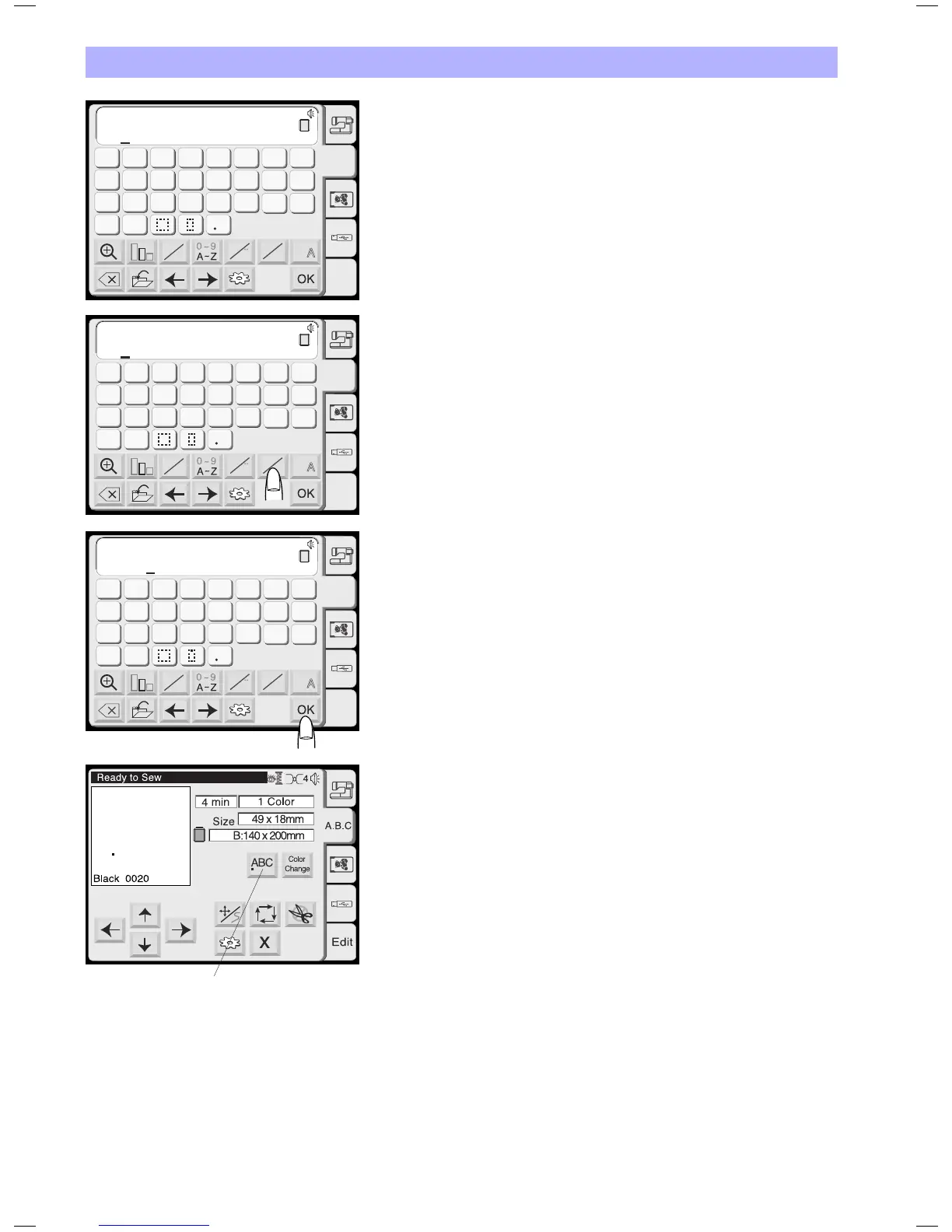
(Programming «Bear» in Gothic style)
Press «B».
Press the letter case key to select lower case letters.
Select «e», «a» and «r».
Press the OK key.
The display will change to the embroidery screen.
Selecting the Starting Point
Choose the location of the start position in the letter string by
pressing the alignment key.
1 Alignment key
Each time press this key, the position of the first stitch will
change in the following order:
• Left(horizontal)orTop(vertical)aligned
• Centeraligned
• Right(horizontal)ofButton(vertical)aligned
When starting to emborider the carriage will first move to this
position=Stich#00001.Usingthejogkeysyoumaynowalignthe
position of the letter string exactly to your project.
AB
AB
G
H
IJKL
M
N
OP
Q
RST
U
V
W
X
YZ
A
B
C
DEF
AB
B
Gothic
A.B.C
Edit
A
a
A
A
A A
L M
S
B
AB
AB
AB
B
Gothic
A.B.C
Edit
A
a
A
A
A A
L M
S
B
g
h
ijkl
m
n
o
p
q
rst
u
v
w
x
yz
a
b
c
def
AB
AB
AB
B
Gothic
A.B.C
Edit
A
a
A
A
A A
L M
S
g
h
ijkl
m
n
o
p
q
rst
u
v
w
x
yz
a
b
c
def
Bear
Bear
1


 To Next Page